


Diwali is almost here. Sick of seeing those generic greeting images everyone keeps forwarding every year? You’d love to send something special to your family, friends or business contacts, but designing a card yourself needs art skills most people don’t have. Hiring a graphic designer costs too much and takes time, and regular online templates feel plain and impersonal. What should be a warm festive gesture just becomes a hassle.
Luckily, generative AI changes everything. Use this AI Diwali greeting card maker, and you can create sharp, culturally appropriate custom cards in seconds , no design experience needed. This guide shows how easy it is to make stunning, one-of-a-kind festive greetings with AI.
Why Traditional Ways to Create Diwali Cards Fall Short
Back then, making a custom Diwali card always meant trade-offs between cost, speed and creativity:
-
High learning curve: Tools like Photoshop or Illustrator take lots of practice for nail lighting, layouts and color tuning.
-
Tired stock resources: Free Diwali vectors are reused by millions each year, so they feel stale.
-
Pricey custom work: Commissioning an artist runs $30–$100 per design, plus days of messy back-and-forth messages.
A 2025 report on digital festive communication found over 78% of people prefer personalised, well-designed digital cards over generic mass greetings. That’s why a flexible a1.art tool has become the top pick for creating standout Diwali visuals.
Start your art journey with a1.art.
What Makes an Exceptional Diwali Greeting Card Maker?
There are tons of AI generators out there, and quality can differ a lot. If you want standout festive cards, keep these key points in mind when picking your Diwali greeting‑card maker.
Easy access matters too. Whether you work on the web through a1.art or use it on mobile, a seamless workflow makes all the difference to your creating experience.
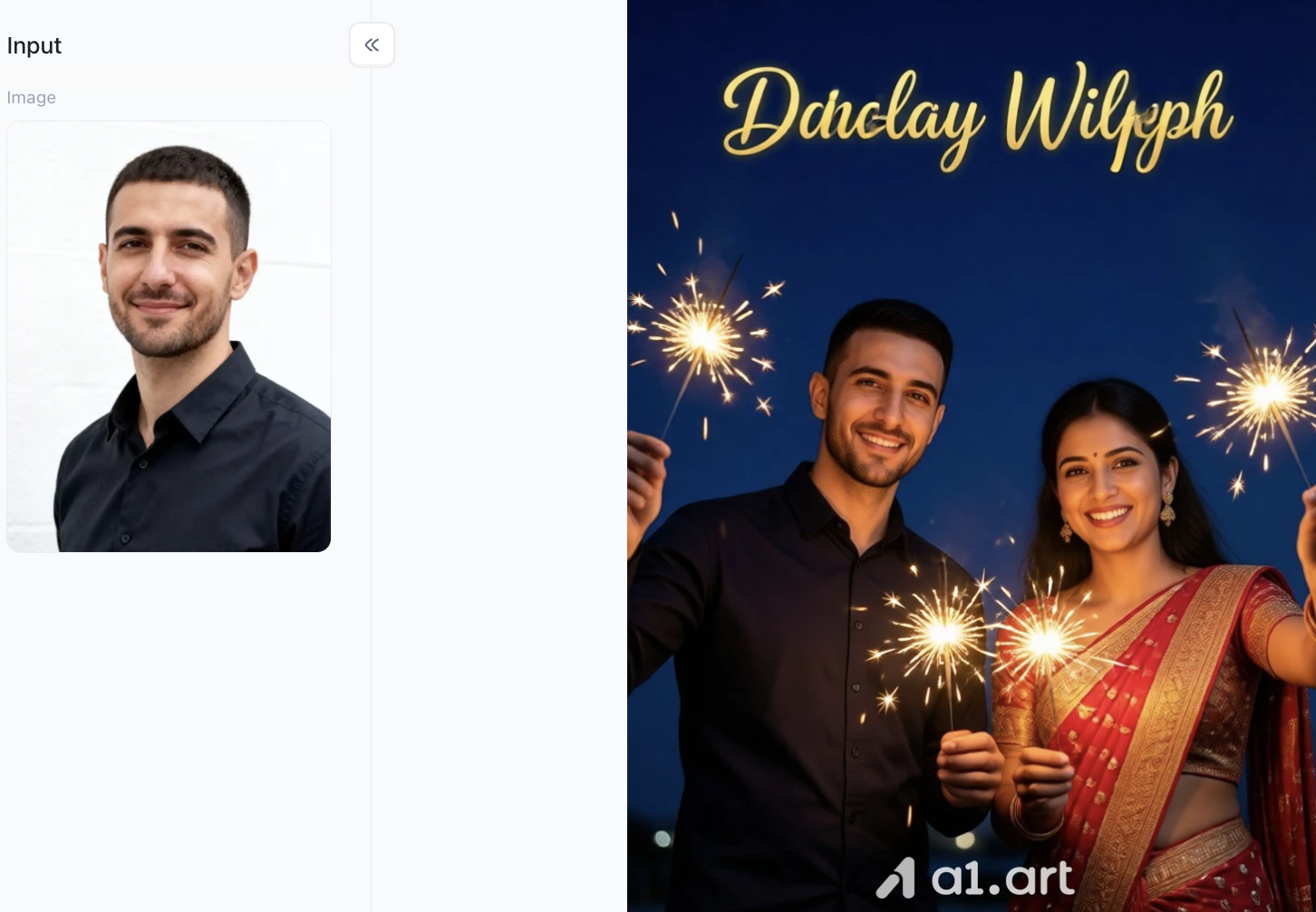
Double-click the image to instantly create the Diwali greeting card you want⬇️
Why Choose a1.art? 7 Core Advantages Driven by Data & Experience
Of all AI tools, a1.art shines with its refined handling of cultural holiday styles, earning it a strong reputation for Diwali artwork creation. User tests and rendering data show what makes a1.art so good:
-
Crisp Details: Enhanced rendering creates sharp golden text and smooth glowing gradients with no pixel blur, ready for printing.
-
Realistic Lighting: Light is central to Diwali. The AI naturally recreates how traditional diyas emit and bounce light, with no fake cutout look.
-
Genuine Textures: It captures fine details, from rangoli powder grains to delicate silk embroidery on traditional clothing.
-
No Distorted Images: It fixes typical AI flaws like messed-up hands or warped faces, using pose and geometry controls for natural-looking people.
-
Smart Layout: The composition tool leaves clean empty space for text. Your holiday messages stay easy to read and won’t cover important visuals.
-
Customizable Styles: It mixes classic Indian culture with modern design. Choose from sacred blessing scenes, cute 3D miniatures or trendy nightscapes for users of all ages worldwide.
Feature Comparison: AI Platforms vs. Traditional Solutions
| Benchmark Feature | a1.art Platform | Traditional Online Template Editors | Generic AI Image Generators |
| Average Output Speed | ~3 Seconds | 10–30 Mins (Manual Layout) | 15–45 Seconds |
| Cultural Accuracy | High (Dedicated Diwali Filters) | Medium (Constrained Stock Assets) | Low to Medium (Requires Complex Prompts) |
| Anatomical Consistency | > 98% Clear | N/A (Static Photos Only) | ~80% (Occasional Artifacts) |
| Festive Style Apps | Integrated (Lakshmi, Rangoli, 3D) | None (Basic Filters Only) | None (Prompt-only Control) |
| User Onboarding | Easiest (One-click "Fork" Prompts) | Moderate (Requires Manual Editing) | Steep (Requires Prompt Engineering) |
For users looking to blend cultural authenticity, high resolution, and maximum efficiency, choosing a platform that offers a diwali wishes card maker online free workflow delivers the highest value.
3 Simple Steps to Create Your Diwali Card on a1.art
Creating a stunning card using a1.art's Diwali Greeting Card Maker takes just three quick steps:
Step 1: Register for a personal a1.art account
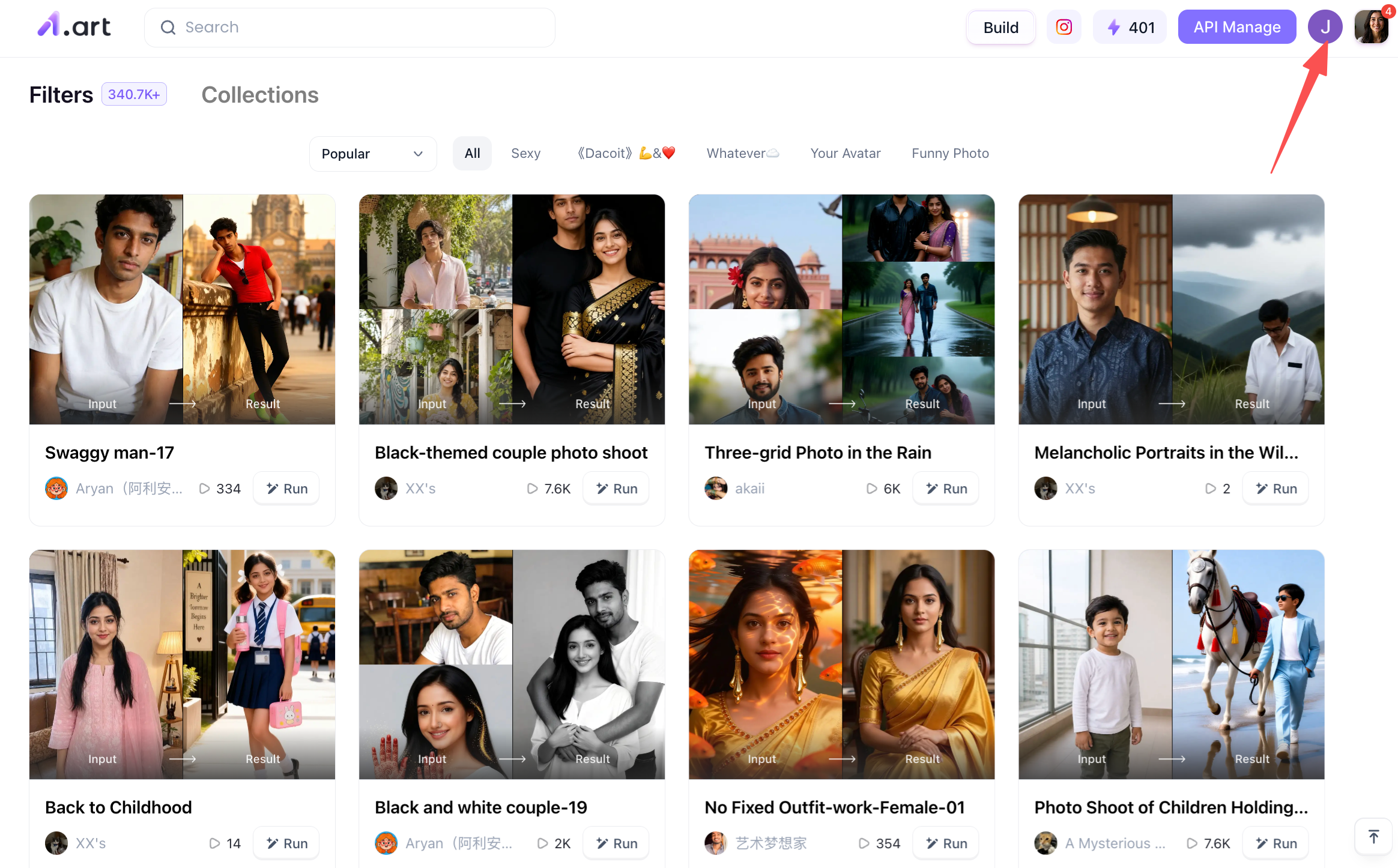
This step is simple yet crucial; having your own account is a prerequisite for the subsequent steps, as it determines whether you can use your points to generate the Diwali greeting card you want. To register, simply visit the a1.art homepage, locate the profile icon in the top-right corner, click on it, and follow the on-screen instructions.
Step 2: Start creating your own Diwali greeting card
Once you have registered an account, the next step is to begin the creation process. So, how do you go about it? Simply locate the "Create" option on the page and click on it.
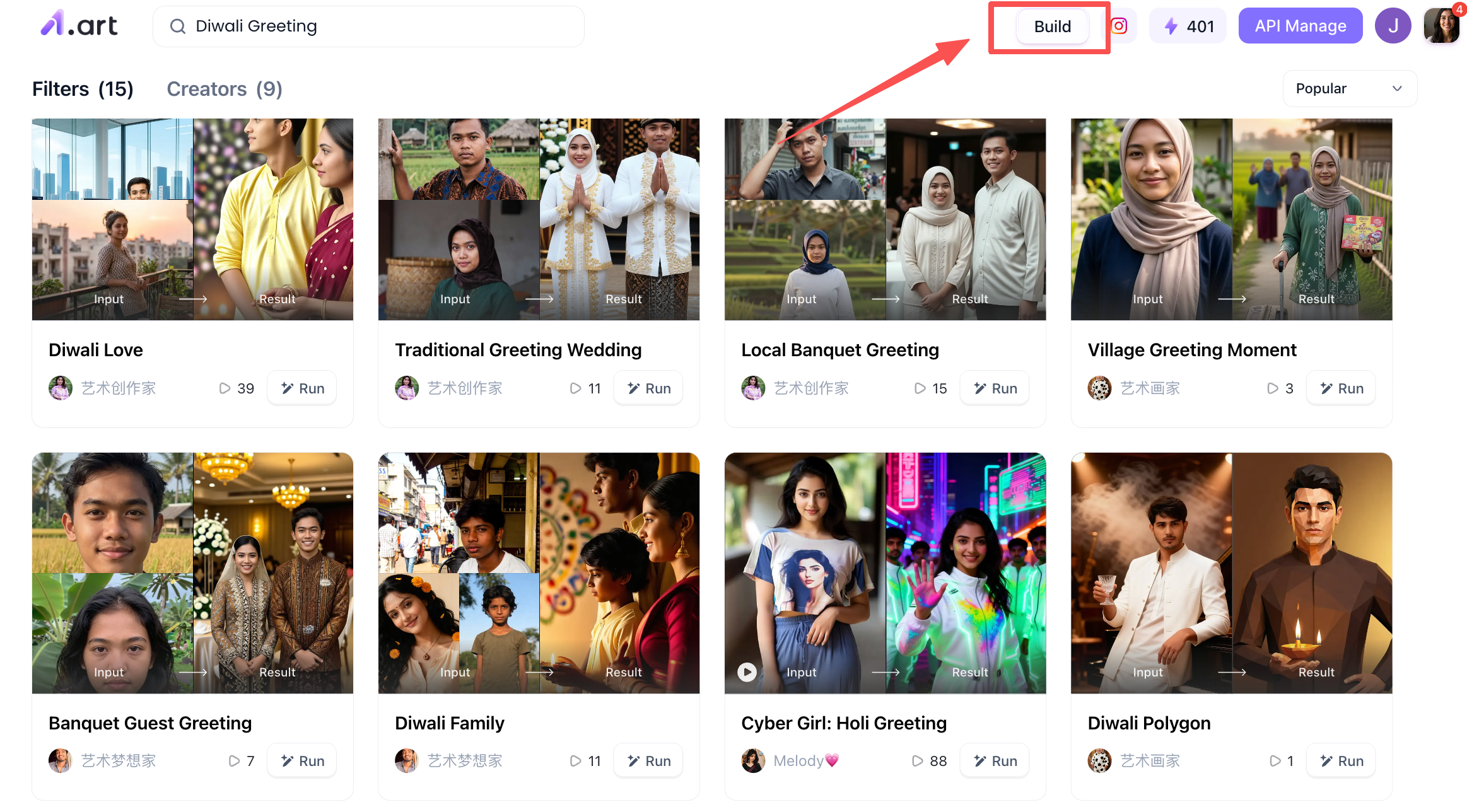
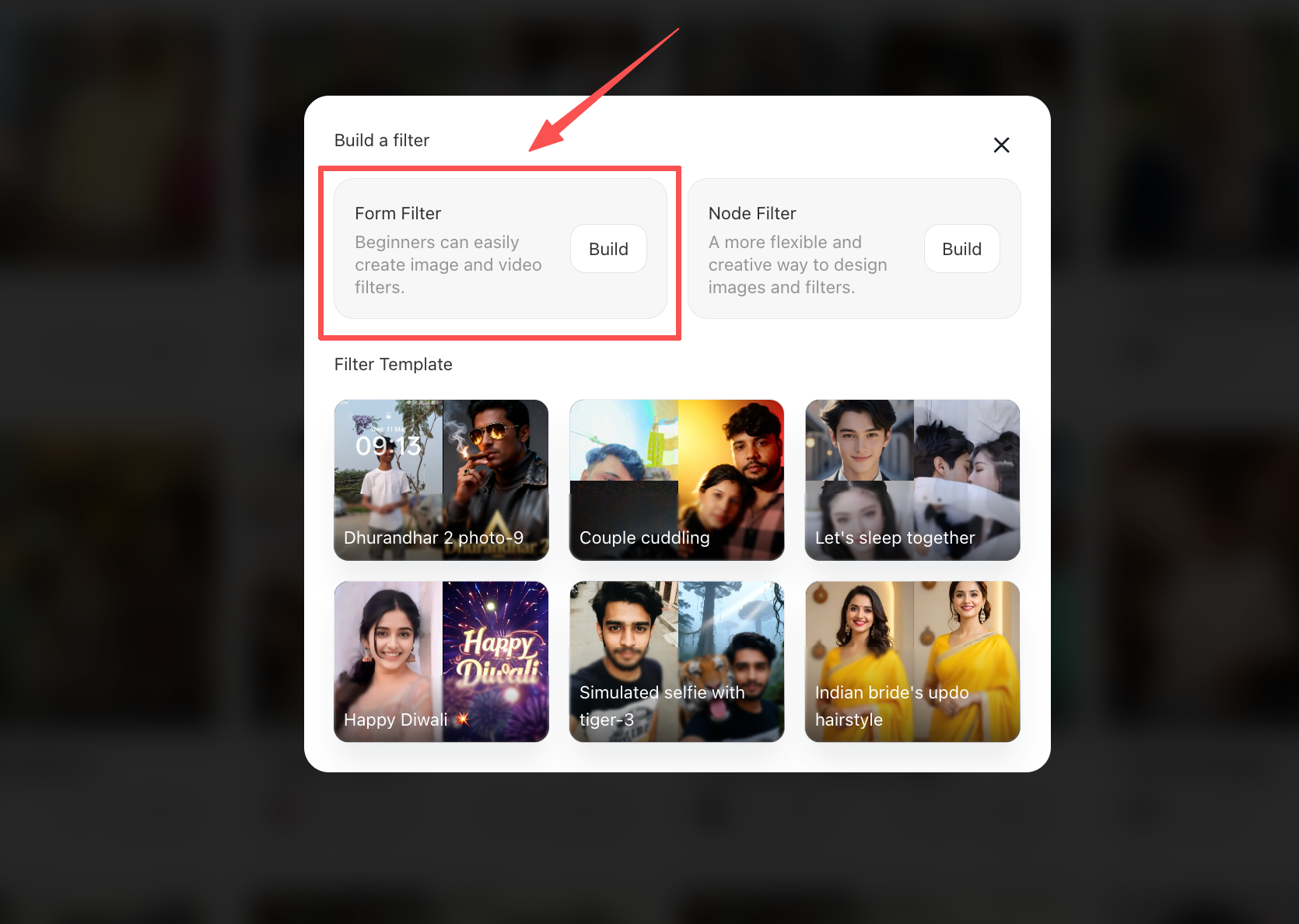
Once you click through, you will see two options: a form-based filter on the left and another on the right. If you are a complete beginner or unfamiliar with the specific operations of a1.art, I recommend choosing the form-based filter on the left to create your work.
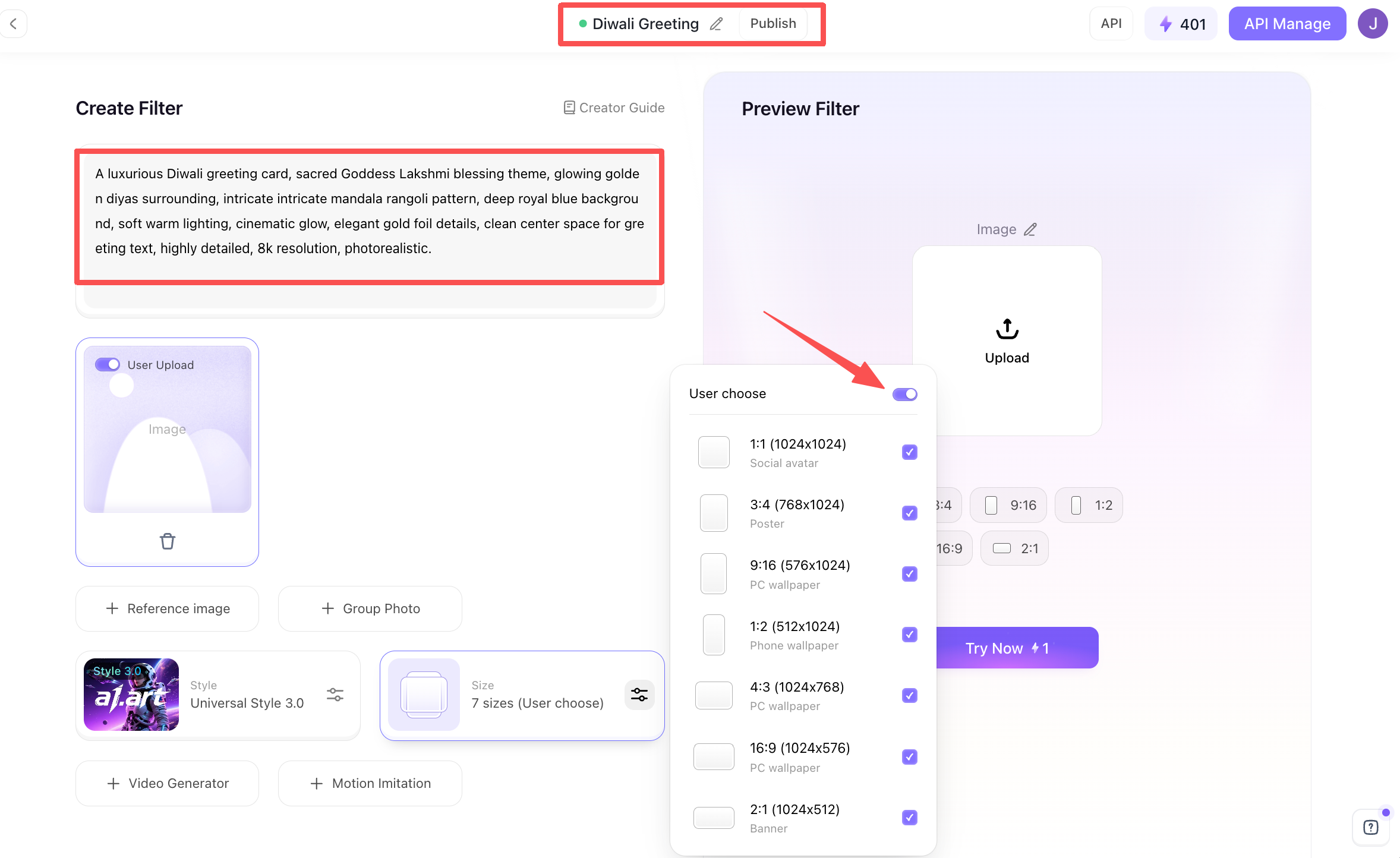
After clicking on the form filter on the left, you will see the page below,this is the configuration page for the "Diwali Greeting Card Maker" you are creating. Here, you need to input details regarding your concept. At the very top is the filter name; you can choose any name you like for easy future reference. Below that, on the left, is the area for entering your prompt. Further down, you will find options for image dimensions; it is recommended to select all available sizes so that you can generate images in any size you need later on.
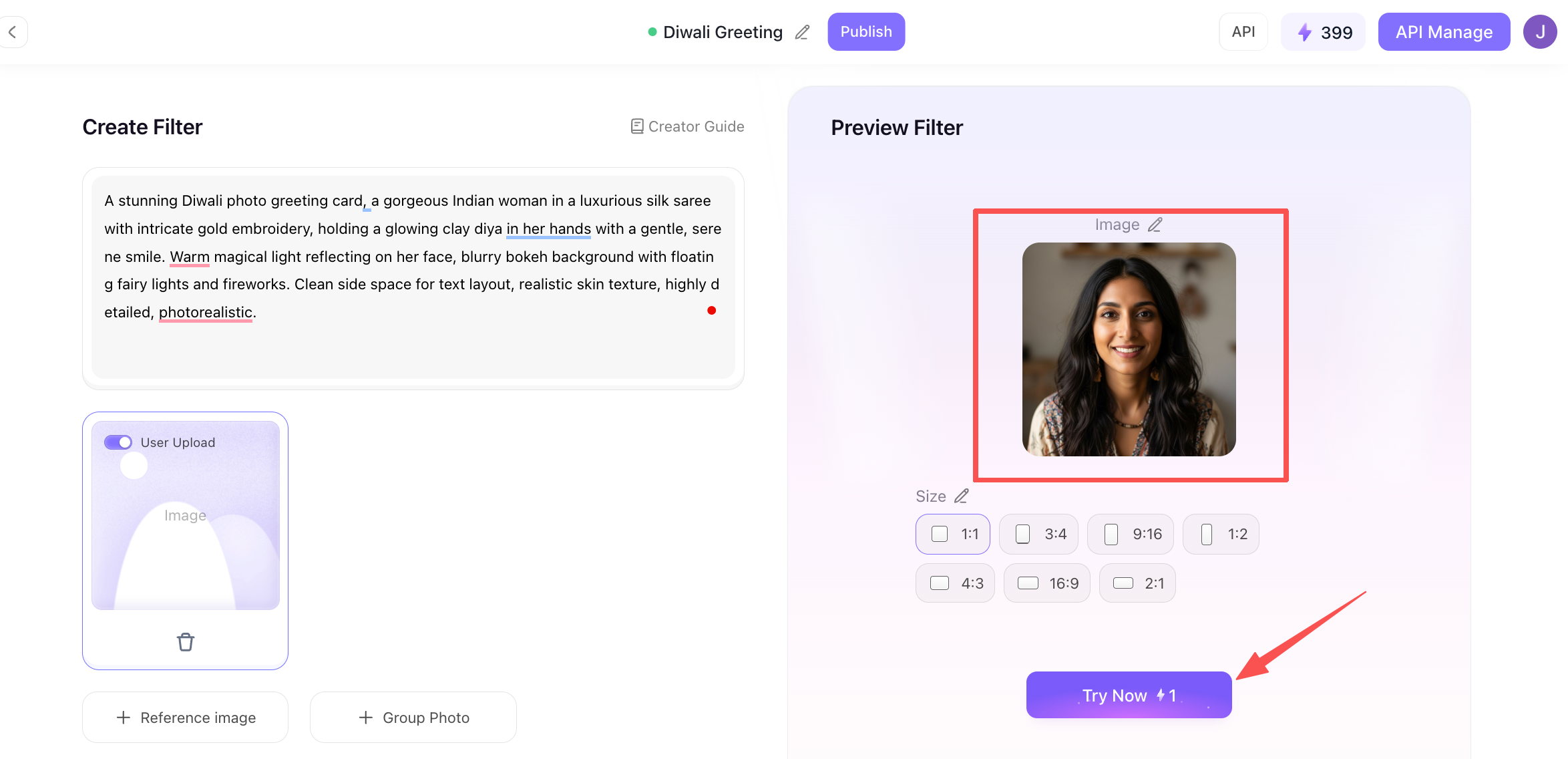
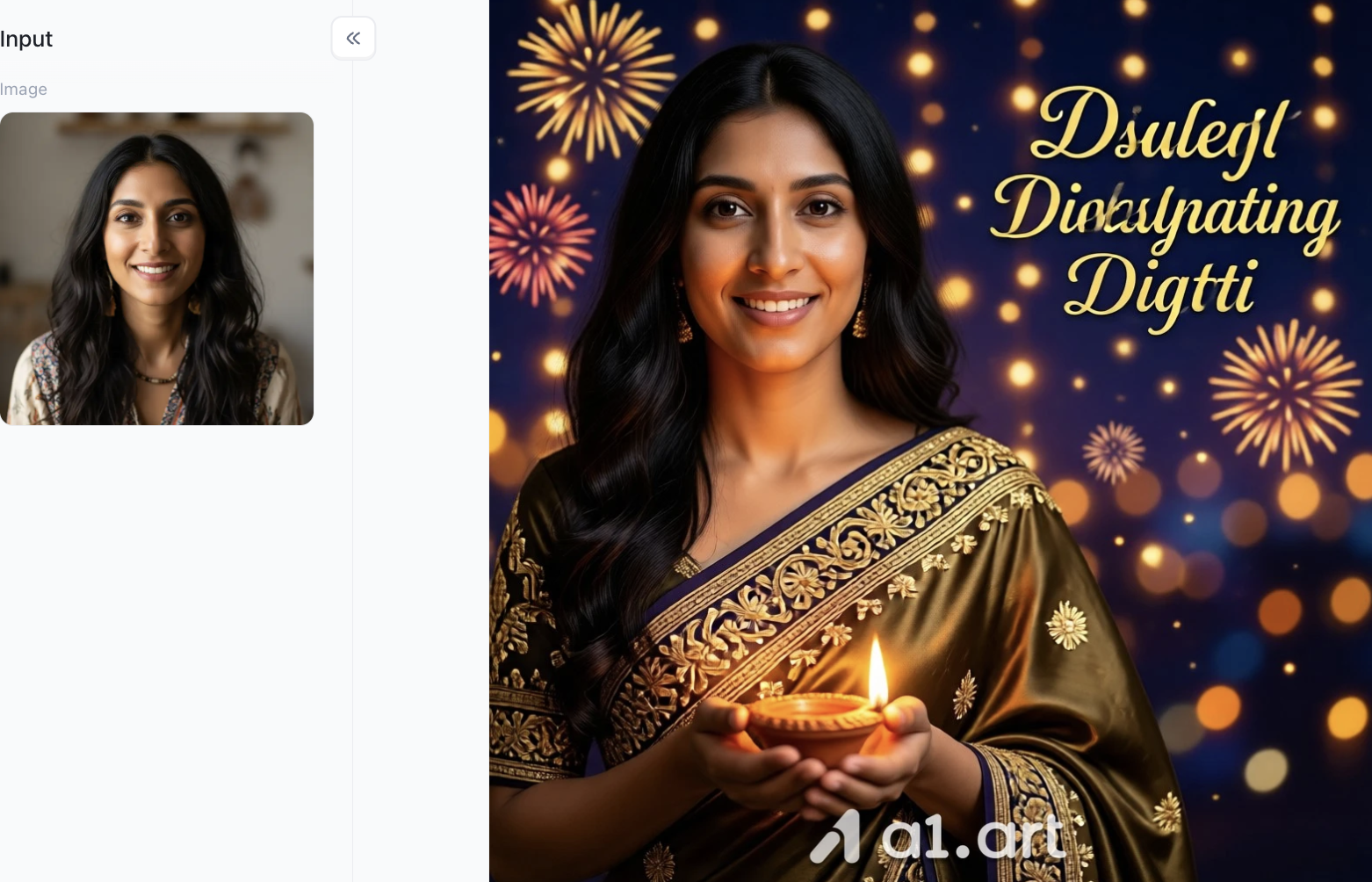
Since a1.art supports text-to-image generation, you can upload a reference image,ideally a portrait,on the right and then click the "Generate" button below. This allows a1.art to quickly create the Diwali greeting card you want based on your specifications; it takes just a few seconds to complete.
Step 3: Publish or manage your generated Diwali greeting card
Once you are satisfied, you can take a quick preview. There is a "Publish" button at the very top of the page; if everything looks good, you can publish it immediately, making the filter discoverable to both you and other users via keywords. Alternatively, you can download it to share with your friends or family.
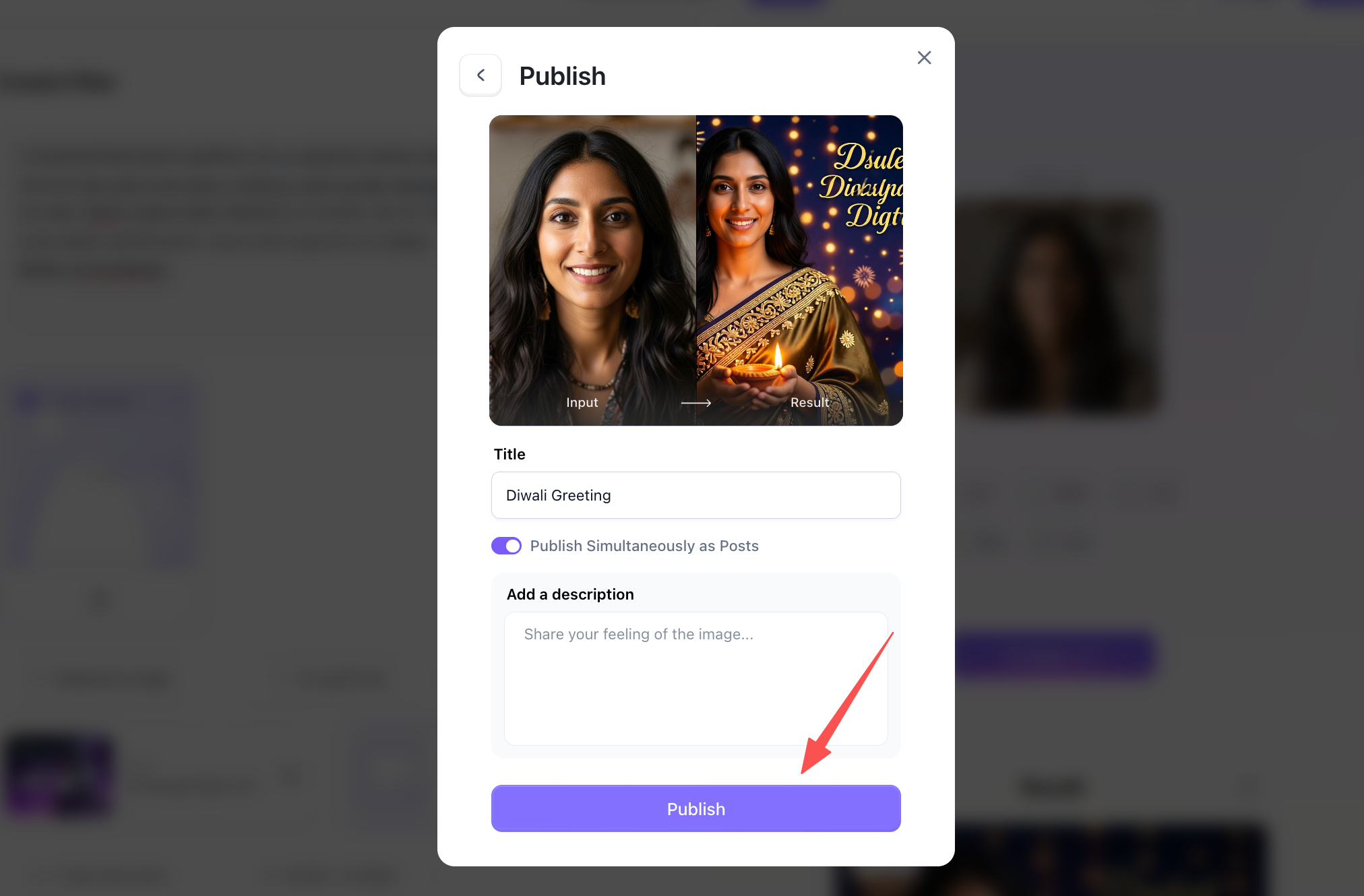
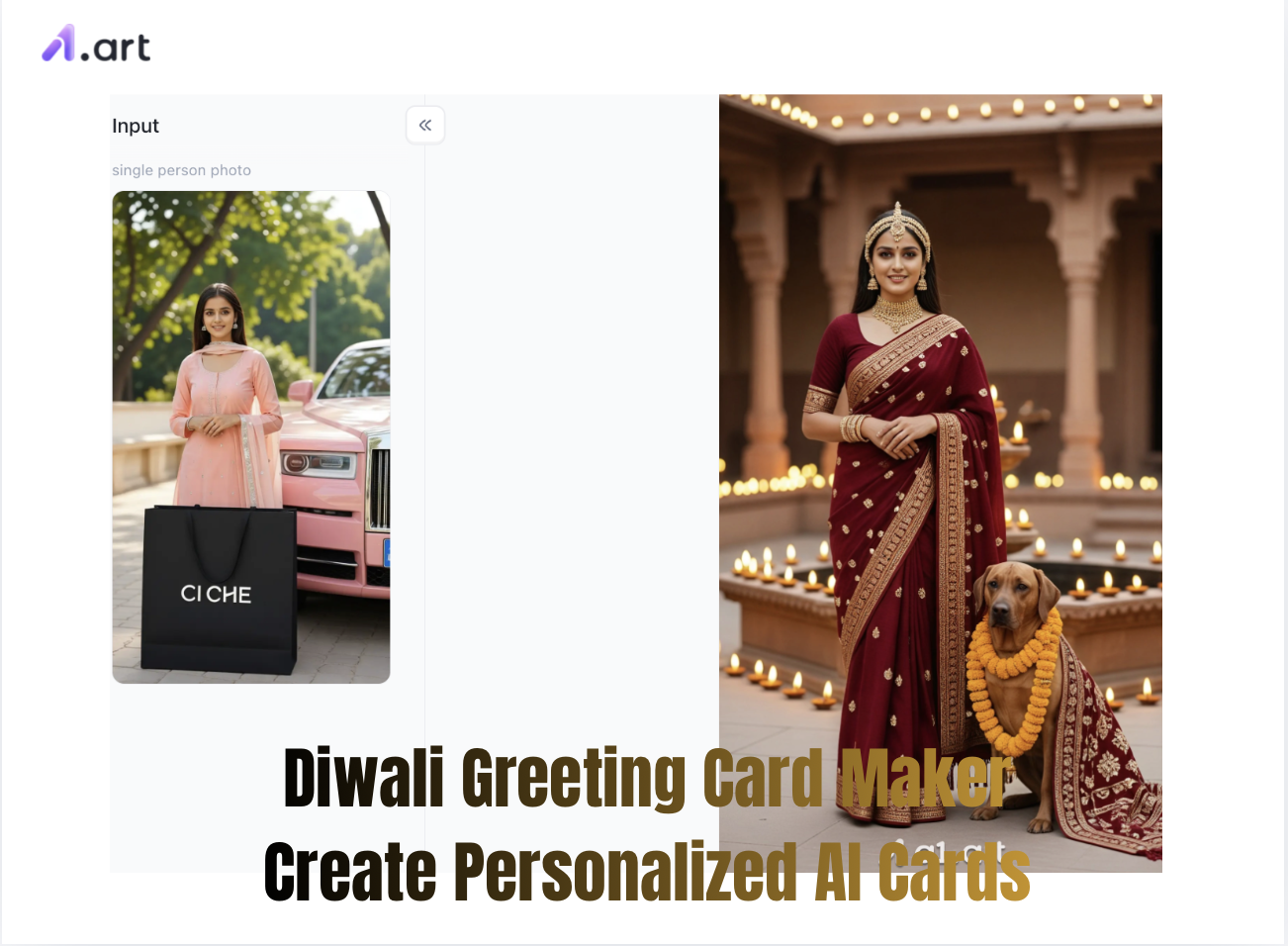
Now, let’s take a look at the generated Diwali greeting card,isn't it exquisite? The character consistency and the festive atmosphere have been captured beautifully!
Practical Scenarios & Example Use Cases
Here are 3 common ways this Diwali greeting card maker really helps:
Scenario 1
Heartfelt Family Wishes for Elders Challenge: Cards for parents and grandparents need respect, cultural warmth and a graceful feel.
AI Solution: Use the Lakshmi Puja style on a1.art with your family photo. The AI turns it into a cozy glowing room with traditional oil lamps and marigold garlands, full of peace and happiness.
Scenario 2
Corporate Thank-You Cards Challenge: Business holiday greetings need a premium, festive look without feeling too casual.
AI Solution: Try this prompt: "Luxury Diwali e-card, shiny gold text on deep royal blue background, glowing diyas, elegant geometric rangoli borders, keep empty space in the middle for greetings." The result has a neat layout ready for your company logo and formal messages.
Scenario 3
Eye-Catching Social Media Posts (3D & Cartoon Style) Challenge: Ordinary static photos easily get overlooked in busy social feeds.
AI Solution: Pick the 3D Diwali or Diwali Baby filter to make adorable tiny 3D characters lighting sparklers or sharing festive treats like samosas and jalebis. The vibrant 3D visuals grab more attention on Instagram and Facebook.
Pro Tips: Make Better AI Festival Art
Use these four simple tricks to get great results from your Diwali greeting cards:
-
Use lighting keywords: Add terms like warm glowing light, cinematic lighting or golden hour luminescence to your prompts, to make diyas and fireworks look more magical.
-
Pick a clear color palette: Classic Diwali combinations are royal blue + burnished gold, or crimson red + warm amber. Sticking to two main colors instantly gives a premium look.
-
Reserve space for text: If you plan to add words later, include phrases like center negative space for typography or clean center background, so the middle stays uncluttered.
-
Try the Fork feature: No need to build prompts from zero. Use the Fork button to tweak popular community prompts with your own ideas,you’ll get better results on your first try.
Conclusion
Diwali is a festival of light, hope, and meaningful connections. In this digital era, a personalized card created with genuine thought speaks far louder than generic forwarded images. By leveraging a1.art as your go-to Diwali Greeting Card Maker, technology becomes a creative tool to express your heartfelt wishes with elegance and ease.
Ditch the overused stock photos and start your AI art journey today! Whether sending love to relatives, fun wishes to friends, or gratitude to business partners, use a diwali greeting card maker online platform now to illuminate every greeting this Diwali season!
FAQs
Q1: How do I create a personalized Diwali greeting card using AI?
Simply choose a festival theme or filter, upload a photo or enter a text prompt, and let the AI generate your custom card in seconds. You can then download and share it directly.
Q2: Can I add text or custom greetings to my generated Diwali cards?
Yes. Most AI prompts automatically reserve clean, unuttered negative space in the design, making it easy to overlay your personal text, family name, or company logo.
Q3: Are AI-generated Diwali cards free to download and share?
Many tools offer free daily credits or free preview downloads, allowing you to easily generate, save, and send high-resolution digital cards across WhatsApp and social media.
Read more
- Casa Tupka Anthemo AI Video Prompt for the Viral Car Reel
- 9 Best Porn Face Swap Tools Online Free 2026
- AI Jewelry Photography: How to Create Product and Model Photos
- Top 12 AI Cinematic Portrait Generators for Movie-Style Photos
- How to Add a Person to a Photo and Make It Look Natural
- How to Fix Closed Eyes in a Photo Using a Reference Picture
- 10 Best Secret Desires AI Alternatives in 2026
- Best Remini Alternatives for Photo Enhancement in 2026
- Secret Desires AI Review 2026: Is It Free, Safe and Worth It?
- How to Remove Glare from Glasses in Photos with AI
Written by

a1.art
Published on
Oct 8, 2026
Share article


