

PixelDojo is an AI creative platform that brings image generation, video creation, and ready-made effects into one place. With more than 310 one-click video effects, users can turn photos into short videos without writing prompts. Free accounts also receive three video or photo effect uses per day.
But PixelDojo isn't the only option for AI-powered creativity. Depending on your workflow, you might prefer a simpler image filter tool, a platform with customizable AI models, an anime-focused generator, or a real-time image creation experience.
That's where PixelDojo alternatives come in.
In this guide, we'll explore 11 AI tools like PixelDojo, highlighting what each platform offers, where it stands out, and which types of creators might find it useful.

11 Best PixelDojo Alternatives in 2026
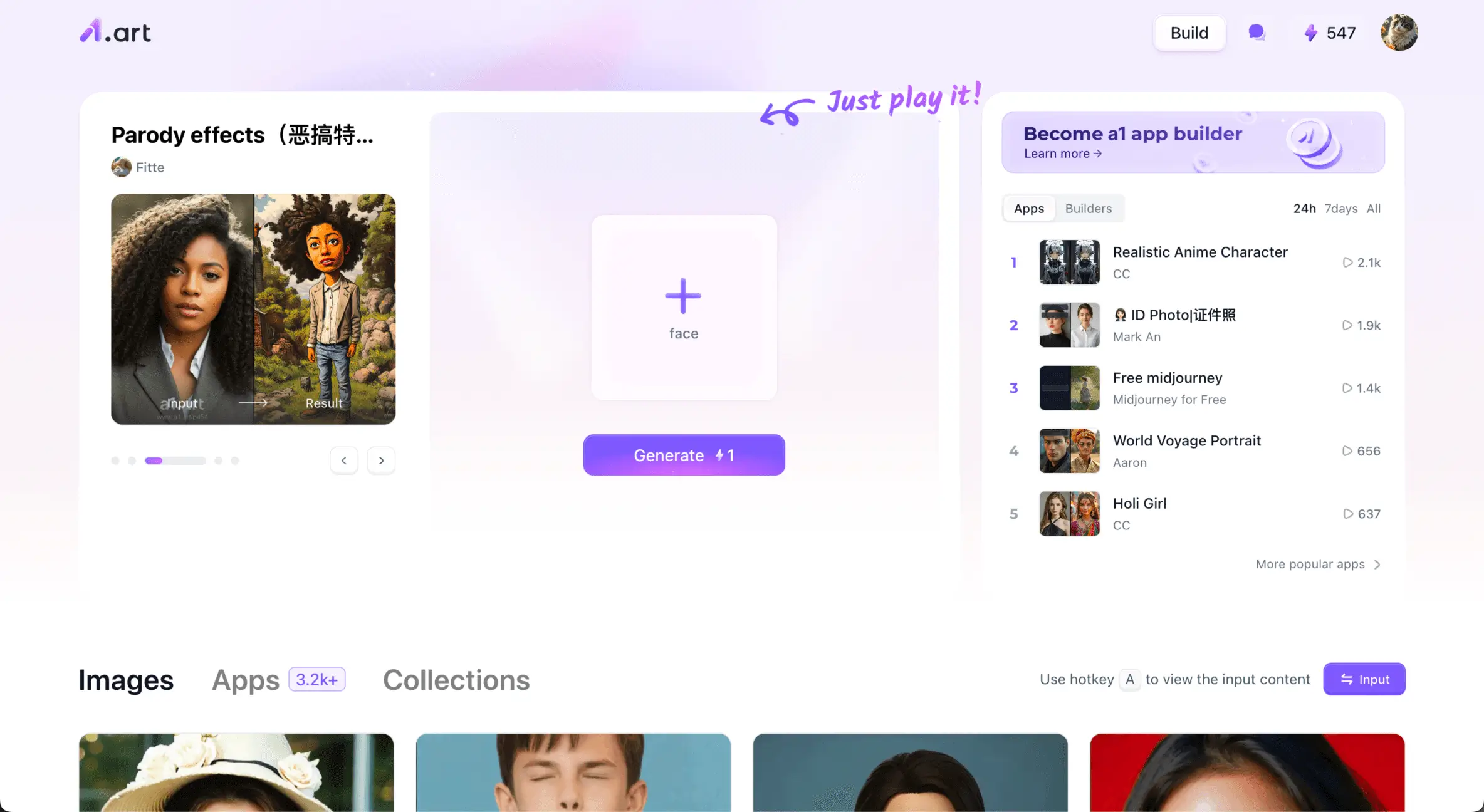
1. a1.art — Best for Easy AI Art Filters and Photo Transformations
If you're looking for a PixelDojo alternative focused on accessible AI image creation, a1.art is worth exploring.
a1.art offers a collection of AI-powered filters and creative templates designed to help users transform images without extensive prompt writing. Instead of building every visual concept from scratch, you can browse existing styles, upload a photo, and experiment with different artistic effects.
This approach is particularly useful for people who want to create stylized portraits, fantasy-inspired images, cinematic artwork, or social media visuals.
What makes a1.art stand out?
- Ready-to-use AI filters: Explore different visual styles without having to develop detailed prompts.
- Photo-based transformations: Upload an existing image and apply creative effects.
- Accessible workflow: Start with a template rather than configuring multiple AI models.
- Creative variety: Experiment with portraits, illustrations, fantasy themes, and other artistic styles.
How does a1.art compare with PixelDojo?
Both platforms offer ways to create AI visuals without advanced prompting skills.
PixelDojo provides over 310 one-click video effects, along with AI image and video models and dedicated creative studios. A free account allows users to generate three video or photo effects per day.
a1.art takes a more filter-oriented approach to image creation, making it appealing to users who prefer browsing visual templates and transforming photographs.
The distinction is primarily about workflow and creative goals, rather than one platform being universally easier or more powerful.
If your main interest is experimenting with AI art filters and photo transformations, a1.art is a useful PixelDojo alternative to explore.
Best for: AI portraits, photo transformations, creative filters, and template-based image generation.

2. SeaArt AI — Best for Exploring AI Models and Artistic Styles
SeaArt AI is another option for creators looking for sites like PixelDojo.
The platform offers AI image generation tools alongside a collection of community-driven models and artistic styles. Users can explore different visual approaches, from anime illustrations to fantasy characters and realistic-looking artwork.
One of SeaArt AI's main attractions is the opportunity to discover and experiment with different AI-generated aesthetics.
Compared with a filter-focused workflow, SeaArt AI can offer more opportunities for users who enjoy exploring models, prompts, and customizable creative settings.
Best for: Anime artwork, fantasy illustrations, model exploration, and creative experimentation.
3. Mage.Space — Best for Prompt-Based Image Generation
Mage.Space is a browser-based AI image generation platform that appeals to creators interested in experimenting with prompts and image-generation settings.
Rather than emphasizing ready-made filters alone, Mage.Space provides an environment where users can explore different image concepts through text descriptions and supported generation options.
For creators who enjoy refining prompts, adjusting visual details, and experimenting with different outputs, Mage.Space is an alternative worth considering.
Best for: Prompt-driven image creation and users who want more direct involvement in the generation process.
4. Tensor.Art — Best for Community AI Models
Tensor.Art focuses on AI image creation through a community-driven collection of models and creative resources.
Users can explore different models and discover visual styles created or shared by other members of the community.
This makes the platform particularly interesting for creators who want to experiment with different artistic directions rather than rely exclusively on a fixed selection of templates.
Compared with PixelDojo's broader creative suite, Tensor.Art is worth considering when discovering and using community models is a priority.
Best for: Community models, anime illustrations, character artwork, and model experimentation.
5. 5. Leonardo AI — Best for Game Assets and Digital Art
Leonardo AI is a creative platform used for generating digital artwork, illustrations, and visual assets.
Its image generation features can support projects involving concept art, characters, environments, and other design-oriented visuals.
For artists, designers, and game developers, Leonardo AI offers a different creative emphasis from tools primarily centered on quick photo transformations.
If you're comparing AI tools like PixelDojo for professional illustration or visual concept development, Leonardo AI deserves consideration.
Best for: Concept art, character design, game assets, and digital illustrations.
6. Playground AI — Best for Accessible Image Design
Playground AI is an option for people who want to combine AI-assisted image creation with visual design workflows.
Its approach can be useful for creating and refining graphics, experimenting with layouts, and developing images for personal or creative projects.
Creators who prefer a design-oriented environment may find Playground AI worth exploring alongside platforms such as PixelDojo and a1.art.
Best for: Creative graphics, image design, and accessible visual editing.
7. NightCafe — Best for AI Art Communities
NightCafe combines AI art creation with a community-oriented experience.
Beyond generating images, users can discover artwork, explore creative ideas, and engage with other AI art enthusiasts.
This community aspect makes NightCafe an interesting PixelDojo alternative for people who enjoy both producing AI images and finding inspiration through the work of others.
Best for: AI art exploration, community participation, and creative inspiration.
8. PixAI — Best for Anime and Character Illustrations
PixAI focuses on anime-style artwork and character-focused AI image generation.
For users primarily interested in anime characters, stylized portraits, and illustration-based creative projects, PixAI provides a more specialized direction than a general-purpose image and video platform.
It is worth considering if anime-inspired artwork is your main creative interest.
Best for: Anime portraits, character illustrations, and stylized artwork.
9. Dezgo — Best for Straightforward AI Image Generation
Dezgo offers AI-powered image generation tools through a browser-based interface.
It is an option for users who want to generate images from prompts and explore supported AI image creation features without building a separate local setup.
Creators comparing PixelDojo alternatives may find Dezgo useful when their primary goal is straightforward image generation rather than an extensive template library.
Best for: Text-to-image creation and browser-based AI image workflows.
10. Artbreeder — Best for Collaborative Image Exploration
Artbreeder takes a distinctive approach to AI creativity by emphasizing the exploration and combination of visual characteristics.
Rather than focusing exclusively on conventional text-to-image prompting, it allows creators to experiment with images and develop new visual variations.
This approach is especially interesting for people exploring character concepts, portraits, and imaginative visual combinations.
Best for: Character exploration, portrait variations, and experimental visual creation.
11. Krea AI — Best for Real-Time Visual Experimentation
Krea AI is another platform worth exploring when comparing sites like PixelDojo.
Its creative tools emphasize interactive image workflows, including real-time visual generation experiences.
For artists and designers who prefer seeing visual ideas develop as they make adjustments, this can offer a different experience from traditional prompt-and-generate workflows.
Best for: Real-time image creation, visual experimentation, and interactive creative workflows.
PixelDojo vs. a1.art: Which Should You Choose?
PixelDojo and a1.art both help people create AI-generated visuals, but they emphasize different creative workflows.
| Feature | PixelDojo | a1.art |
| AI image generation | Yes | Yes |
| Ready-made visual effects | Yes | Yes |
| One-click video effects | 310+ video effects | Not the primary focus of this comparison |
| Prompt-free creation | Available through effects | Available through filters |
| Image transformation | Available | Core use case |
| Free access | 3 video or photo effects daily | Free-to-try options |
| Main appeal | Broad image and video creative suite | Accessible AI art filters and templates |
Choose PixelDojo if:
You want access to image and video creation in one platform, enjoy experimenting with AI models, or need ready-made video effects for photographs.
Choose a1.art if:
You mainly want to transform photographs, explore different artistic styles, or create AI artwork through a filter-based workflow.
Neither platform is the right choice for everyone. The better option depends on what you want to create and how much control you need over the process.
AI Filters to Explore on a1.art
If you're interested in using a1.art as a PixelDojo alternative for image creation, exploring different filter styles is a practical starting point.
Here are four creative directions to consider.
Cinematic Glow
If you are captivated by the motion pictures screened late in the night, the Cinematic Glow Filter is what you should be going for. The light is diffused and cozy with an uncanny tension to it, making the images cozy but without making them besmirch. The kind of creators who turn to Pixeldust alternatives for an outlet tend to love it because it makes images well-composed and evokes a sense of environment. There are no sharp edges, as the light caresses the surface of the subject and creates that subtle and enrapturing artistic ambiance.
Click the link to create Cinematic Glow⬇

Velvet Night
The Velvet Night filter is intended for less moodful and more tension-filled scenes. Creator: shadows deepen, hues elate, image turns luxurious. A good number of creators who look for sites like Pixeldojo filter have such an effect because it captures tension and mystery. These moments seem to be captured right when there is something interesting just about to happen.
Click the link to create Velvet Night⬇

Soft Romance
For people who like warmer tones in images, Soft Romance adds a bit of glow, which makes it look so romantic and even melancholy. Lighting also enters such a state where it is more evenly distributed and the surroundings have this minor defocusing blur, which lends a lovely, sleepy nature to the image. This style is often used by many people experimenting with AI tools like Pixeldojo, and this is because it has a way of resulting in very comfortable yet aesthetically appealing images that are not mechanical to see.
Click the link to create Soft Romance⬇

Midnight Cinema
The Midnight Cinema filter's dramatic lighting and stark contrast fit quite nicely; behind-the-scenes, still-image-like, suspenseful movie scene. Creators exploring Pixeldojo alternatives often go for this filter, which sometimes results in photographs with strong and slightly mysterious emotional ties.
Click the link to create Midnight Cinema⬇

How to Use a1.art Step by Step
If you want to try the best pixeldojo alternative, here is how to start.
- Step 1: Visit the a1.art website.

visit the a1.art- Step 2: Browse the available AI filters.

Select a Filter- Step 3: Upload a photo or write a short prompt.

Upload Your Photo- Step 4: Click generate.

Hit Generate- Step 5: Download your favorite result.
The entire process takes less than a minute.
That simplicity is one reason many creators prefer it over other pixeldojo alternatives.
Real User Experience
After testing several sites like Pixeldojo, one pattern became clear. Tools that rely heavily on prompts can produce amazing images but require practice. Filter-based tools like a1.art often deliver impressive results instantly.
One user explained it well:
"I tried several AI tools like Pixeldojo, but I kept coming back to a1.art because it just works faster."
Another said:
"It feels less like writing commands and more like directing a scene."
FAQ
What is the best PixelDojo alternative in 2026?
The best PixelDojo alternative depends on your creative needs.
a1.art is worth considering for AI art filters and photo transformations. Leonardo AI is an option for digital illustration and concept art, while PixAI focuses on anime-style creation. Krea AI may appeal to creators interested in interactive image workflows.
For creators who need both AI image and video generation, PixelDojo itself remains a relevant option.
Are there any free PixelDojo alternatives?
Several AI art platforms offer free access or free-to-try features, although usage allowances and restrictions may vary.
You can explore platforms such as a1.art, SeaArt AI, and other tools listed in this guide.
PixelDojo also offers a free account with three video or photo effect uses per day.
Check each platform's current pricing and usage policies before choosing a tool.
Can I use PixelDojo without writing prompts?
Yes.
PixelDojo offers more than 310 ready-made video effects that allow users to generate videos from photos without writing prompts.
Users can select an effect, upload a photo, and generate a result.
PixelDojo also provides other AI image and video creation workflows where prompts may be useful.
Which PixelDojo alternative is best for AI portraits?
a1.art is worth exploring if you prefer ready-made filters and photo-based transformations.
For anime-inspired character portraits, PixAI offers a more specialized experience. Leonardo AI and other creative platforms may be useful for illustration-focused projects.
The best option depends on the visual style you want and the level of customization you need.
Which AI tools like PixelDojo can create realistic images?
Several platforms in this guide support realistic-looking AI image generation, including Leonardo AI, a1.art, and other image-focused tools.
However, realistic results depend on factors such as the selected model, source image, prompt, and generation settings.
Comparing results from the same reference image or creative brief is a more useful approach than assuming one platform always delivers better realism.
Do I need prompt-writing skills to use PixelDojo alternatives?
Not necessarily.
PixelDojo offers one-click video effects, while a1.art provides filter-based image creation options. Both approaches can reduce the need for detailed prompts.
Other platforms offer more prompt-oriented workflows for users who want additional control.
Final Verdict
There is no single PixelDojo alternative that will be the best fit for every creator.
If you're interested in AI image filters, creative photo transformations, and a template-based workflow, a1.art is a practical place to start.
For anime illustrations, PixAI offers a specialized creative direction. For digital art and concept development, Leonardo AI may be a better match. If interactive visual experimentation is important to you, Krea AI is another option to explore.
PixelDojo remains a capable choice for users who want both AI image and video creation, including hundreds of ready-made effects that require no prompt writing.
The best approach is to compare the tools based on your actual creative projects.
If your goal is to transform photographs into new artistic styles, explore the filters available on a1.art and find the creative workflow that works for you.
🔞 Content Publication Policy (Concise English Version)
All users must strictly adhere to the following rules and bear full responsibility for the content they publish:
- Illegal Content: The generation or distribution of any form of illegal content is strictly prohibited.
- CSAM (Child Sexual Abuse Material): Any sexual content involving minors is considered a severe felony worldwide, with zero tolerance.
- Deepfakes (Non-consensual Intimate Images): The creation or dissemination of intimate images of any real person without their explicit consent is strictly forbidden.
- User Responsibility: Users are solely responsible for ensuring all generated content complies with copyright, privacy, and all applicable laws.
Read more
- Veterans Day 2026: History, Meaning & How Americans Honor Veterans
- 20+ GPT Image 2.6 Prompts with Real Examples
- GPT Image 2.6 vs 2.5: Real Image Tests and Key Differences
- How to Make GIFs with ChatGPT Images 2.6 (Step-by-Step)
- Hari Pahlawan 2026: Tanggal, Sejarah & Makna Hari Pahlawan
- Best Hot Girl Prompts for Gemini: Stylish AI Photo Ideas
- Diwali 2026: Date, Lakshmi Puja Muhurat, Rangoli & 5-Day Guide
- How to Make an AI Kissing Video from 2 Photos for Free
- How to Design a Poster with AI: From Idea to Final Layout
- Best Nemora AI Alternatives in 2026
Written by

a1.art
Published on
Nov 11, 2026
Share article


