


Have you ever seen those stunning Hollywood movie posters and desperately wanted to replicate that atmosphere, depth, and cinematic lighting in your own photos?Many content creators, artists, and those who enjoy telling stories through visuals want to manually recreate that high-quality cinematic look, but it's incredibly difficult. You either painstakingly adjust complex lighting parameters, spend hours color grading and retouching in Photoshop, or struggle with ordinary image editing tools, only to end up with disappointing results: strange faces, artificial-looking textures, and blurry, messy details.
All your creative ideas are ruined by the harsh flaws of AI, which is incredibly frustrating.Actually, you don't have to force yourself to accept this low-quality visual style. For authentic cinematic quality, just choose an AI tool specifically designed for cinematic portraits.
Start your art journey with a1.art.
This guide compiles the best cinematic image generation tools currently available, helping you choose the most suitable tool to enhance the quality and storytelling of your images. We will also focus on a1.art, a brand-new creative platform. With its extreme detail and freedom of style, it has completely changed the AI image creation experience, producing images with the quality of high-end movie stills, rather than the monotonous, assembly-line AI images.
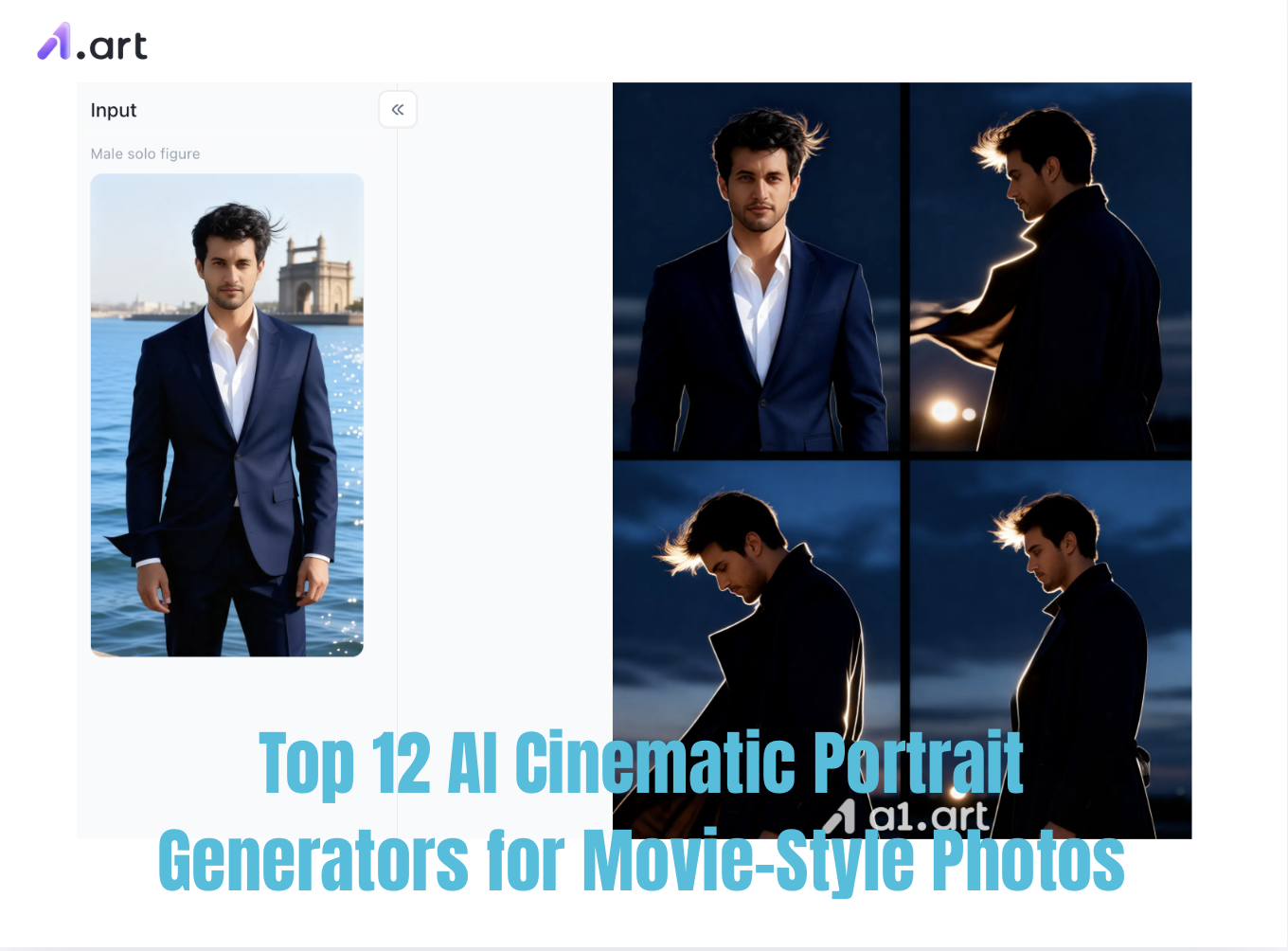
a1.art :The Ultimate AI Cinematic Portrait Generator
If you want to create realistic, cinematic-quality visuals without spending a lot of time learning complex tutorials and fiddling with various parameters, a1.art is definitely the top choice right now.
Why does it outperform ordinary tools? Most AI image editing software on the market suffers from several common problems: distorted faces, awkward lighting, and strange proportions. But a1.art is different. It's equipped with top-tier models like Sora2 and a professional photography-grade rendering engine. After extensive user testing and structural optimization, it completely surpasses similar software in the following core aspects:
- Ultra-high-definition image quality: Supports ultra-high-definition image quality, clearly reproducing minute details such as fabric texture and individual strands of hair, avoiding blurring.
- Ultra-realistic lighting: Intelligently calculates real-world ambient light, creating soft and natural shadows on the subject and producing cinematic lens flares for a truly immersive atmosphere.
- Authentic, non-plastic texture: Completely eliminates the "fake plastic look" characteristic of AI images, perfectly preserving skin pores and fine lines, and even subtle micro-expressions are rendered realistically and naturally.
- Zero distortion in human proportions: A precise spatial correction algorithm eliminates issues like asymmetrical facial features, twisted limbs, and deformed bodies.
- Clean and uncluttered images: Intelligent composition eliminates unwanted clutter and afterimages, highlighting the subject and creating a clean, sophisticated look.
- Aesthetically pleasing: Hundreds of thousands of constantly updated style filters are available, including hyper-realistic portraits, Bollywood styles, and retro film looks, perfectly aligning with current mainstream aesthetics. The resulting images are sophisticated and not tacky.
Here are a few AI Cinematic Portrait filters you absolutely can't miss on a1.art
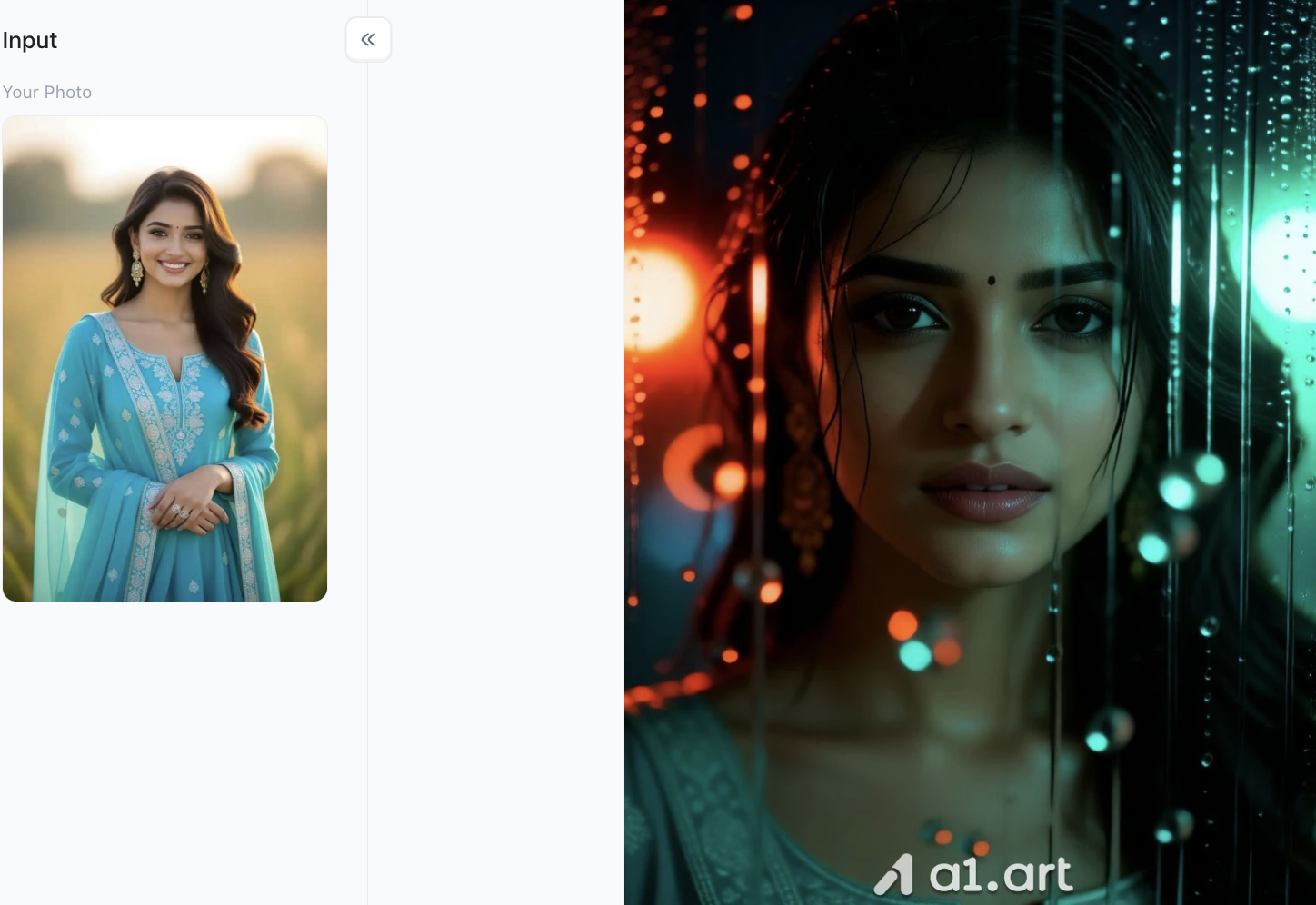
First one: Monsoon Noir Beauty
Double-click the image to try AI Cinematic Portrait Generator now!⬇️
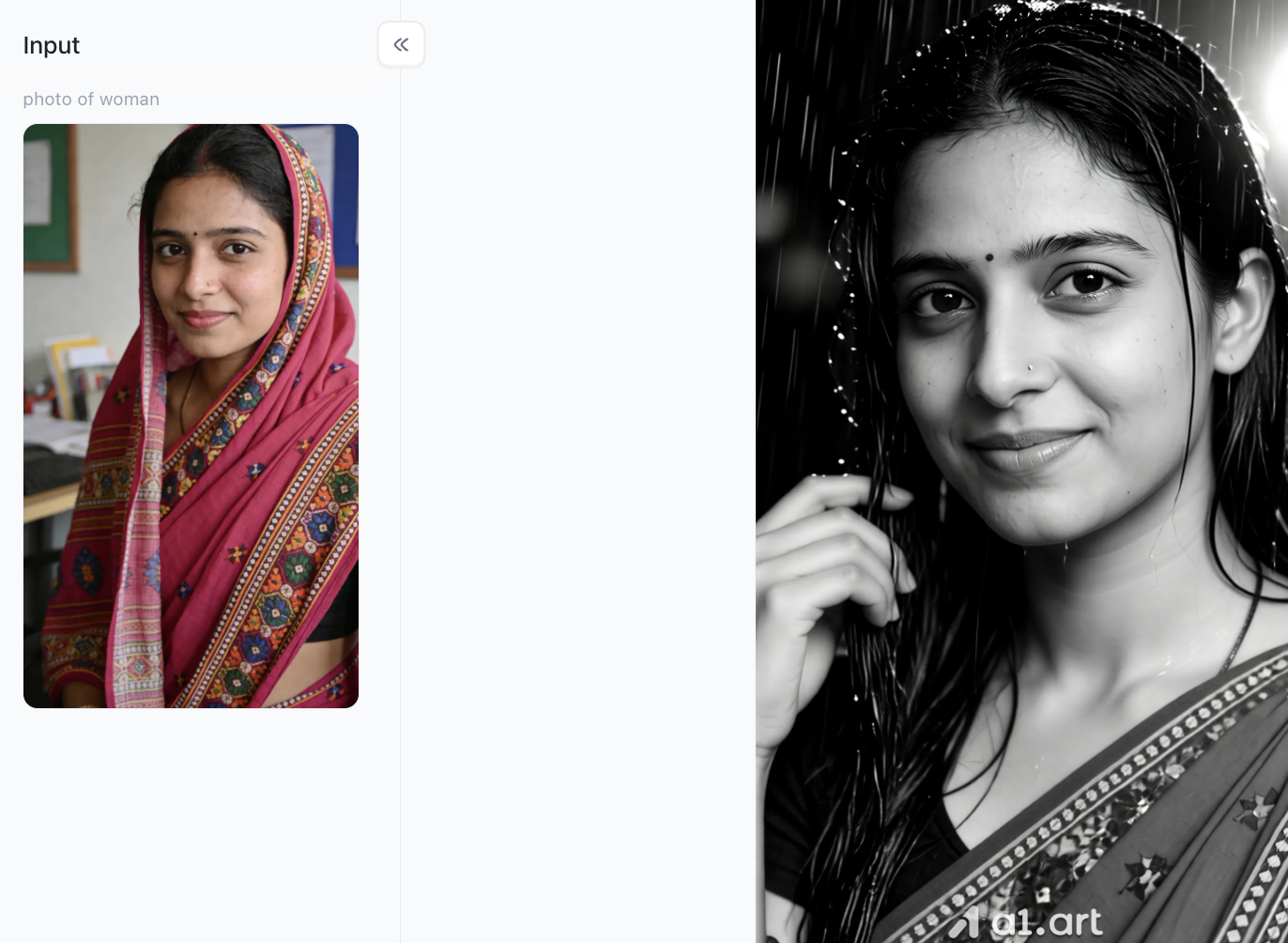
Filter Effects
Transform ordinary color photos into a black-and-white cinematic feel, giving the overall image a more artistic and sophisticated look.
Automatically generate realistic rainy scenes, adding details such as raindrops, wet hair, and water droplets to enhance the realism of the image.
Enhance the light and shadow layers and facial contours of the subject, making features more three-dimensional and the subject more prominent.
Preserve the original expression and characteristics of the subject while imbuing the image with a strong sense of emotion and story.
Filter Features
Generate cinematic rainy night portraits with one click, achieving blockbuster effects without complex post-processing.
Intelligently blends rain scenes, wet skin, and hair details for a natural and delicate visual effect.
Automatically weakens and optimizes the background's light and shadow, guiding the viewer's focus to the subject.
Suitable for various creative scenarios such as portrait photography, social media profile pictures, artistic photography, and emotionally charged images, delivering outstanding image quality.
Second one: Golden Shore
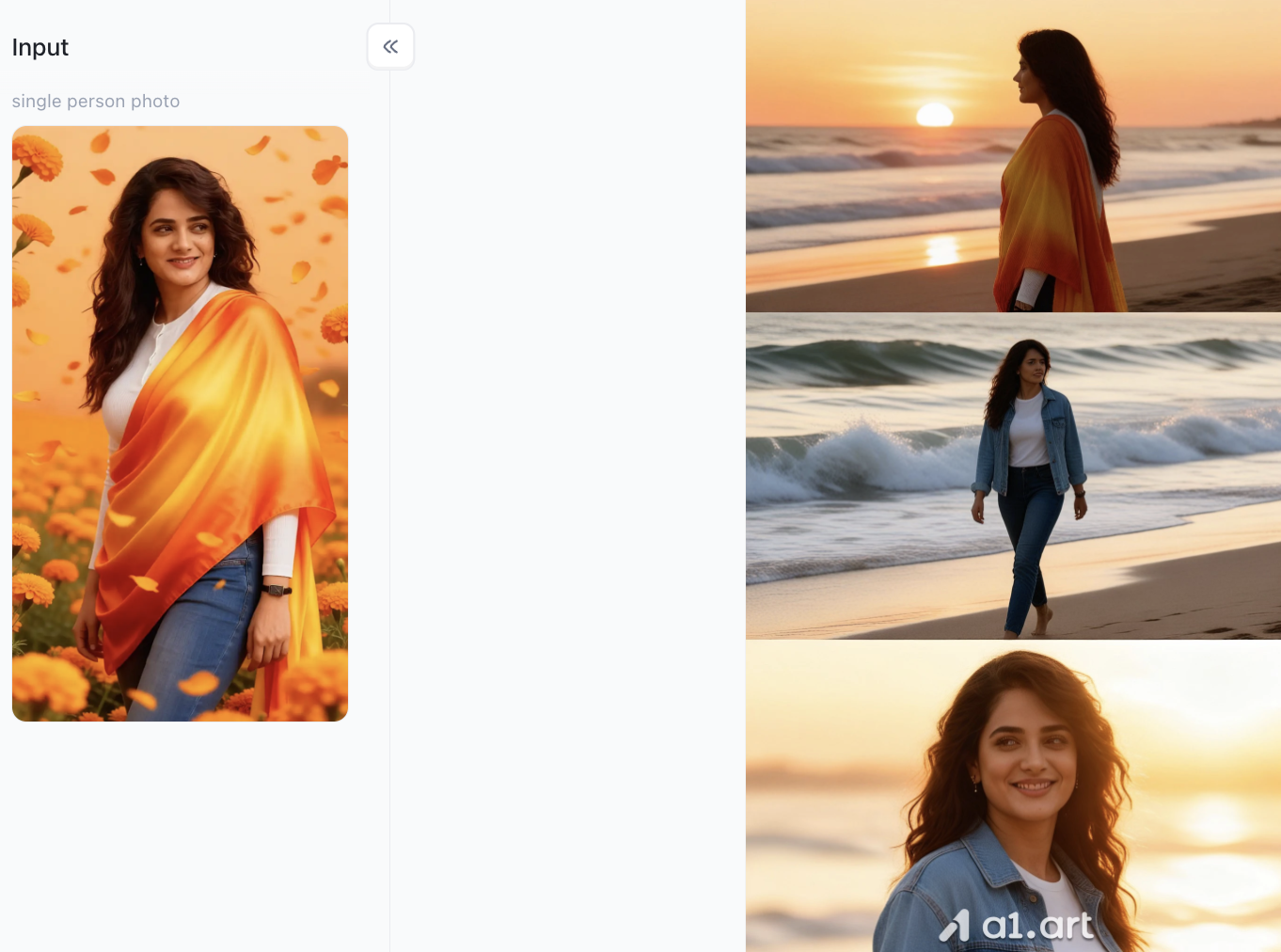
Generation Effects
- Creates warm eye contact and interaction, adding emotion and storytelling to the image.
- Enhances lighting, depth, and facial details for a clean, professional look.
- Transforms separate photos into a lifelike companion portrait with a timeless aesthetic.
Key Features
- Intelligently matches poses, perspective, and lighting for a seamless blend.
- Adds a cinematic atmosphere with soft background bokeh and refined contrast.
- Perfect for pet lovers, keepsake portraits, social media, and artistic photography.
Third one: Saree Neon
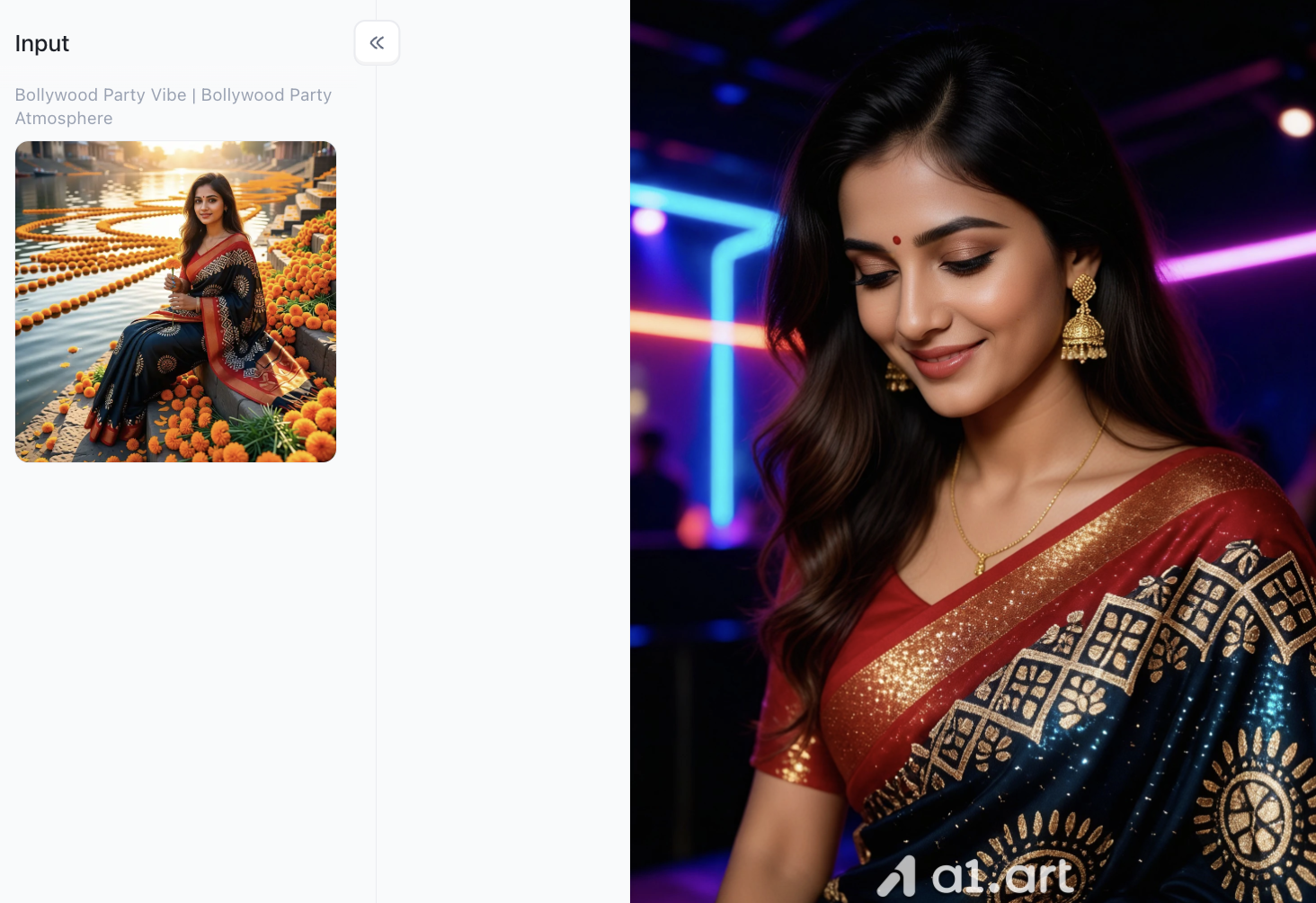
Generation Effects
- Transforms an ordinary photo into a timeless black-and-white stage portrait with a cinematic feel.
- Enhances facial features, lighting, and contrast for a refined, professional look.
- Reimagines the subject with an elegant performance-style outfit while preserving natural expressions.
Key Features
- Instantly creates a vintage concert-inspired portrait with no editing required.
- Intelligently upgrades clothing, lighting, and composition while keeping the subject recognizable.
- Produces rich monochrome tones with balanced highlights and shadows for a premium finish.
Midjourney (v6)
Midjourney remains a powerhouse for generating highly atmospheric, creative visuals. Its latest v6 engine excels at understanding intricate narrative prompts, allowing users to craft deeply moody and textured scenes.
- Key Strength: Unmatched artistic depth and complex atmospheric effects like volumetric fog and dramatic chiaroscuro lighting.
- The Catch: It requires a Discord account to operate and has a steep learning curve for mastering advanced text syntax.
- Pro Tip: To get the best results, try using an ai cinematic photo generator prompt that specifies camera gear, such as:
"/imagine a rugged protagonist in a neon-lit cyberpunk alley, rain-slicked pavement, shot on 35mm anamorphic lens, cinematic lighting, 8k resolution --ar 16:9".
Stable Diffusion XL
For creators who demand absolute control over their workflow, Stable Diffusion XL is an open-source marvel. It allows for deep customization via ControlNet and specialized LoRA models tailored for film styles.
- Key Strength: Complete open-source flexibility, local deployment capabilities, and thousands of community-made photographic models.
- The Catch: Requires powerful local hardware (high-end GPUs) and technical knowledge to install and configure properly.
Adobe Firefly
Integrated directly into Adobe Photoshop and Illustrator, Firefly is designed specifically for commercial designers and creative professionals who need commercial-safe generations.
DALL-E 3 (via ChatGPT)
Powered by OpenAI, DALL-E 3 is exceptional at text adherence. If you write a long, descriptive story detailing exactly where the light hits a character's face, DALL-E 3 will follow it perfectly.
- Key Strength: Incredible prompt comprehension; understands conversational English flawlessly.
- The Catch: The final images can sometimes lean toward an overly vibrant, digital-art illustration style rather than a true, gritty film-grain texture.
Leonardo AI
Leonardo AI provides a highly robust web interface equipped with specialized fine-tuned models like "Leonardo Diffusion" and "Absolute Reality," making it a popular choice for concept artists.
- Key Strength: Excellent balance of a clean user interface alongside advanced tools like prompt expansion and canvas editing.
- The Catch: The free tier operates on a daily token refresh limit, which can run out quickly during heavy experimentation.
SeaArt AI
SeaArt acts as a highly accessible gateway to the Stable Diffusion ecosystem, hosting thousands of community models directly in a user-friendly cloud interface.
- Key Strength: Built-in smart workflows for face-swapping, image upscaling, and quick cinematic style applications.
- The Catch: The interface can feel cluttered due to the massive volume of community options and social features displayed at once.
Picsart AI Image Generator
Picsart brings professional-grade creative models into a streamlined platform, offering users access to dozens of separate AI engines (including Flux 2 Pro and Imagen 4.0) under one roof.
- Key Strength: Multi-model access allows you to switch between hyperrealism and graphical styles instantly while utilizing built-in branding tools.
- The Catch: Advanced canvas layers and premium model exports require a paid subscription.
NightCafe Studio
NightCafe is a community-driven powerhouse that brings together leading models like Flux and Ideogram, wrapped in an engaging, collaborative ecosystem.
- Key Strength: Frequent daily community challenges that let you test your skills against other prompt engineers to earn free generation credits.
- The Catch: Because it relies on multiple external models, output consistency can vary wildly depending on the specific engine selected.
Fotor AI Photo Generator
Fotor is a long-standing name in online photo editing, and its AI companion excels at turning text concepts into clean, polished marketing and portrait assets.
- Key Strength: Excellent 3D rendering and portrait smoothing features that make it perfect for rapid avatar creation.
- The Catch: Lacks some of the deep, gritty contrast and film-grain presets needed for true, dramatic movie-still aesthetics.
Canvа AI Art Generator
Canva utilizes its proprietary Magic Media platform to allow creators to generate stunning images directly inside their design layouts, presentation decks, or social media templates.
- Key Strength: Flawless integration with Canva's massive library of fonts, stickers, and drag-and-drop design elements.
- The Catch: Designed primarily for layout creators, meaning it lacks granular photographic adjustments like aperture or shutter speed simulation.
Magic Studio
Magic Studio focuses on speed and simplicity, stripping away complex parameters in favor of a clean "text-to-image" bar that yields immediate, high-quality results.
- Key Strength: Zero registration required for basic use; lightning-fast generation for quick conceptual mockups.
- The Catch: Offers limited manual adjustments, making it tough to tweak fine composition details without entirely re-rolling the prompt.
A Visual Comparison of 12 AI Cinematic Portrait Generators
To help you choose the right tool for your creative needs, I'll briefly highlight their respective strengths:
For quickly creating high-quality portraits and cinematic photos, a1.art is the top choice. One-click filter application delivers the most realistic and natural skin texture, offering the highest output efficiency,efficiency and quality at a time.
For creating atmospheric, richly detailed scenes and building complete story worlds, choose Midjourney or Stable Diffusion. These two tools offer extremely high freedom, allowing for precise control over background and environmental details, surpassing other tools.
For creating short videos and images for social media, quickly producing everyday content, Picsart and Canva are the most suitable. You can directly add text and logos, and they can be easily adapted to the sizes of various platforms for direct posting.
Practical Tips for Achieving Cinematic Quality
No matter which AI image editing tool you use, to truly create a realistic theatrical film feel, the tool alone isn't enough; you also need to understand the principles of creating visual atmosphere. Here are a few useful professional tips to instantly elevate the quality of your work:
- Use a Cinematic Widescreen Aspect Ratio: Real cinematic images are never rigid squares. When editing, simply adjust the aspect ratio to 16:9. No additional fine-tuning is needed; the image will immediately have that widescreen cinematic feel.
- Label Lens Parameters for a More Realistic Image: Tell the AI the specific camera lens parameters to better simulate the depth-of-field effect of real photography, avoiding a flat and empty image. Just apply: 35mm lens, f/1.8 aperture, soft cinematic background blur, shallow depth of field.
- Precisely Define Tones to Avoid a Blurry "Cinematic" Feel: Don't just vaguely write "cinematic lighting"; such generalizations are prone to failure. Be sure to specify the exact color tone style: a cinematic cyan-orange gradation, sophisticated dark cool tones, or warm golden sunset rim lighting. Precise descriptions are crucial for achieving a sophisticated atmosphere.
Conclusion
By effectively using professional AI image editing tools and combining them with these simple techniques, you don't need expensive photography equipment or time-consuming manual image editing and color grading. Platforms like a1.art offer convenient options, allowing even ordinary people to easily create Hollywood-quality images. With a simple operation, you can transform your creative ideas into high-definition, exquisitely detailed, and visually stunning cinematic visuals. Give it a try!
FAQs
What is the best AI Cinematic Portrait Generator for beginners?
a1.art is the best choice for beginners. Unlike tools like Midjourney that require complex text prompts and a Discord account, a1.art allows you to generate professional, movie-style portraits with a single click using over 31,000+ pre-set style filters.
Can I use these AI cinematic photo generators for free?
Yes. Many platforms like a1.art, Leonardo AI, and SeaArt offer free tiers or daily credit refreshes. This allows you to explore styles and generate high-quality cinematic images without an immediate financial commitment.
How do I make my AI portraits look less fake and more like real movies?
- Use widescreen ratios: Set your aspect ratio to16:9.
- Add camera details: Include terms like "shot on 35mm anamorphic lens" or "f/1.8 cinematic bokeh".
- Specify lighting: Use phrases like "teal and orange color grading" or "moody dramatic chiaroscuro lighting".
Read more
- How to Add a Person to a Photo and Make It Look Natural
- How to Fix Closed Eyes in a Photo Using a Reference Picture
- 10 Best Secret Desires AI Alternatives in 2026
- Best Remini Alternatives for Photo Enhancement in 2026
- Secret Desires AI Review 2026: Is It Free, Safe and Worth It?
- How to Remove Glare from Glasses in Photos with AI
- How to Do the 80s AI Photo Trend with Your Own Photo
- How to Create Teachers Day Photos with AI?
- How to Create Hot Photos? A Step-By-Step Guide For Beginners
- 1980s Photo Prompt: How to Create the Viral ChatGPT 80s Look
Written by

a1.art
Published on
Sep 22, 2026
Share article


