


Scroll through TikTok, Instagram or Xiaohongshu, and you’ll see it everywhere: trendy 80s high school yearbook portraits. Big voluminous hair, denim jackets, neon color gradients, and soft-focus studio backdrops :this retro vibe has totally taken over social media.
You might want to jump on this nostalgic trend and turn your selfies into vintage-style shots. But professional retro photoshoots are pricey, time-consuming, and require tons of styling work. Most free editing apps aren’t much better either: they produce blurry, fake-looking portraits that distort your features and make you barely recognizable.So how do you nail authentic 80s retro photos without spending money or ending up with unnatural, cartoonish results? AI is the perfect solution. Powerful AI image tools let anyone generate sharp, high-quality 80s-style portraits in seconds.
Start your art journey with a1.art.
This full guide will walk you through exactly how to recreate the viral 80s AI photo trend with your own pictures. You’ll get tool comparisons, customizable prompts, and clear tips to pick the best platform for fast, smooth creative editing.
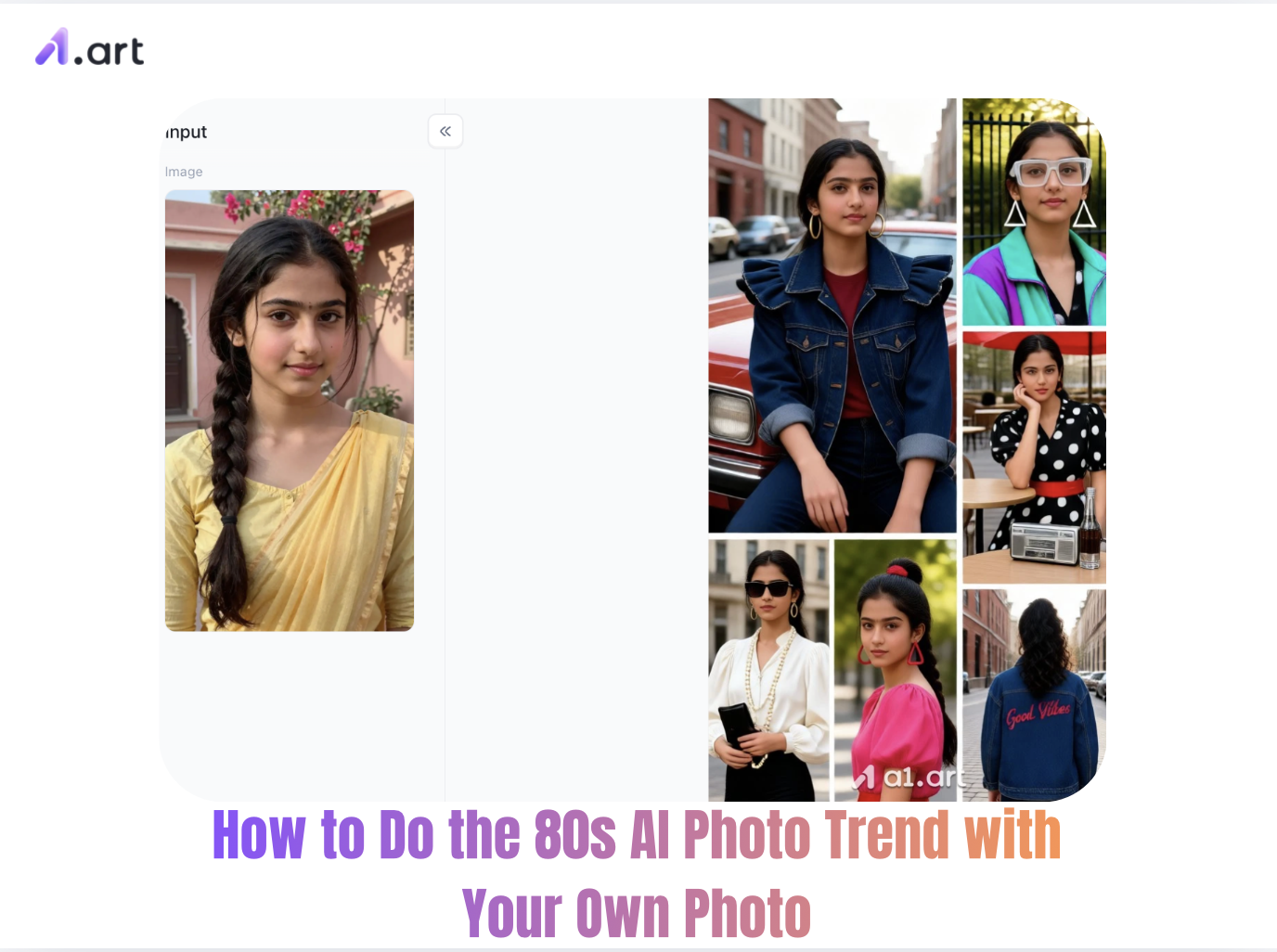
What Is the 80s AI Photo Trend and Why Is It Viral?
The 80s AI photo trend uses generative AI to turn regular selfies into stylish 1980s-themed portraits, including classic yearbook shots, vintage glamour photos, and retro action hero-style images. Fueled by nostalgia and viral short-video content on TikTok and other platforms, this trend lets people reimagine themselves with iconic retro vibes from the 80s.
Industry data shows retro-style photos get up to 35% more social media engagement than ordinary modern portraits. That’s because nostalgic visuals spark warm, positive feelings, making people far more likely to like, comment and share these posts.
Double-click the image to create a textured, vintage-style photo⬇️
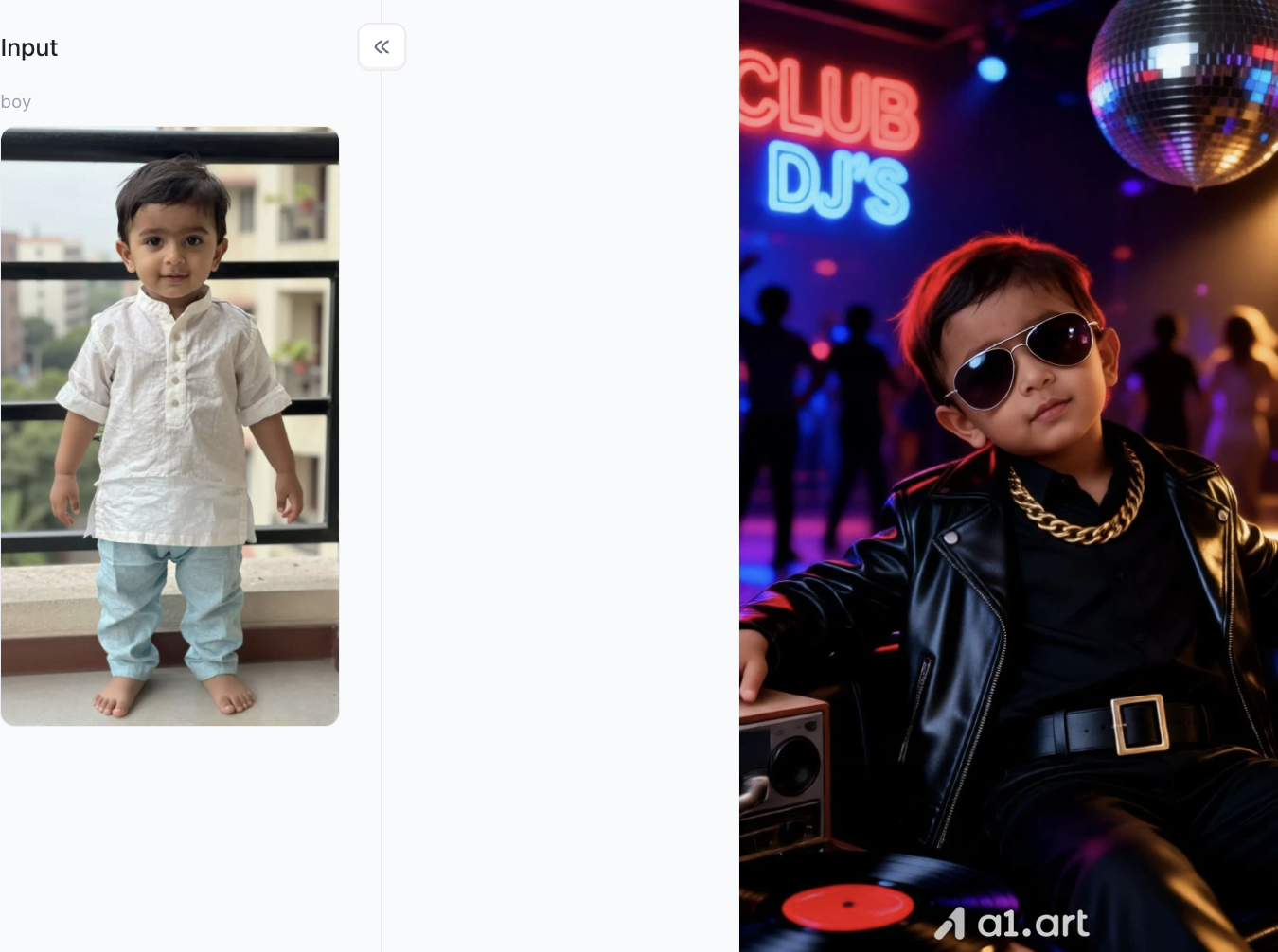
Top 3 Generators for 80s AI Photos: Performance Comparison
To achieve convincing retro portraiture, tool choice plays a pivotal role. Below is a comparative breakdown of top platforms capable of generating vintage artwork from user photos:
a1.art :The ultimate AI tool for creating 80s-style photos
If you are looking for an authentic retro aesthetic without facial distortion, a1.art is the best choice. It is not only incredibly fast but also perfectly preserves your original facial features. Whether using ready-made retro filters or custom prompts, it accurately renders vintage tones and produces natural, realistic results that far surpass standard AI models. Plus, it offers a wide range of built-in filters for you to use.
Midjourney (V6)
Midjourney excels at creating stunning artistic effects and nuanced lighting textures for retro-style photos. However, it is not particularly beginner-friendly. Preserving original facial features requires crafting complex prompts, employing multi-layer blending techniques, and navigating the Discord interface,making it ill-suited for quickly or casually creating trendy retro photos.
Remini and various mobile filter apps
These mobile apps pioneered the trend of 80s "yearbook-style" photos thanks to their ease of use. However, they have significant drawbacks: they tend to excessively alter facial features and erase natural skin texture, resulting in an unnatural, "plastic" look. To make matters worse, users often face long wait times for results, only to discover that full functionality requires payment.
Step-by-Step Guide: How to Do the 80s AI Photo Trend with Your Own Photo
Step 1: Register for a personal a1.art account
The first step is to visit a1.art and sign up for a personal account. Click on the top-right corner of the page and follow the on-screen prompts to complete the registration process; this is essential for creating images later on.
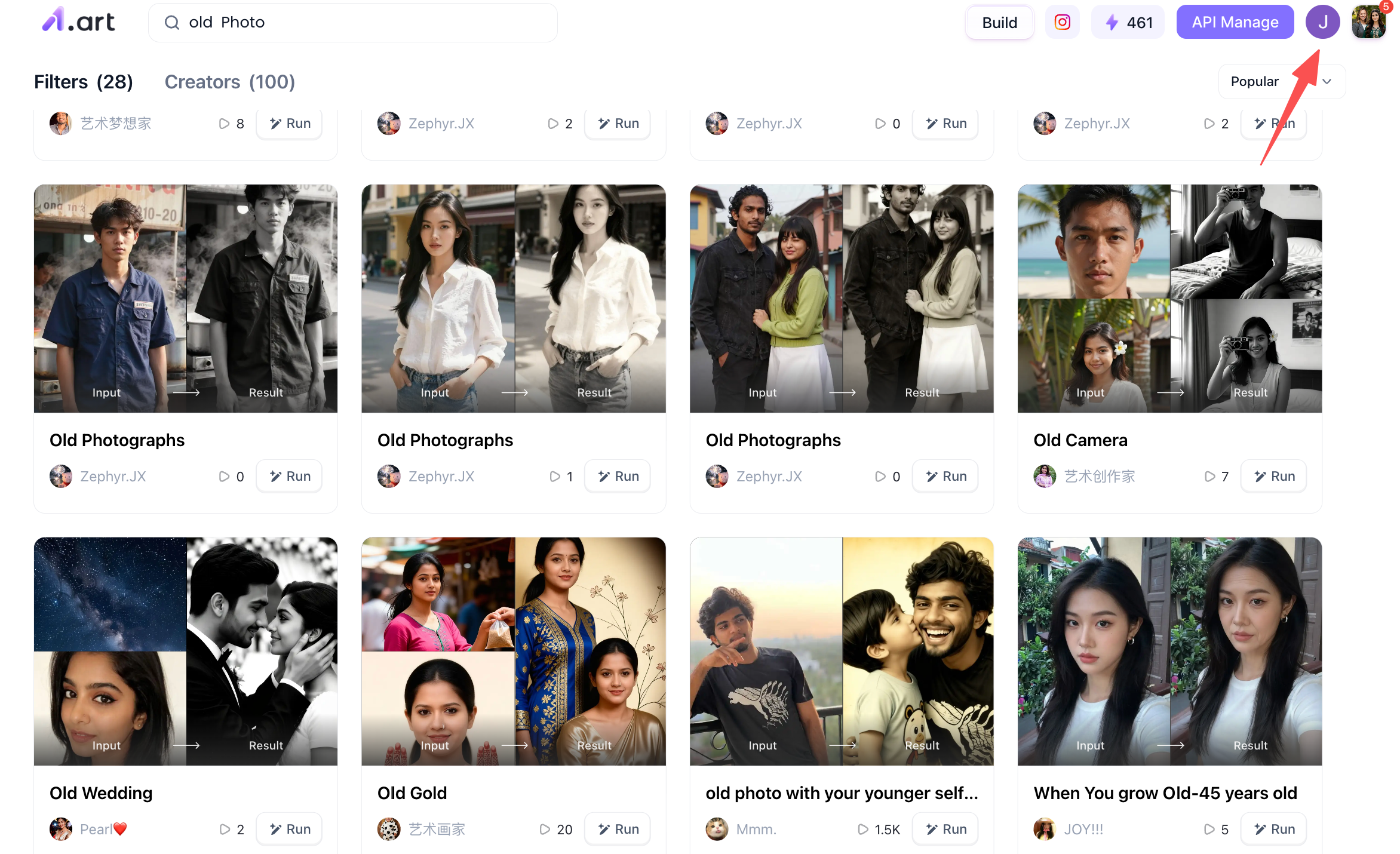
Step 2: Search for relevant keywords to find the right filter
A standout feature of a1.art is its vast filter library, offering a wide variety of styles for you to choose from and use as inspiration. For instance, if you type a term like "vintage photo" into the search bar, the platform will automatically suggest filters related to that keyword, allowing you to generate 1980s-style vintage photos.
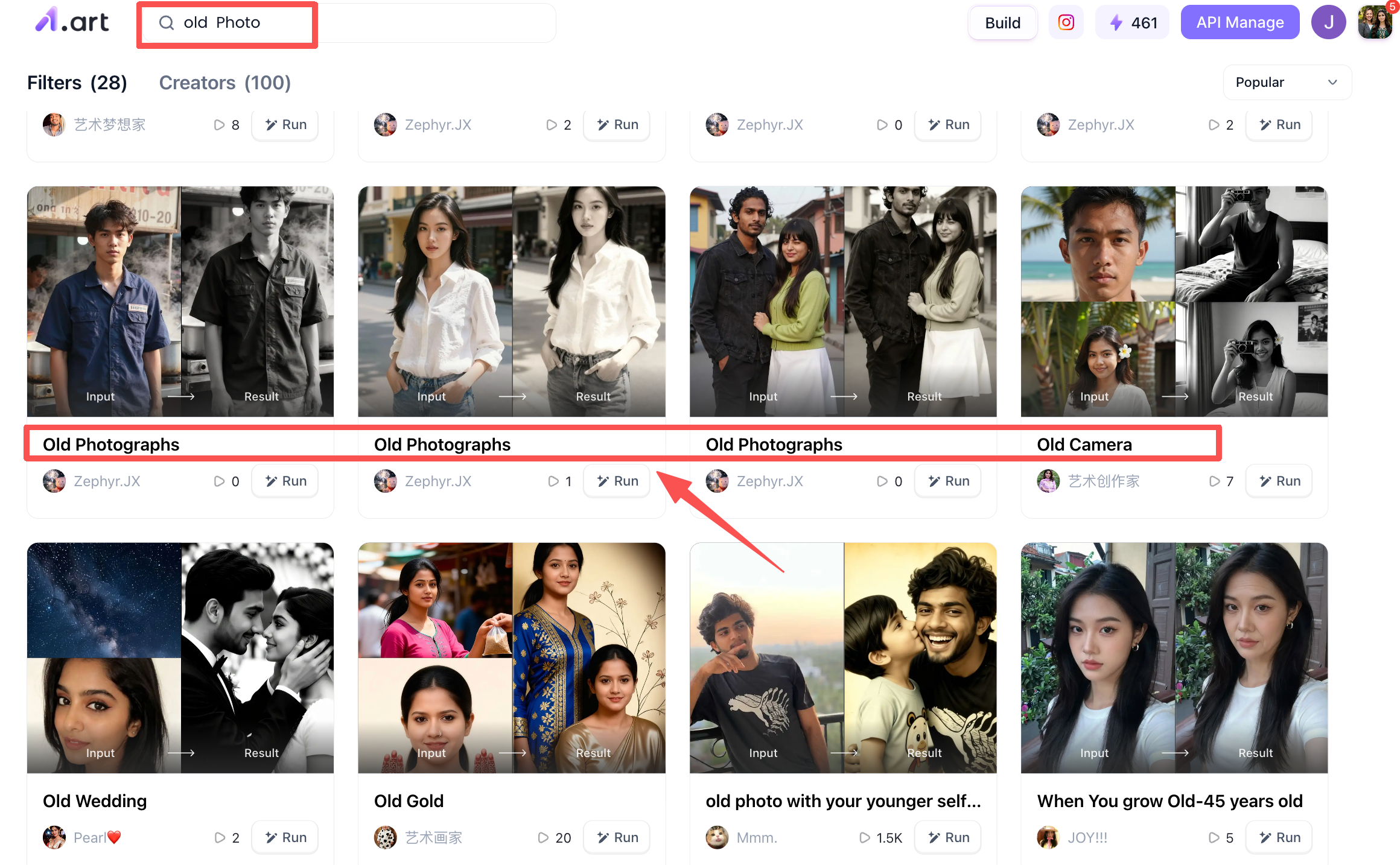
Step 3: Select your preferred 80s-style vintage photo filter to start generating images
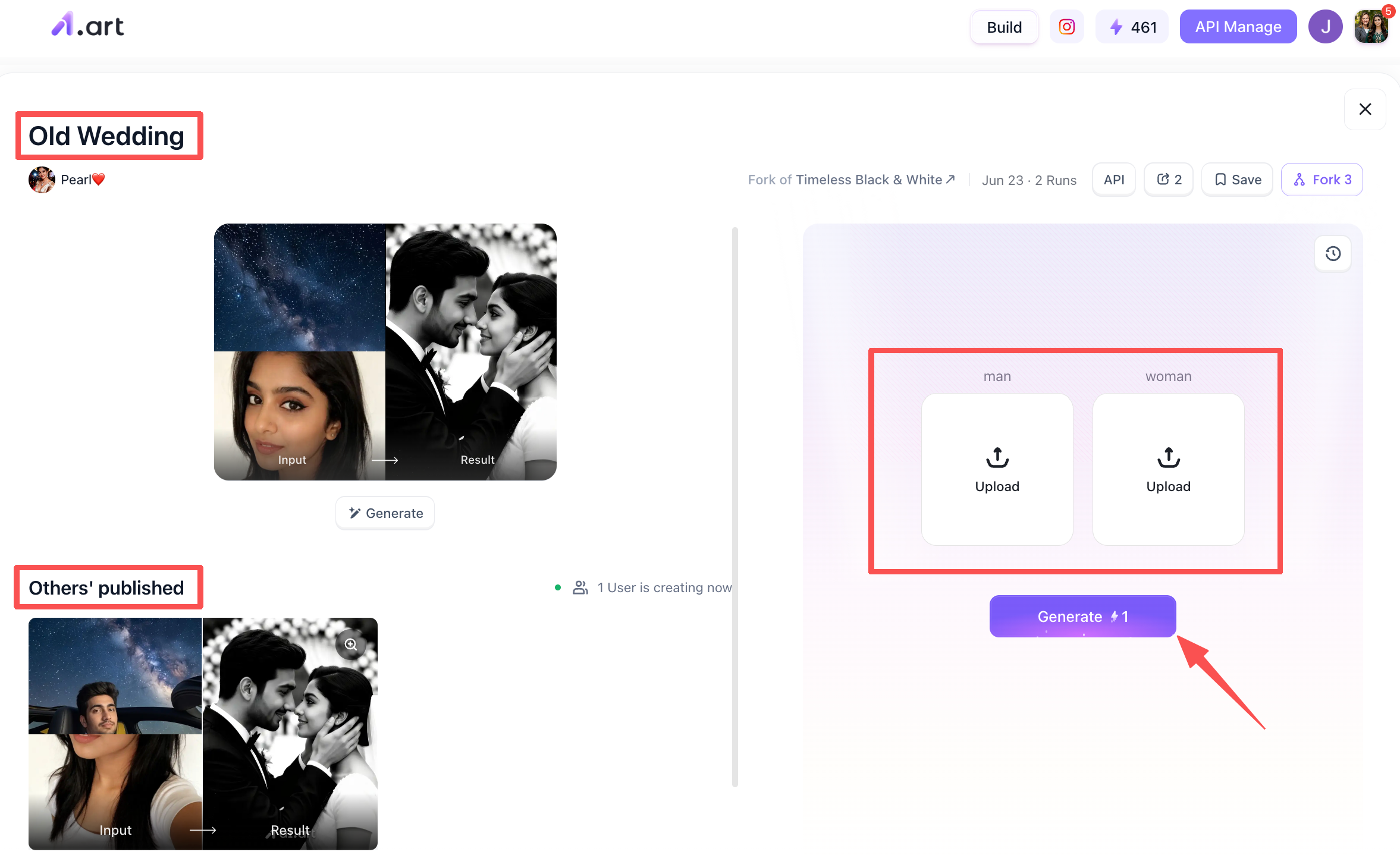
At this stage, you can randomly choose a filter you like to begin creating vintage-style photos. Taking the "Old Wedding" filter as an example, you will see a preview of the filter's general effect in the top-left corner of the page, while the bottom-left displays results generated by other users with this filter. The area on the right is where you upload your image.
Step 4: Processing the generated 80s-style photos
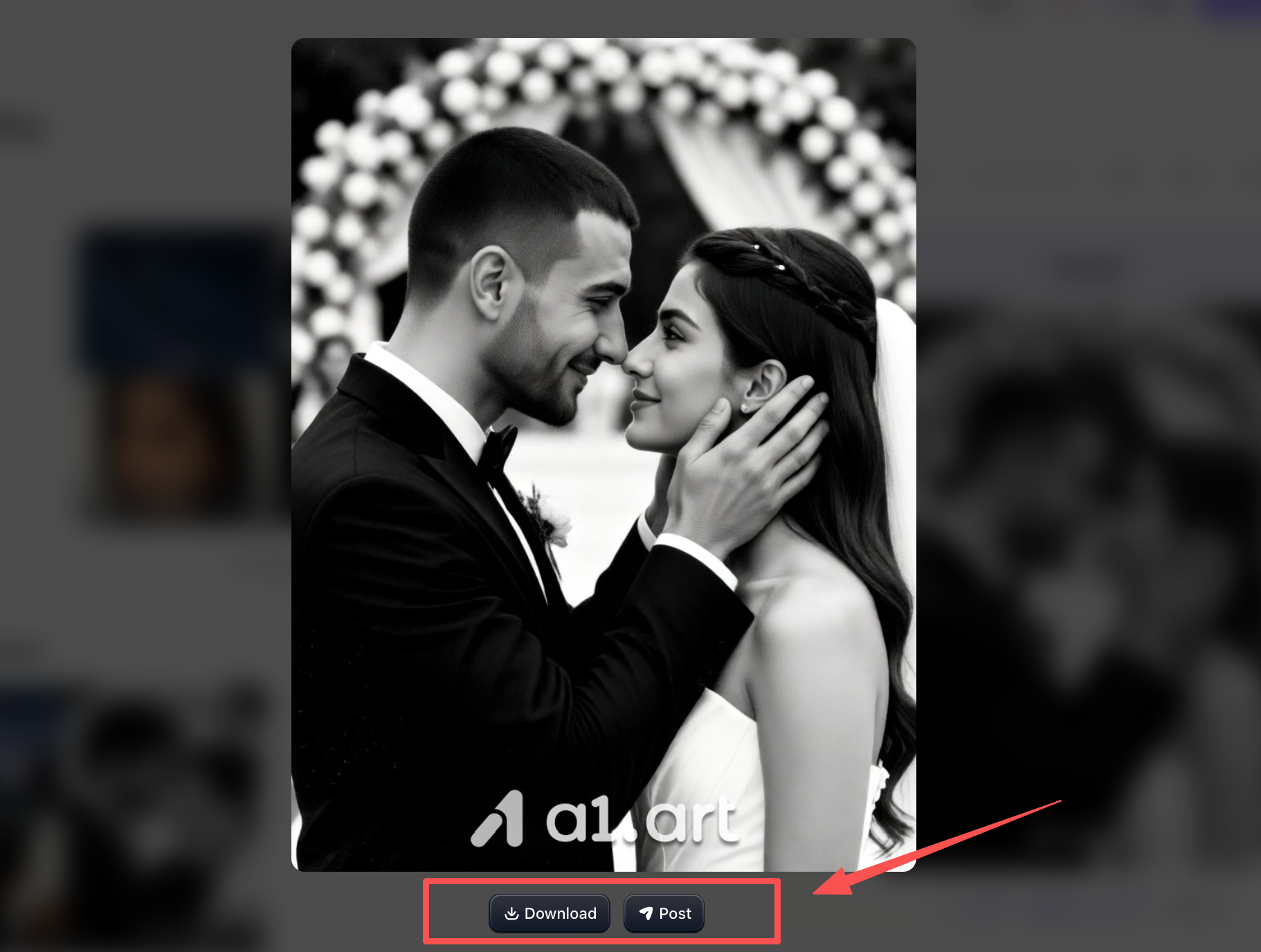
Once 2–3 minutes have passed and your photos are ready, you can begin processing the generated vintage images. Just look at the result,it’s incredibly realistic, both the man and woman look fantastic, and it feels like an instant trip back to the 1980s.You are free to either publish it within the filter's community or download and use it yourself.
Why a1.art Delivers a Superior Retro AI Generation Experience
-
Most AI tools mess up retro portraits: distorted faces, fake plastic skin, wonky body proportions and frustratingly long wait times. This is exactly why a1.art is the best free tool for creating authentic 80s AI photos.
-
Higher Structural Clarity: It outputs sharp 4K images with fine details on pores, hair strands and fabric textures, no blurry or artificial smoothing effects.
-
More Natural Facial Retention: Smart facial preservation tech keeps your original facial features and expressions intact in every 80s-style portrait.
-
Zero Anatomy Distortion: It naturally renders hands, ears, collarbones and clothing, fixing the weird structural errors common in basic AI generators.
-
Clean Foreground-Background Separation: It smoothly adds classic 80s studio backdrops and soft vignettes without cutting off or overlapping your hair and shoulders.
-
True-to-Era Aesthetics: Trained on real 1980s photography styles, it nails authentic vintage outfits, iconic voluminous hairstyles and accurate retro color tones.
Here are three additional examples of 1980s-style AI-generated photos
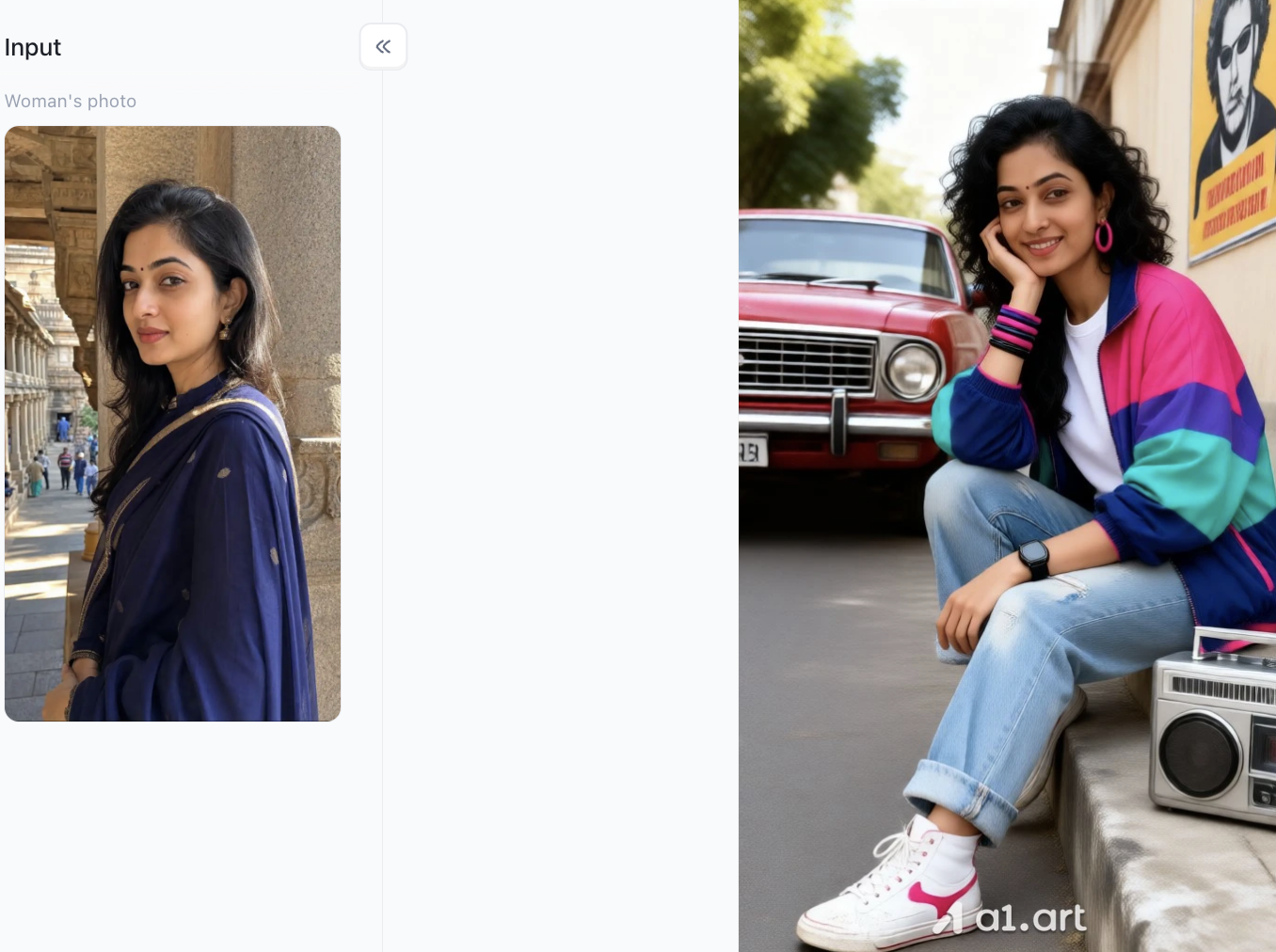
Beautiful Woman of the '80s-02
-
Vibrant 80s Wardrobe & Styling: Replaces outfit with iconic color-blocked windbreakers, rolled-up denim jeans, white sneakers, and colorful plastic bangles/hoop earrings.
-
Classic Retro Props & Backdrop: Sets the scene with signature 80s street culture staples—a boombox tape player, a vintage red car, and retro pop posters.
-
Signature Voluminous Hairstyle: Restyles straight hair into bouncy, voluminous 80s curls that fit the decade's pop aesthetic.
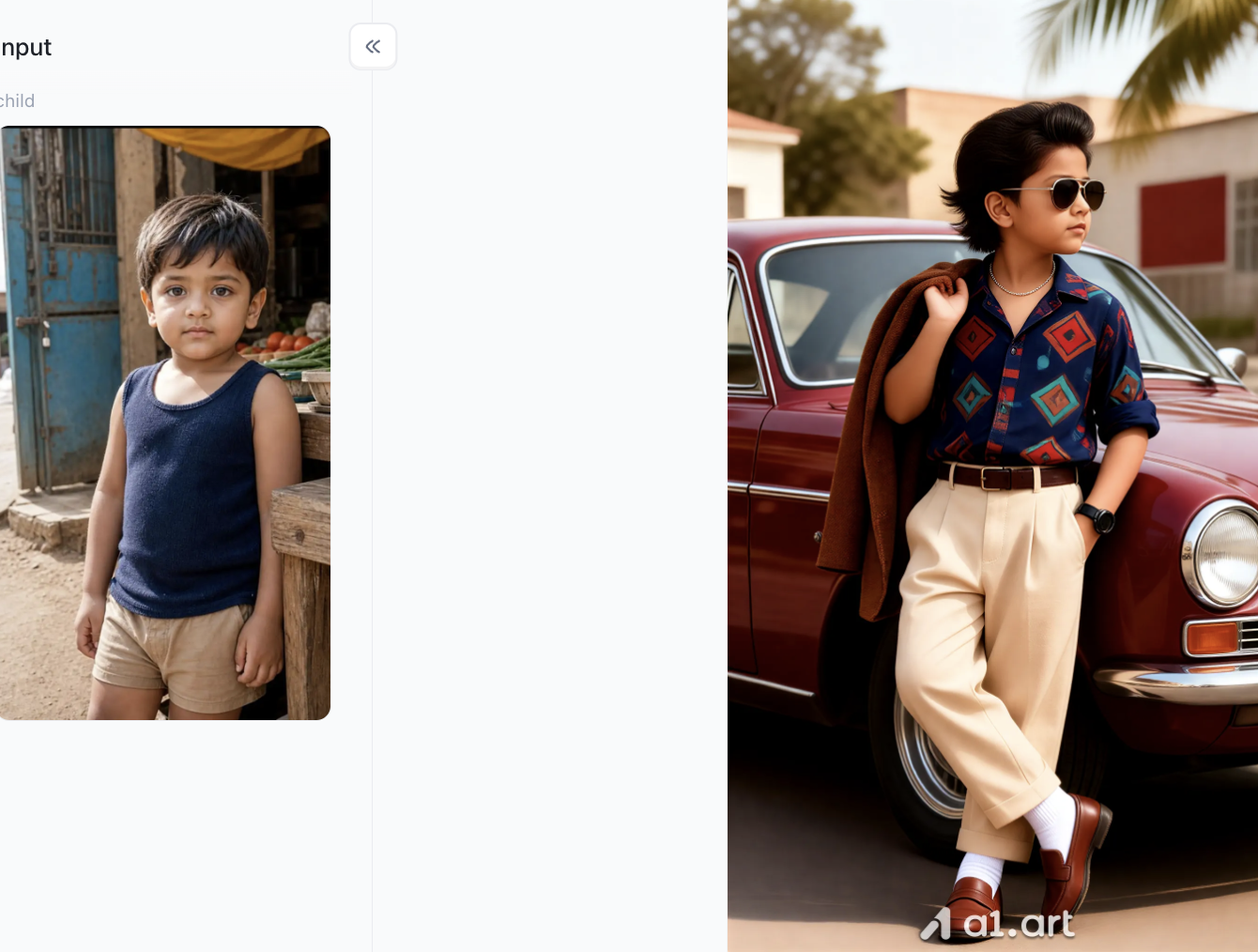
The 80s Car Tycoon
-
80s Luxury Scene Reconstruction: Automatically embeds classic elements like a vintage red luxury car, chrome details, and a palm tree estate background for an instant cinematic vibe.
-
Iconic Retro Styling & Wardrobe: Upgrades the outfit into signature 80s fashion—a geometric pattern shirt, high-waisted trousers, white socks with loafers, and a casual jacket-over-the-shoulder pose.
-
Signature 80s Hair & Accessories: Adds a voluminous 80s blowout hairstyle paired with classic aviator sunglasses and a watch for a trendy, effortless retro look.
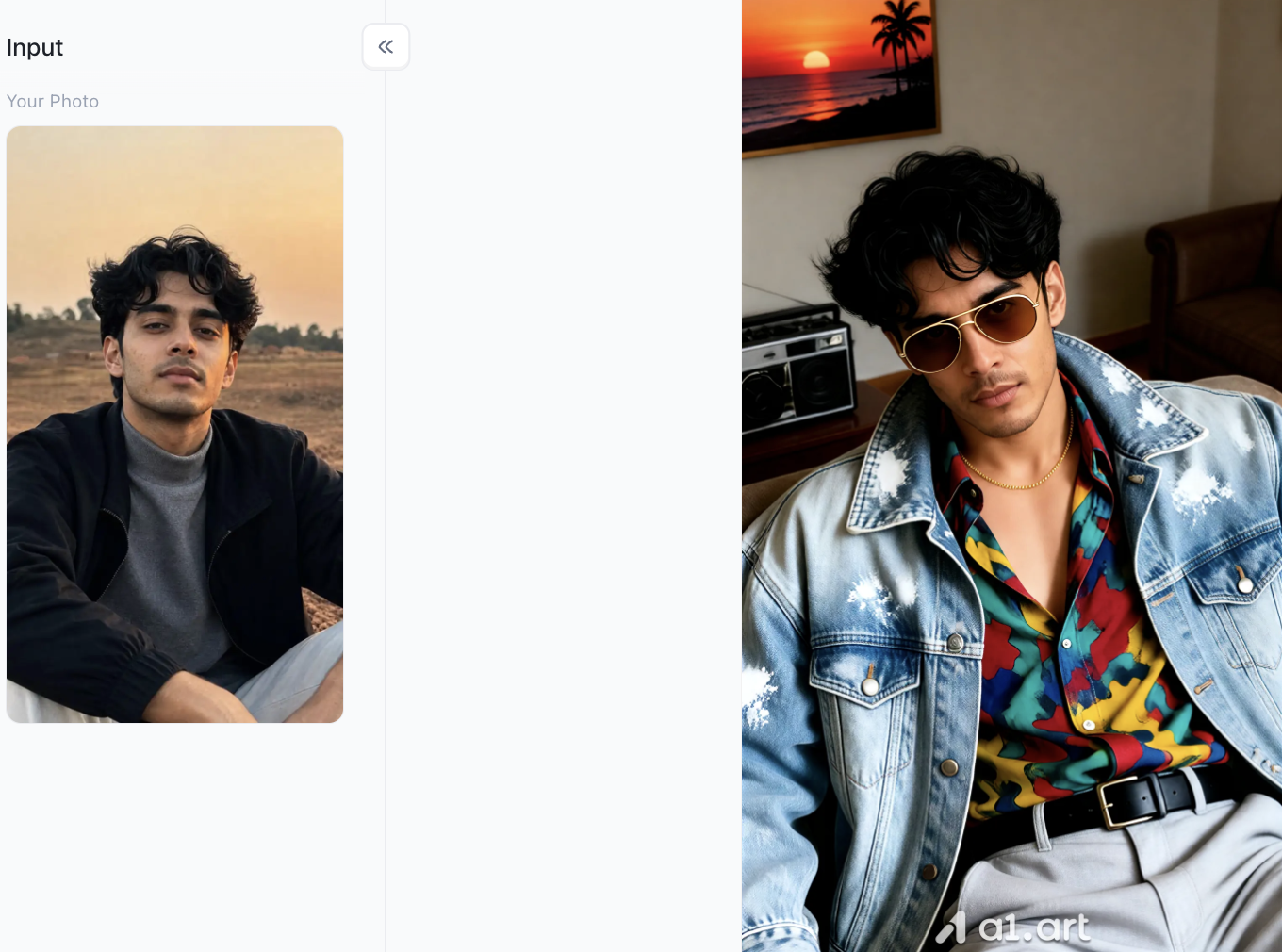
80s Fashion Icons
-
Signature 80s Rocker Wardrobe: Upgrades the outfit with a washed denim jacket, a bold colorful abstract-print shirt, high-waisted trousers with a leather belt, and a gold chain.
-
Classic Retro Accessories: Adds tint-lens aviator sunglasses, a vintage boombox cassette player, and tropical sunset wall art to set the 80s indoor vibe.
-
Textured Retro Hair & Pose: Enhances hair into a fuller, wavy 80s messy mop while transforming the posture into a relaxed, confident indoor lean.
Essential Styling Tips for Authentic 80s Results
To maximize output quality when generating 80s ai photo renders, keep these pro recommendations in mind:
-
Use Neutral Input Photos: Upload original photos where you aren't wearing heavy modern makeup or trendy accessories, allowing the model to apply 80s styling smoothly.
-
Experiment with Hair Prompts: Don't hesitate to specify classic hairstyles in your prompt, such as "mullet," "perm," "feathered bangs," or "side ponytail."
-
Balance Vintage Film Grain: A touch of film grain adds realism, but avoid over-prompting noise parameters to keep face details clear and crisp.
-
Try Multiple Angles: If a front-facing image feels too stiff, test three-quarter angle portraits for a more dynamic 80s glamor shot appearance.
Conclusion
Learning how to do the 80s AI photo trend with your own photo opens up a fun, creative way to engage with retro pop culture and upgrade your digital presence. By understanding the core visual markers of 1980s portraiture, using well-crafted prompts, and leveraging high-performance tools like a1.art, you can transform simple everyday selfies into stunning, high-definition vintage portraits in seconds. Grab your favorite photo, pick a retro style, and bring the golden age of 80s aesthetics back to life today!
FAQs
Can I generate 80s AI photos for free?
Yes! You can use an ai 80s photo generator free tier on platforms like a1.art, which offer daily creation credits to turn personal photos into vintage portraits without up-front subscriptions.
Will the AI alter my facial features completely?
When using high-performance platforms, facial structure, eye shape, and smile characteristics are accurately mapped and retained. The AI modifies hair volume, clothing, and background lighting while preserving your natural identity.
How do I fix distortion in AI-generated hands or clothes?
Distortion typically occurs when input images are low quality or prompts contain contradictory commands. Using clear reference photos and clean platforms like a1.art prevents anatomical glitches and ensures smooth visual rendering.
Read more
- How to Create Teachers Day Photos with AI?
- How to Create Hot Photos? A Step-By-Step Guide For Beginners
- 1980s Photo Prompt: How to Create the Viral ChatGPT 80s Look
- GPT Image 2.5 vs GPT Image 2: The Complete Comparison
- GPT Image 2.5: New Features and Alternatives
- Best Hot AI Video Generator Apps to Create New Videos from Photos
- How to Create the Viral Radha Rani AI Photo Trend in 2026
- 15+ Ganesha AI Video Prompts for Ganesh Chaturthi Reels in 2026
- How to Get AI Photos of Yourself: An Easy Step-by-Step Guide
- 20+ Ganesh Chaturthi AI Prompts for Festive & Devotional Photos in 2026
Written by

a1.art
Published on
Sep 14, 2026
Share article


