


When looking at a slightly faded photo from twenty years ago, have you ever wondered: "What would it look like if my younger self could sit right next to the person I am today?" Content that evokes such nostalgia and contrast resonates deeply with millions of people on social media platforms like TikTok and Instagram. While the creative concept of placing one's "past self" and "present self" in the same frame has been around for a while, manually stitching together images spanning different eras often leads to issues like awkward transitions, mismatched lighting, or unnatural proportions,unless, of course, you are an expert in complex photo-editing software.
Start your art journey with a1.art.
Fortunately, modern solutions now make realizing this nostalgic dream effortless. With popular AI childhood photo generators available today, you can instantly bridge the gap between past and present, blending the two seamlessly. This innovative technology automates the complex compositing process, naturally merging images from different periods to create a flawless visual masterpiece. In this article, we will explore how online AI childhood photo generators can transform your personal photos into viral digital art, and we’ll recommend an excellent platform to breathe new life into those cherished memories. Let’s dive in!
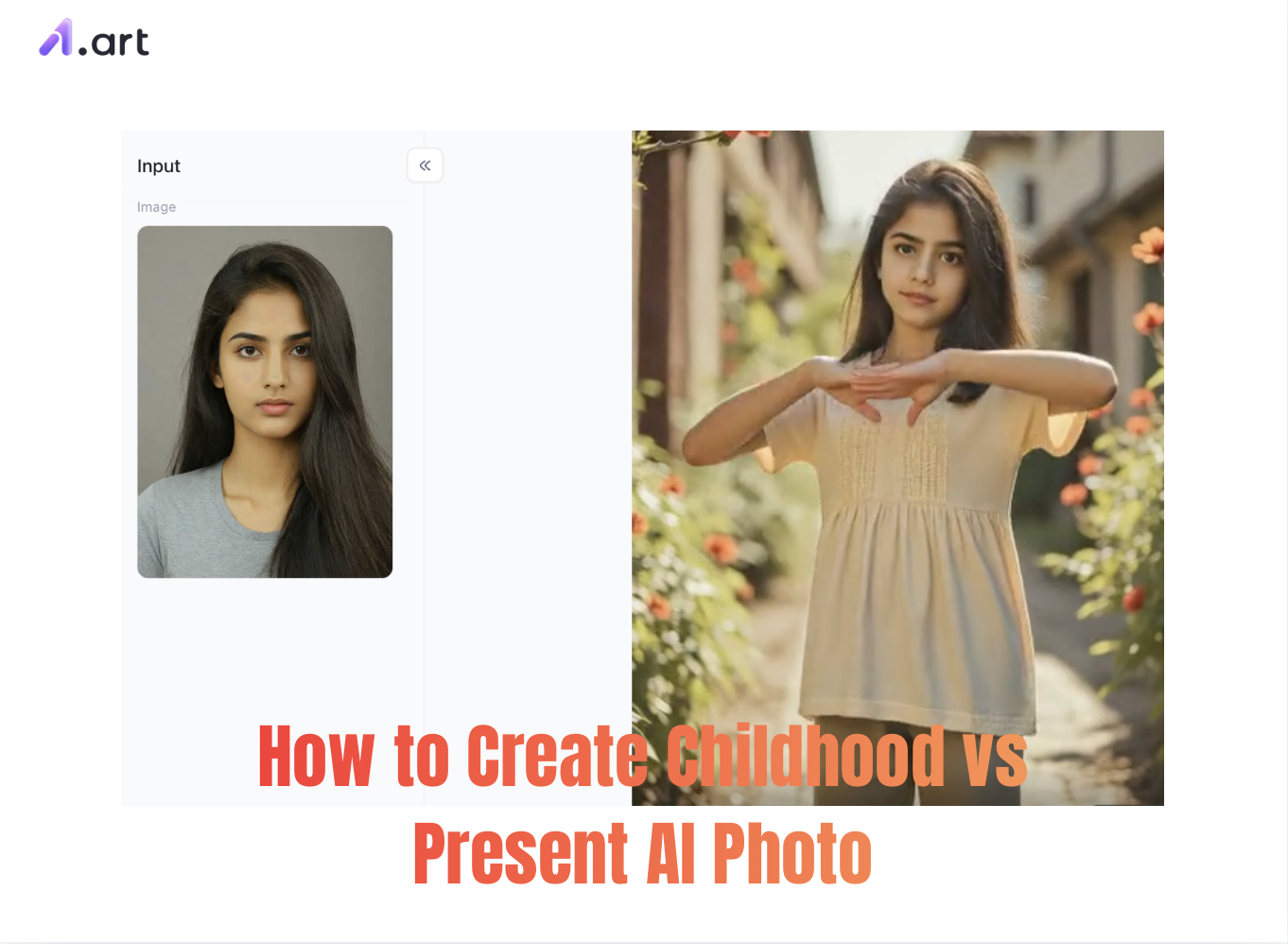
What Exactly Is an AI Childhood Photo Generator?
At its core, an AI childhood photo generator is a highly specialized artificial intelligence tool designed to analyze, map, and replicate distinct facial structures across different biological ages. Unlike standard editing apps that merely slap two images side-by-side, a dedicated ai child photo generator uses sophisticated deep learning algorithms to examine the key mathematical markers of a face,such as eye spacing, bone structure, and nose shape.
Whether you choose a free or paid AI service to generate childhood photos, the core technology driving these systems is a process known as "image-to-image" synthesis. The AI extracts unique facial features from your recent photos and blends them with elements representing childhood memories. The resulting image is remarkably realistic and seamless,effectively placing "two versions of you" within the same space.
Meet a1.art: The Best Online AI Childhood Photo Generator
If you want to create stunning, natural-looking transformation effects, a1.art is the industry-leading platform of choice. It is a one-stop creative hub where anyone can easily achieve complex visual transformations.
What is a1.art?
a1.art is an advanced, browser-based AI image generation platform (offering a free trial). It supports a wide range of effects,such as "childhood photo" transformations,and boasts a vast ecosystem of over 31,000 style filters and templates. The platform excels at generating hyper-realistic images; with just a single click, users can achieve professional-grade results in face-swapping, timeline evolution (like age-progression transformations), and cross-temporal blending.
Double-tap the image to instantly start generating your AI childhood photo⬇️
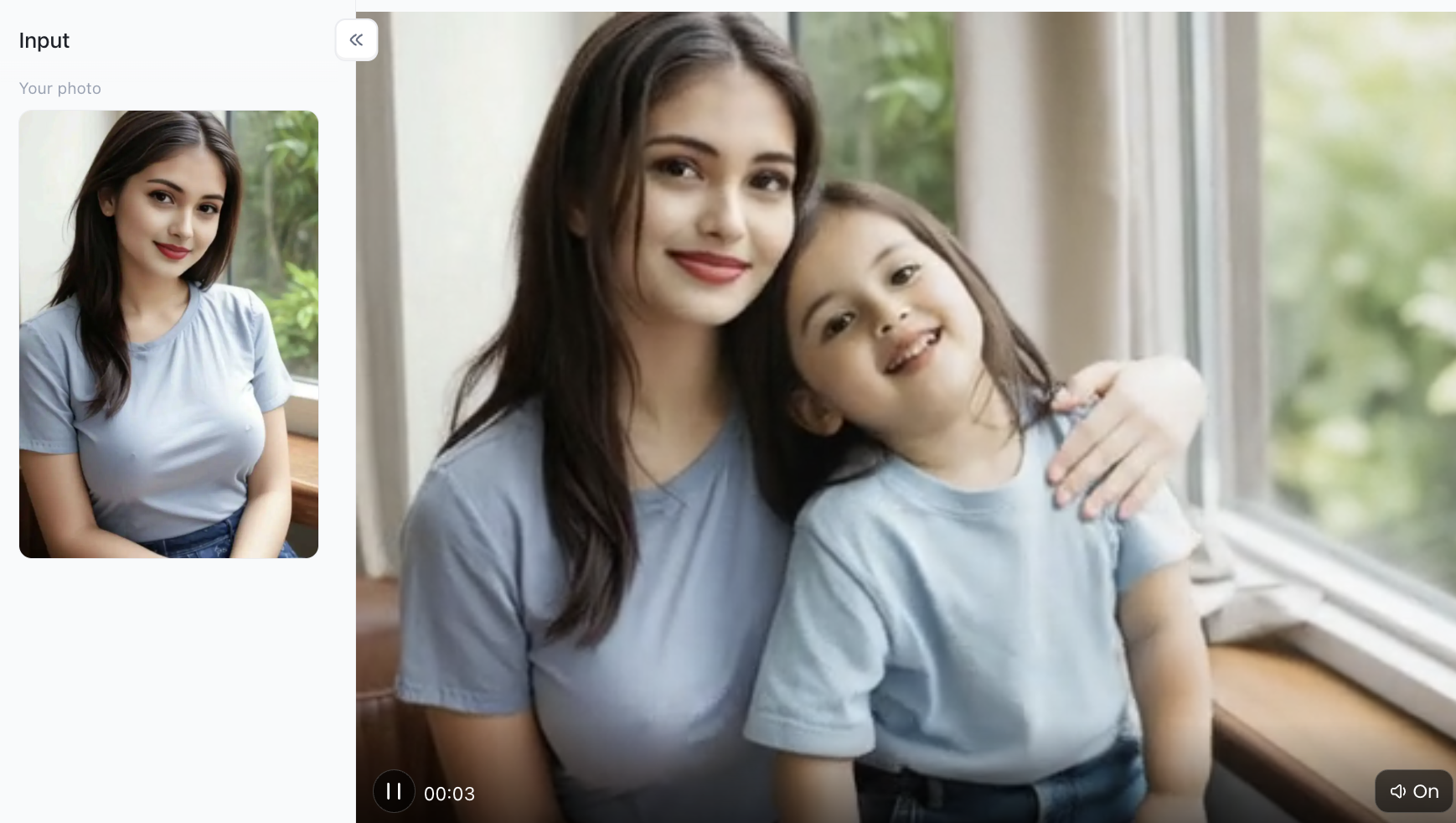
Key Features and Highlights
-
Hyper-realistic Imaging Engine: The platform excels at matching skin textures and micro-expressions, ensuring the generated facial features align perfectly with your actual appearance.
-
Extensive Template and Prompt Library: Offers thousands of preset scenes, including specialized layouts designed for "time-travel" style transformations.
-
High-Speed Processing Engine: Powered by top-tier cloud GPU computing, it transforms your uploaded photos into high-definition artistic images in under 5 seconds.
-
Cross-Device Compatibility: As an optimized web application, it runs smoothly on various mobile browsers and desktop computers without the need to download bulky software. Of course, a dedicated app is also available for download on your mobile phone.
Pricing Model
a1.art offers daily credits to free users who wish to try out the AI childhood photo generation feature, though please note that you must log in to a1.art each day to claim them. For power users and enterprise clients seeking ultra-high-definition quality, the platform offers highly competitive paid subscription plans that are completely ad-free, ensuring a premium user experience. For instance, you can get access for just $4.99 per week.
Step-by-Step: How to Create a Childhood vs Present AI Photo on a1.art
Want to see your younger self standing right beside the person you are today? Follow this simple guide to use a1.art’s powerful AI-driven childhood photo generation ecosystem and meet your past self! Let’s get started with the tutorial!
Step 1: Sign up and log in to a1.art
This is the essential first step; you must be logged into the platform to proceed with the rest of the process. If you are using a computer, simply enter "a1.art" into your browser, visit the site, and register an account using the option in the top-right corner. The process is straightforward. Just follow the on-screen prompts step-by-step, just like signing up for any other app!
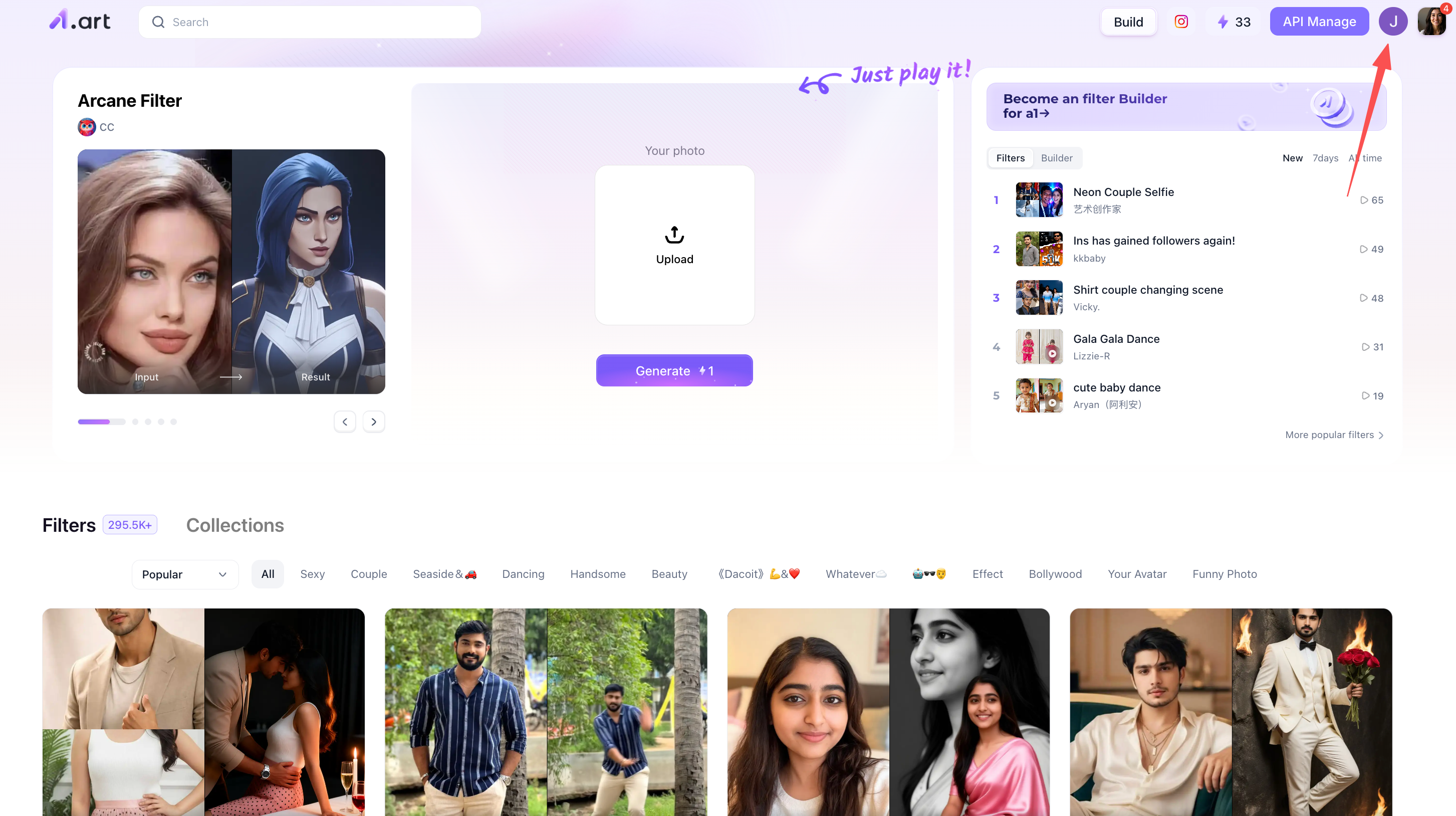
Step 2: Search for filters themed around "childhood photos."
One of a1.art's standout features is its filter library! If you scroll down slightly, you’ll see a wide variety of filters available for creating different types of images or videos.
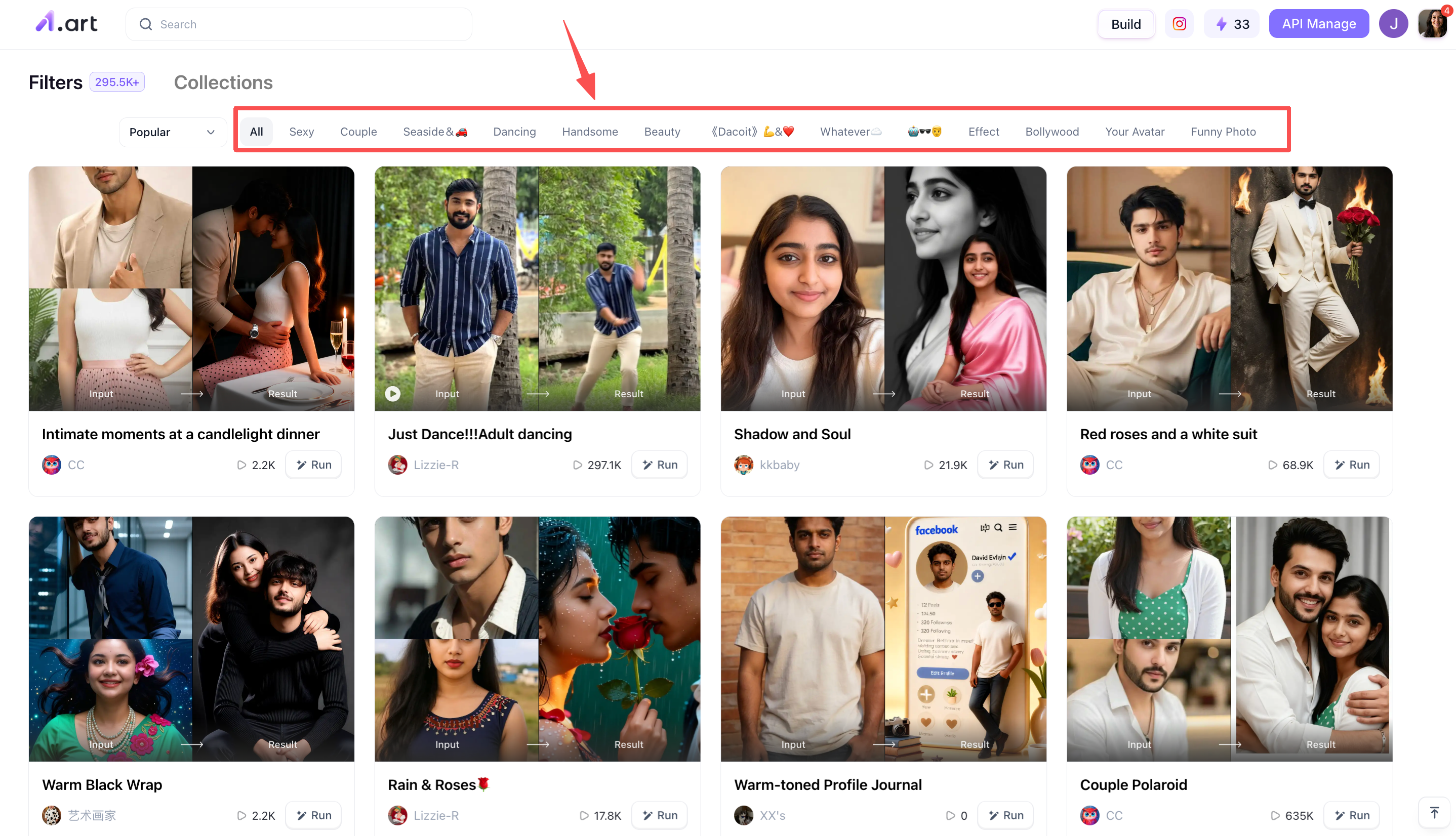
As I mentioned when introducing a1.art, it is perfect for AI beginners; you don't need to understand advanced AI techniques,just follow the steps I’m about to outline. Simply locate the top-left corner of the page and enter a keyword,such as "childhood",and a1.art will display all the filters related to that term. Then, you can simply choose the ones that interest you!
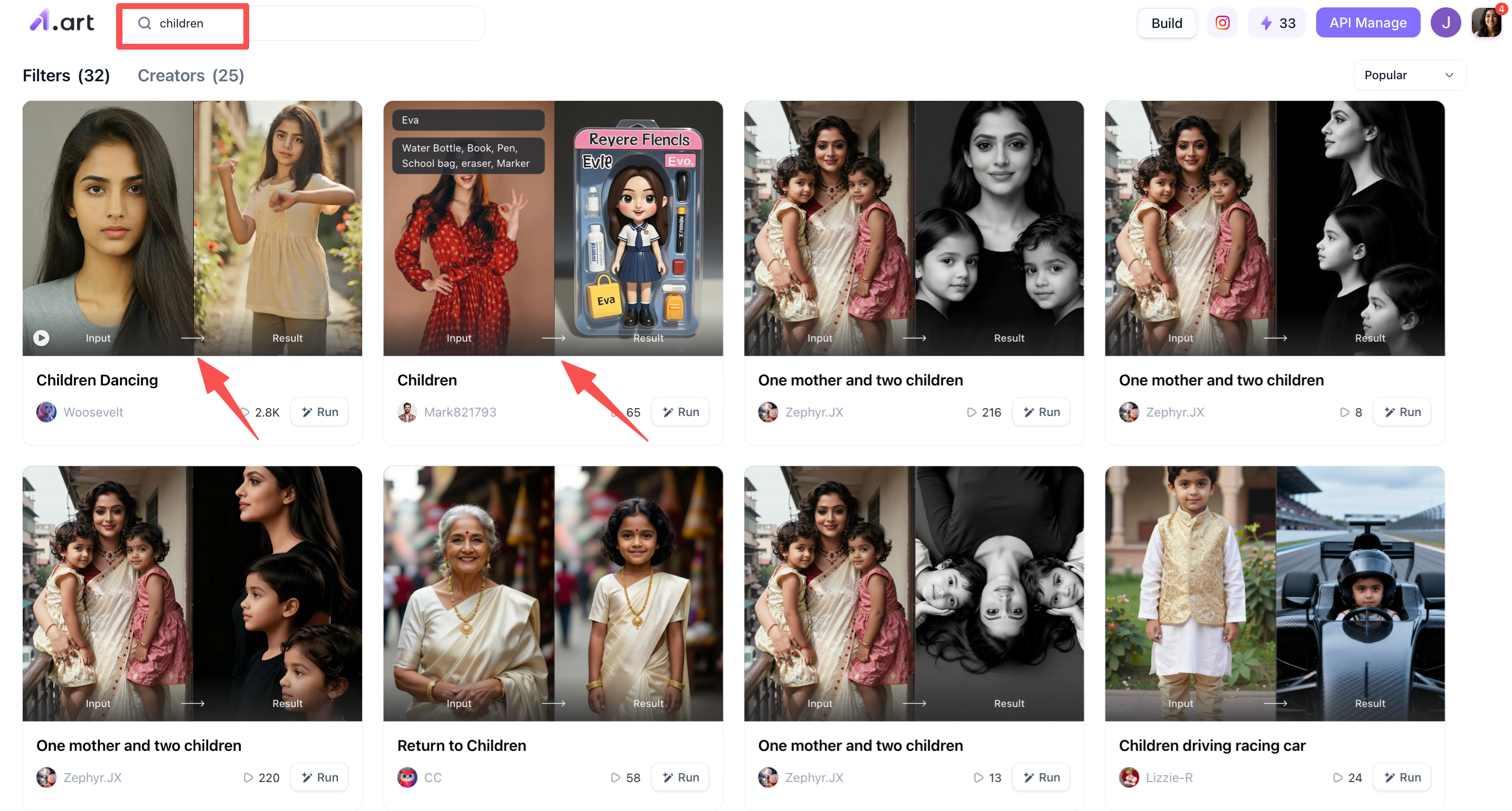
Step 3: Start generating your AI childhood photo
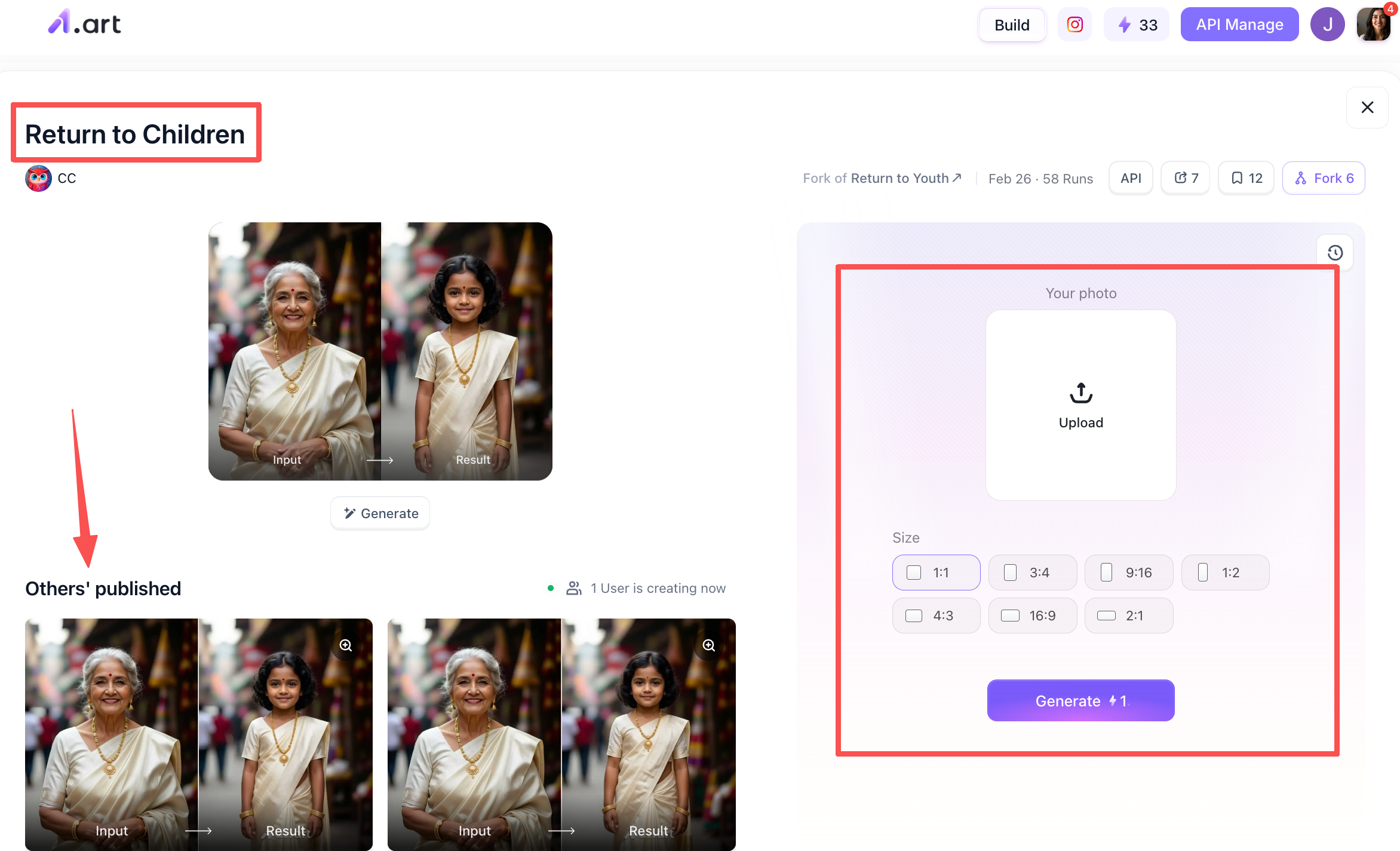
Now that Step 2 is complete, we can begin generating the AI childhood photo! Let’s use the "Return to Children" filter as an example. Once you select this filter, you will see the following screen: the top-left area displays an example of the filter's output, while the bottom-left shows results generated by other users (and if you choose to publish your own results later, they can appear here too). On the right is the control area, where you can upload a clear photo of your face or upper body to generate the AI childhood photo.
Step 4: Process the AI-generated childhood photo
Once generated, you can visually see the difference between the original real-life image and the AI-generated childhood photo.For example, once a1.art has generated an image for you, you have two options: download it yourself or publish it to the a1.art user community, allowing other users to see the work you created.
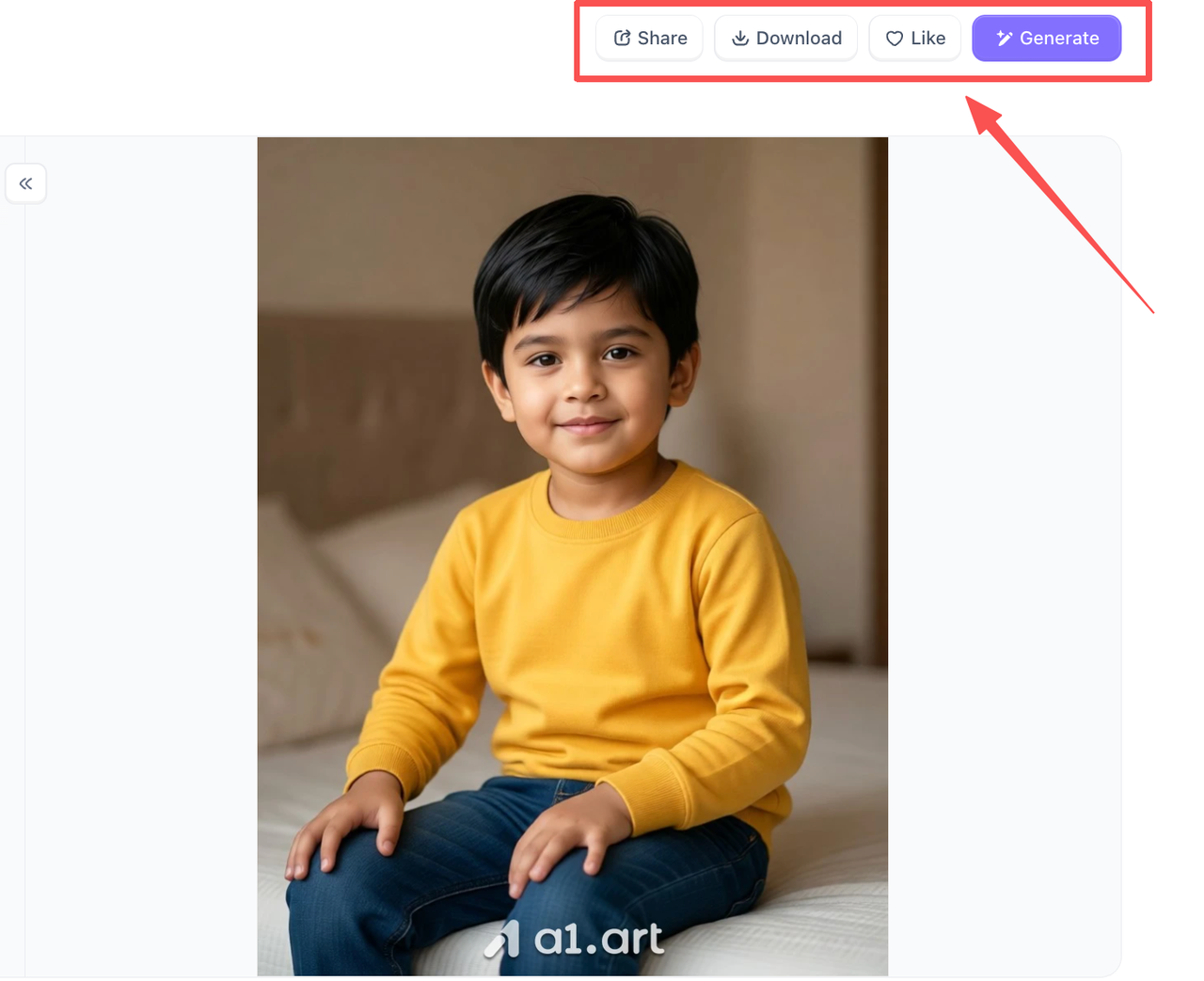
Once you've completed this step, the entire process is finished, it's really that simple. Even complete beginners can pick it up quickly! So don't wait,give it a try right now!
Step 5: How to Create a "Comparison" Effect?
Since it's a comparison (VS), the key is how you handle the two photos, one from your childhood and one from now. Here are two methods:
Method A: Comparison of Two Real-Life Photos (Highly Recommended)
In the test area on the right, upload two photos simultaneously:
-
Left/Top: Your childhood photo.
-
Right/Bottom: Your current photo.
The AI will then uniformly transform both photos into a cool Blackwhiplash comic style, creating a perfect real-life comparison.
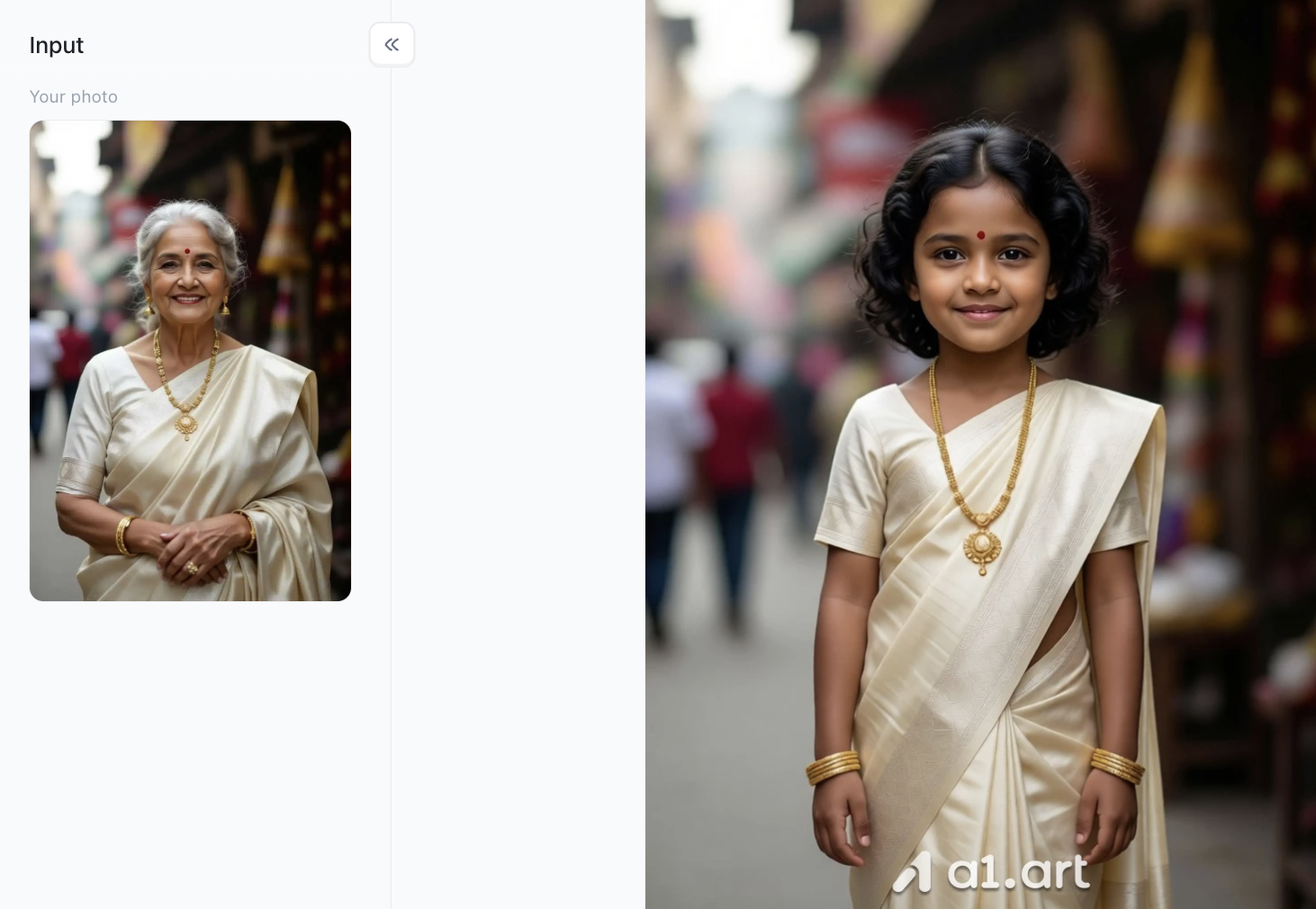
This is a comparison of a user's childhood self and their adult self, generated by another user.
Method B: Use prompts to let AI automatically generate comparisons
If you only have one photo of yourself as a child and want AI to generate a picture of you as an adult, you can write the following in the prompt box:
Split-screen. Left side is a 5-year-old child. Right side is the same person grown up at 25 years old. Blackwhiplash style.
Crafting the Perfect AI Prompt
If you want to go beyond simply using a1.art templates to generate images or videos,and instead aim to create scenes rich in detail and narrative depth,you can achieve this by using the "Advanced Text Box" combined with a tailored prompt designed for AI-generated childhood photos. To achieve stunning results, the key lies in the nuanced depiction of the environment, emotional interactions, and overall lighting setup. Naturally, these prompts work not only with a1.art but also with other AI childhood photo generators.
The following three prompt templates are practical options I discovered through repeated testing; they are universally applicable and can be used directly on other AI childhood photo generators:
-
Emotional Studio Style: "A high-end, minimalist studio setting. On the left, a hyper-realistic depiction of the subject at age five sits happily on a simple wooden stool; on the right, the adult version of the same person stands nearby, gently and affectionately resting a hand on the child's shoulder. Features warm, cinematic studio lighting, natural skin textures, 8K resolution, photorealistic facial proportions, and a rich emotional resonance."
-
Nostalgic 'Mirror in Time' Concept: "An elegant 'window through time' concept featuring a subtle reflective effect. An adult gazes into an antique mirror that emits a soft glow; the reflection reveals the subject at age seven, rendered with exquisite detail and realism. Both figures wear gentle, knowing smiles. Utilizes volumetric lighting and soft, floating dust motes to create a nostalgic atmosphere alongside ultra-high-definition image quality."
-
Side-by-Side Growth Timeline: "A professional double-exposure timeline portrait. The left side displays a hyper-realistic image of the subject as a child with soft, natural facial features, while the right side shows them as an adult. The two images blend seamlessly in the center through a soft transition of light and shadow. Set against a clean, minimalist background with sharp focus, the image achieves magazine-cover visual quality."
Creative Use Cases: Sharing Your Art
Once you’ve created your "childhood photo" using an AI generator, there are countless meaningful ways to share it with the world. This piece of digital art holds extraordinary emotional value,far surpassing the significance of an ordinary social media post.
Sparking a Buzz on Social Media
Short-video platforms love nostalgic content. Import your generated image into TikTok or Instagram Reels, pair it with a trending, slightly sentimental soundtrack, and watch the engagement soar. The striking "then-and-now" contrast is incredibly captivating, ensuring high video completion rates.
Memorable Family Milestones
Are you looking for a unique visual highlight for an upcoming milestone celebration? These AI-generated "then-and-now" photos are perfect for slideshows at 30th, 40th, or 50th birthday parties, graduation celebrations, and family reunion albums. They offer a moving visual testament to personal growth, perseverance, and the beautiful journey of life.
Heartwarming Physical Keepsakes
Platforms like a1.art allow you to export high-resolution, lossless files, meaning your artwork doesn't have to stay confined to a digital screen. You can easily take your downloaded files to a local print shop to create stunning canvas prints, personalized holiday cards, or framed tabletop displays. These make deeply heartfelt and cherished gifts for parents or grandparents.
Conclusion
The ability to create artworks that seamlessly blend childhood with the present day vividly demonstrates the tremendous strides made in AI technology. It has evolved beyond a mere tool for automating tasks into a medium for profound emotional expression. You can easily use high-quality, free online AI tools,such as a1.art,to visualize what you looked like as a child in ways you’ve never seen before. So, what are you waiting for? Get started today! Upload your cherished childhood memories and watch as your personal history is transformed into a stunning, lifelike masterpiece.
FAQs
How to create a childhood photo in Gemini prompt?
-
Go to a platform or app that supports Google Gemini AI image generation.
-
Select the option or tool for Gemini childhood photo prompt.
-
Upload your selfie or enter a text prompt describing your age, gender, style, or look.
-
Let Gemini AI generate your childhood photo in seconds.
Can AI recreate old photos?
Yes, they can! With digital tools and software, most old photos can be restored to their original state or, at least, close to it. However, if the original image is extremely faded, damaged, torn, or of low quality, it can affect the quality and accuracy of the restored photo.
Can ChatGPT edit existing images?
Yes, ChatGPT can edit existing images. You can upload any photo and use text prompts or the built-in visual editor to change specific parts, alter backgrounds, remove objects, or even generate new images based on your photo's style.
How to create a younger version of yourself?
If you want to use AI image generators (like Nano Banana 2) to recreate a younger version of yourself, the trick is to be specific about the era, the lighting, and the "vibe" of old photography. "A realistic school individual portrait of a [Gender] teenager in the mid-1990s. Soft, slightly blurry studio lighting.
How can I generate AI images of myself for free?
To make AI photos of yourself for free, the fastest method is using the built-in AI assistant on Instagram or Meta. Simply open your messages, chat with Meta AI, and type a prompt like "Imagine me as an astronaut." Upload your selfies when prompted, and it will generate AI photos of you.
Read more
- Dreemy AI Review 2026: Is It Safe, Free and Worth It?
- Best MyAIArt Alternatives in 2026
- MyAIArt Review: Features, Pricing & Alternatives for Better AI Photos
- How to Create 3D Pixar Couple AI Images Step by Step?
- How to Create a Hot AI Video from an Image
- Best Indian Nude Websites in 2026: Top Sites to Explore
- How to Create an AI French Kiss Video for Free
- Spider Man AI Trend: How to Create Viral Spider Man Photos in 2026
- Best Free AI Kissing Video Generators Without Login in 2026
- How to Make Adorable Chibi Cartoon AI Photos Easily
Written by

a1.art
Published on
Aug 28, 2026
Share article


