


Many people spend a lot of time meticulously crafting descriptions, adjusting style tags, and repeatedly refining various parameters, only to find that the resulting images are not only blurry and distorted, but also have a monotonous and dull overall look. This is not an isolated case. Every day, numerous visual creators, digital designers, and AI painting enthusiasts encounter this problem when creating realistic photographs or exquisite fantasy scenes. The key to effectively using SeaArt AI prompts is to thoroughly understand the operating logic of the text-to-image model, figuring out how the model recognizes keywords, lighting parameters, and camera angles. If the logical structure of the prompts is not precise enough, your creative ideas will be misinterpreted by the algorithm, ultimately wasting platform points and significantly dampening creative enthusiasm.
In fact, turning scattered creative ideas into stunning visual works doesn't require professional computer skills. Simply apply a mature prompt framework and validated keyword combinations, and the quality of output images of various styles,whether it's cinematic hyper-realistic portraits or atmospheric cyberpunk urban scenes,can be instantly improved. This comprehensive guide features 30 high-quality SeaArt AI prompts to optimize your AI-generated images. It includes reusable templates, detailed style breakdowns, and professional prompt optimization techniques. Furthermore, we'll delve into advanced image compositing tools, addressing the core question of SeaArt AI's commercial viability, and comparing its rendering speed and overall image output performance with mainstream platforms like a1.art.
Start your art journey with a1.art.
What is SeaArt AI? An Overview of the Platform
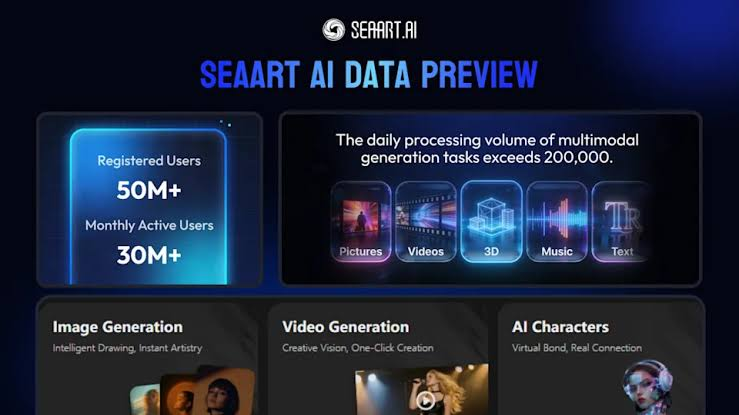
SeaArt AI is a cloud-based generative AI art platform built on Stable Diffusion technology, designed to make digital visual creation accessible through a Web browser and mobile app interface. It serves digital artists, anime enthusiasts, and content creators by offering a comprehensive suite of image synthesis, style transfer, and prompt assistance tools.
Key Features
-
Multi-Model Synthesis Engine: Supports text-to-image and image-to-image generation powered by hundreds of community-trained LoRAs and Stable Diffusion checkpoint models.
-
Built-in ControlNet & Editing Studio: Features precise spatial controls (pose estimation, depth maps, line art extraction) along with integrated inpainting, background removal, and face-restoration tools.
-
Community Prompt Library: Includes a search-and-copy community feed where users can browse community artwork and replicate prompt settings with a single click.
Pros & Cons
-
Advantages (Pros):
-
Rich Anime & Illustration Assets: Offers an extensive collection of specialized artistic styles, character checkpoints, and custom LoRAs.
-
Flexible Free Experience: Provides daily task rewards and renewable credits for creators testing a sea art ai prompt free workflow.
-
Granular Parameter Control: Allows advanced users to manually tweak sampling steps, CFG scales, seed numbers, and custom negative prompts.
-
-
Limitations (Cons):
-
Slower Rendering Speeds: High server traffic often leads to generation queue delays (frequently averaging 12–15 seconds per image).
-
Persistent Anatomical Artifacts: Standard base renders regularly produce mangled hands, warped limbs, and facial asymmetry without extensive negative prompt tuning.
-
Steep Learning Curve: The complex multi-parameter interface can be daunting for beginners seeking instant, single-click outputs.
-
Understanding the Architecture of an Effective AI Prompt
Before jumping straight into our hand-picked collection of 30 prompts, it’s important to break down why some word combinations produce incredibly sharp, high-quality visuals, while others end up looking messy and flawed. Today’s AI neural networks work through detailed semantic analysis of every word you input. To create clean, vivid, and layered images every single time, a solid, reliable SeaArt AI prompt building process follows a clear five-part structure:
Core Subject & Action
Lay out your main subject and what it’s doing,this is the central focus of your image, whether it’s a mystical wandering scholar, a futuristic sci-fi vehicle, or a quiet mountain valley landscape.
Environment & Lighting
Establish the overall mood and atmosphere of your scene, including light conditions and surroundings. Examples include soft volumetric light rays, warm golden-hour sunset lighting, and dim neon-lit street alleys.
Artistic Style & Rendering Engine
Define the visual tone, art style, and image quality standards for your work. This covers styles like Unreal Engine 5 rendering, ultra-detailed octane renders, traditional oil painting textures, and crisp 8K high-resolution visuals.
Camera Framing & Optics
Control how your scene is framed and viewed by adjusting camera settings and perspective. Common options are 85mm portrait lens shots, macro close-up details, wide-angle cinematic footage, and f/1.4 shallow depth of field effects.
Negative Directives
Exclude all unwanted flaws and glitches from your generated images, such as distorted duplicated limbs, flat low-contrast shadows, extra deformed fingers, and other common AI rendering errors.
Top 30 SeaArt AI Prompts Categorized by Style
Below are 30 meticulously engineered prompts designed to produce top-tier visuals. You can copy, modify, and test these directly into your preferred text-to-image engine or explore a sea art ai prompt free community library.
Category 1: Photorealistic Portraits & Cinematic Characters
-
Elderly Artisan in Sunlit Workshop
-
Prompt:
A weathered master clockmaker focused on repairing an intricate golden pocket watch, soft morning light streaming through dusty stained-glass windows, micro details on wrinkled skin and leather apron, shot on 85mm lens, f/1.8 aperture, photorealistic, cinematic lighting, 8k --ar 16:9 -
Focuses on realistic skin textures, natural light diffusion, and rich atmospheric detail.
-
-
Cyberpunk Tech-Specialist
-
Prompt:
A futuristic female hacker wearing high-tech holographic visor, subtle glowing blue fiber-optic accents on jacket, rainy night in Neo-Tokyo background, vibrant magenta and cyan neon reflections, close-up shot, depth of field, octanely detailed render, ultra-realistic --ar 4:3 -
Demonstrates high-contrast lighting balance without blowing out highlights.
-
-
High-Fashion Editorial Model
-
Prompt:
Avant-garde fashion portrait, female model wearing sculpted iridescent glass gown, studio light with softbox fill, neutral beige background, sharp eye detail, realistic porcelain skin texture, Vogue magazine cover style, high fashion photography --ar 3:4 -
Ideal for evaluating material transparency and realistic studio lighting response.
-
-
Desert Nomad Wanderer
-
Prompt:
Cinematic portrait of a desert traveler wrapped in windblown indigo robes, golden sunset light illuminating airborne sand dust, intense atmospheric depth, shot on Hasselblad medium format, ultra-detailed facial characteristics, 4k photorealism --ar 16:9 -
Great for testing environmental particle integration and warm color grading.
-
-
Baroque Noble Portrait
-
Prompt:
Portrait of an 18th-century noblewoman in embroidered velvet dress with lace collar, Rembrandt lighting technique, rich dark oil painting aesthetic, subtle golden highlights, masterpiece quality, museum exhibition fine art --ar 4:5 -
Recreates classical painterly techniques with deep shadows and soft transitions.
-
Category 2: Anime, Fantasy & Digital Illustration
-
Ethereal Celestial Sorceress
-
Prompt:
Anime art style, a celestial mage channeling glowing orbital runes, floating silver hair, ornate star-patterned robes, vibrant cosmic background with nebula and glittering particles, Makoto Shinkai aesthetic, vivid colors, crisp line art, trending on AniList --ar 16:9 -
Optimized for high-vibrancy color palettes and crisp cel-shaded anime rendering.
-
-
Forest Guardian Spirit
-
Prompt:
A mystical deer spirit composed of luminous flora and ancient oak bark, standing in a foggy enchanted forest at twilight, glowing blue mushrooms on mossy ground, fantasy concept art, Studio Ghibli inspired ambiance, soft volumetric glow --ar 4:3 -
Combines organic material blending with magical bioluminescent lighting effects.
-
-
Steampunk Mech Pilot
-
Prompt:
Dynamic anime illustration of a young pilot leaning against a massive brass steam robot, detailed brass gears, pressure gauges, escaping steam vents, warm sepia and bronze color tones, intricate line detail, key visual art --ar 16:9 -
Tests mechanical complexity and retro-futuristic texture synthesis.
-
-
Cybernetic Samurai Duelist
-
Prompt:
A futuristic samurai with glowing katana blade standing on a rain-slicked roof, cherry blossom petals drifting past glowing holographic billboards, sleek black armor with gold trim, highly detailed digital painting --ar 16:9 -
Leverages popular community style directives often shared across sea art ai prompt reddit threads.
-
-
Undersea Mermaid Citadel
-
Prompt:
An underwater fantasy kingdom built inside giant pearl shells, glowing jellyfish floating around crystal towers, vibrant coral reefs, sunbeams piercing turquoise ocean water, intricate digital illustration, 8k resolution --ar 16:9 -
Demonstrates underwater light refraction and deep spatial layer separation.
-
Category 3: Epic Landscapes, Environments & Architecture
-
Solitary Alpine Citadel
-
Prompt:
A gothic stone castle perched atop a jagged mountain peak during a snowy storm, dramatic thunderstorm lightning breaking through dark clouds, realistic rock textures, wide-angle cinematic shot, Unreal Engine 5 render --ar 21:9 -
Creates high dramatic impact using wide aspect ratios and volumetric weather.
-
-
Solarpunk Floating Metropolis
-
Prompt:
A utopian floating city integrated with lush vertical gardens, sleek white architectural curves, solar glass towers, sky bridges with flying electric vehicles, bright blue sky with fluffy cumulus clouds, photorealistic architectural render --ar 16:9 -
Tests complex urban geometry, reflections, and bright daylight environment balance.
-
-
Bioluminescent Alien Rainforest
-
Prompt:
Alien jungle landscape at night, massive towering fungal trees emitting purple and emerald glow, crystal clear river reflecting fluorescent flora, exotic atmosphere, sci-fi concept art, octanely detailed, masterpiece --ar 16:9 -
Ideal for testing multi-colored emissive materials in dark scene compositions.
-
-
Ancient Desert Temple Ruins
-
Prompt:
Massive sandstone monoliths carved with mysterious glowing hieroglyphs, half-buried in golden desert dunes, dramatic low-angle sunrise lighting, long shadows, crisp atmospheric haze, National Geographic style photography --ar 16:9 -
Focuses on natural surface degradation and dynamic low-angle lighting depth.
-
-
Cozy Autumn Cottage Interior
-
Prompt:
Warm interior of a wooden cabin, crackling fireplace casting orange light on rustic furniture, large window overlooking falling red autumn leaves, steaming cup of coffee on table, soft indoor atmosphere, photorealistic architectural photography --ar 4:3 -
Balances multiple light sources (fireplace ambient vs outdoor window daylight).
-
Category 4: Sci-Fi, Cyberpunk & Futuristic Concepts
-
Deep Space Exploration Vessel
-
Prompt:
A massive interstellar starship passing near the rings of a purple gas giant planet, intricate hull details, thruster glow, distant galaxies in dark space, scientific accuracy, hard sci-fi concept art, 8k --ar 16:9 -
Renders high-tech industrial surfaces against planetary scale backgrounds.
-
-
AI Android Assembly Line
-
Prompt:
Futuristic cleanroom laboratory with robotic arms assembling a sleek human-like android, white minimalist aesthetic, translucent glass panels, overhead LED strip lighting, hyper-detailed render, sci-fi cinema style --ar 16:9 -
Tests subtle reflections on curved metallic and plastic surfaces.
-
-
Post-Apocalyptic Overgrown Highway
-
Prompt:
An abandoned multi-lane highway overgrown with dense vines and wildflowers, rusted vintage cars, towering moss-covered skyscrapers in distance, soft overcast daylight, eerie peaceful atmosphere, The Last of Us concept style --ar 16:9 -
Combines organic plant growth textures with decaying man-made structures.
-
-
Quantum Supercomputer Core
-
Prompt:
An immense glowing quantum computer core suspended in a dark server room, swirling liquid nitrogen vapor, golden cooling coils, optical fiber trails, cinematic lighting, ultra-modern tech concept --ar 16:9 -
Focuses on atmospheric smoke effects and intricate industrial hardware elements.
-
-
Orbital Space Station Port
-
Prompt:
View from inside a glass observation deck of a space station overlooking Earth's curvature, glowing city lights visible on Earth at night, sleek interior seating, hyper-realistic architectural visualization --ar 16:9 -
Great for demonstrating glass refraction, interior lighting, and planetary scale.
-
Category 5: Commercial, Product Design & 3D Renders
-
Minimalist Perfume Bottle Mockup
-
Prompt:
Luxury glass perfume bottle with wooden cap, resting on a wet dark basalt stone, gentle water ripples surrounding, soft diffused studio backlight, realistic droplets, commercial product photography, 8k --ar 1:1 -
Designed for commercial branding visuals with realistic fluid dynamics.
-
-
Ergonomic Futuristic Running Shoe
-
Prompt:
High-tech athletic sneaker concept, 3D knit mesh upper, translucent cushion sole, floating product render against dark grey background, studio lighting highlights on texture, KeyShot render, ultra-detailed --ar 4:3 -
High focus on material weaving and technical product visualization.
-
-
Modern Ceramic Teapot Set
-
Prompt:
Handcrafted matte ceramic teapot and matching cups on a natural oak table, bamboo tea tray, subtle steam rising from tea, minimalist Japanese studio aesthetic, warm natural daylight, commercial interior photography --ar 4:3 -
Simulates soft tactile textures and peaceful lifestyle marketing visuals.
-
-
Electric Concept Hypercar
-
Prompt:
Sleek matte-black electric supercar in a modern concrete gallery room, sharp LED headlight accent lines, mirror reflections on polished floor, dramatic spotlighting, automotive architectural visualization --ar 16:9 -
Perfect for testing vehicle body panel curves and crisp artificial highlights.
-
-
Abstract 3D Geometric Sculpture
-
Prompt:
Abstract fluid 3D sculpture made of liquid gold and white ceramic intertwining, floating in a clean pastel studio, soft ambient shadows, Octane Render, clay material render style, 8k wallpaper --ar 1:1 -
Creates clean, high-resolution aesthetic assets for graphic design backdrops.
-
Category 6: Surreal, Macro & Abstract Art
-
Macro Dewdrop on Peacock Feather
-
Prompt:
Extreme macro photograph of a crystal clear water droplet sitting on vibrant iridescent peacock feather barbules, magnified reflection inside droplet, high sharpness, professional macro lens 100mm, f/2.8 --ar 1:1 -
Pushes the boundaries of micro-texture resolution and spherical refraction.
-
-
Cosmic Hourglass of Time
-
Prompt:
Surreal artwork of a giant glass hourglass floating in deep space, glowing galaxy sand falling from top to bottom chamber, golden astrological rings encircling, dreamlike visual fantasy, photorealistic lighting --ar 3:4 -
Blends glass transparency with surreal metaphorical storytelling elements.
-
-
Origami Paper Dragon in Flight
-
Prompt:
Intricate red and gold origami paper dragon flying through clouds of colorful ink smoke, sharp paper folds and texture, dramatic side lighting, high contrast art piece, 8k --ar 16:9 -
Tests sharp geometric paper edge definition combined with fluid smoke channels.
-
-
Crystal Floral Garden
-
Prompt:
A garden filled with translucent quartz and amethyst flowers growing out of dark obsidian soil, soft violet ambient light, shimmering light refractions, hyper-detailed fantasy render --ar 16:9 -
Focuses on crystalline light dispersion and mineral texture fidelity.
-
-
Neon Liquid Splashing Portrait
-
Prompt:
Abstract facial silhouette formed by high-speed frozen splash of glowing neon paint, high shutter speed photography, black background, vibrant contrast, micro fluid droplets, 8k resolution --ar 1:1 -
Tests high-speed movement capture and liquid splash physics synthesis.
-
Users who wish to store or organize these prompts locally often search for sea art ai prompt download package. However, copying these structured formulas directly into your generator yields instant results without downloading third-party files.
Beyond Hints: Overcoming AI Generation Bottlenecks
Learning to use SeaArt's 30 top AI hint templates will undoubtedly improve image quality, but the platform itself still has some inherent limitations. Even with perfectly crafted hints, SeaArt users often face long wait times, frequent rendering defects (such as distorted hands and blurred facial details), and overly complex parameter settings, all of which hinder the creative process.
To overcome these common drawbacks, many professional digital artists are turning to a1.art. a1.art is a modern, full-featured AI creative platform built for rapid image generation, style transfer, and dynamic video creation.
What is a1.art?
a1.art is an online AI creative toolset designed to streamline the text-to-image and image-to-image creation workflow for digital marketers, concept designers, and social media content creators. Traditional AI tools require users to manually adjust parameters, while a1.art simplifies the entire process by combining rapid neural rendering with one-click style presets.
Key Advantages
-
Anatomy and Text Clarity: Its optimized, fine-tuned model significantly corrects common AI errors, such as finger deformities, facial distortions, and unrecognizable superimposed text.
-
No-Code Workflow: A clean and user-friendly interface with ready-made visual filters. Achieve professional-grade work without spending time tweaking complex settings.
So, how does a1.art compare to SeaArt in actual use? Below is a side-by-side comparison of the two platforms to help you choose the one best suited to your personal creative workflow.
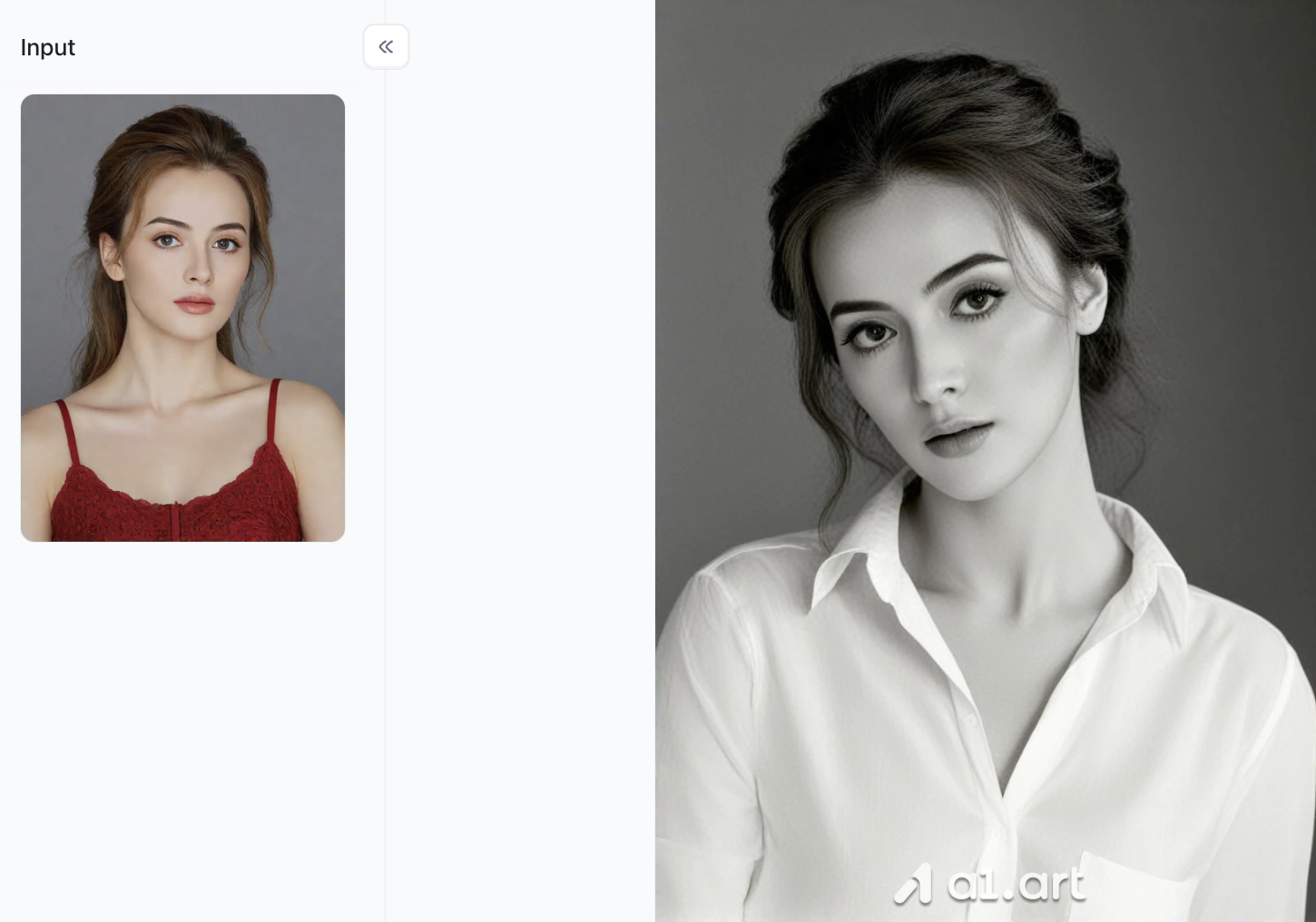
Here are some filters you absolutely shouldn't miss on a1.art
Honestly, the filter library is a1.art's biggest highlight. See the image below; there are already over 300,000 filters on the platform. That's a massive number.
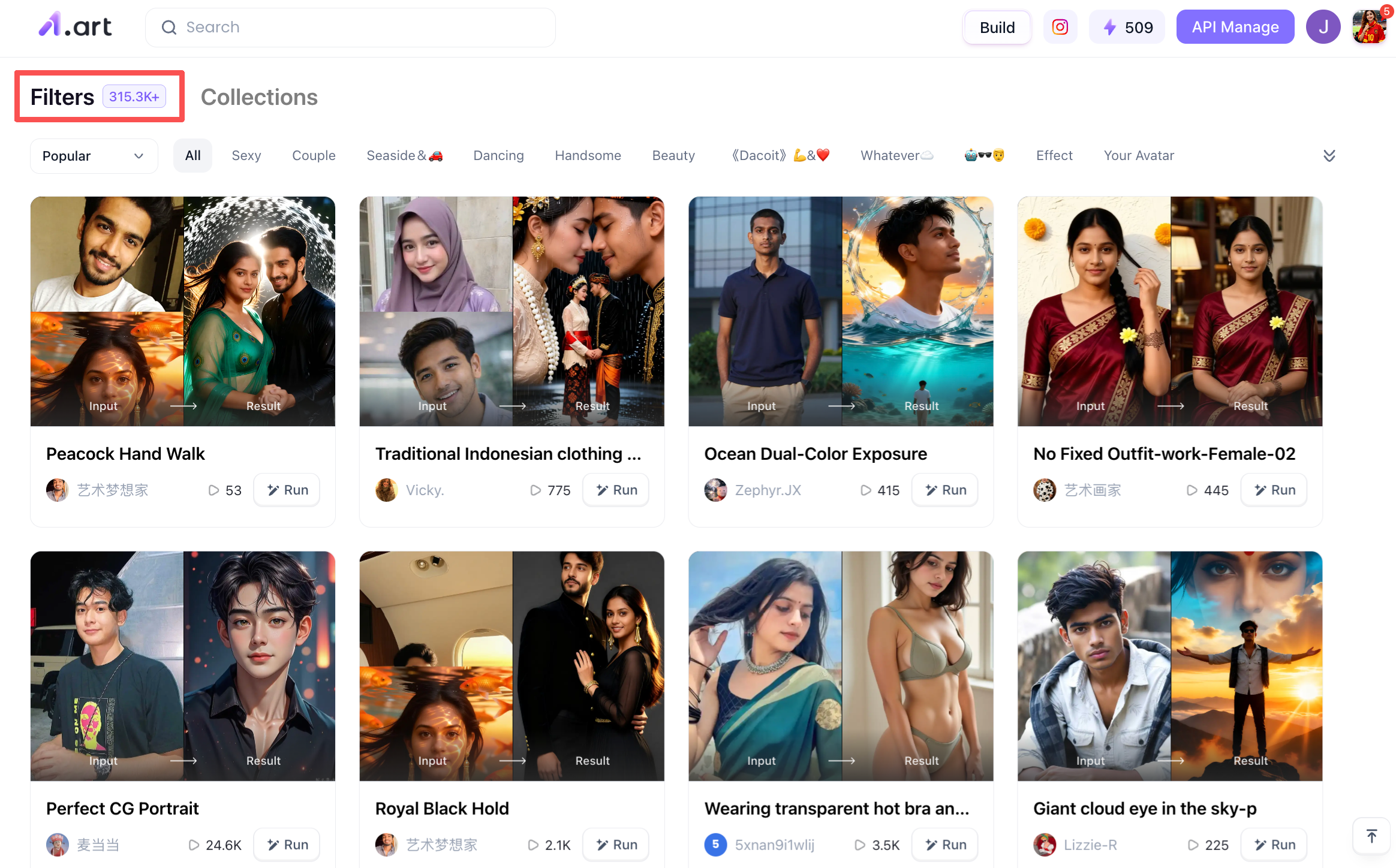
Here are some very popular filters
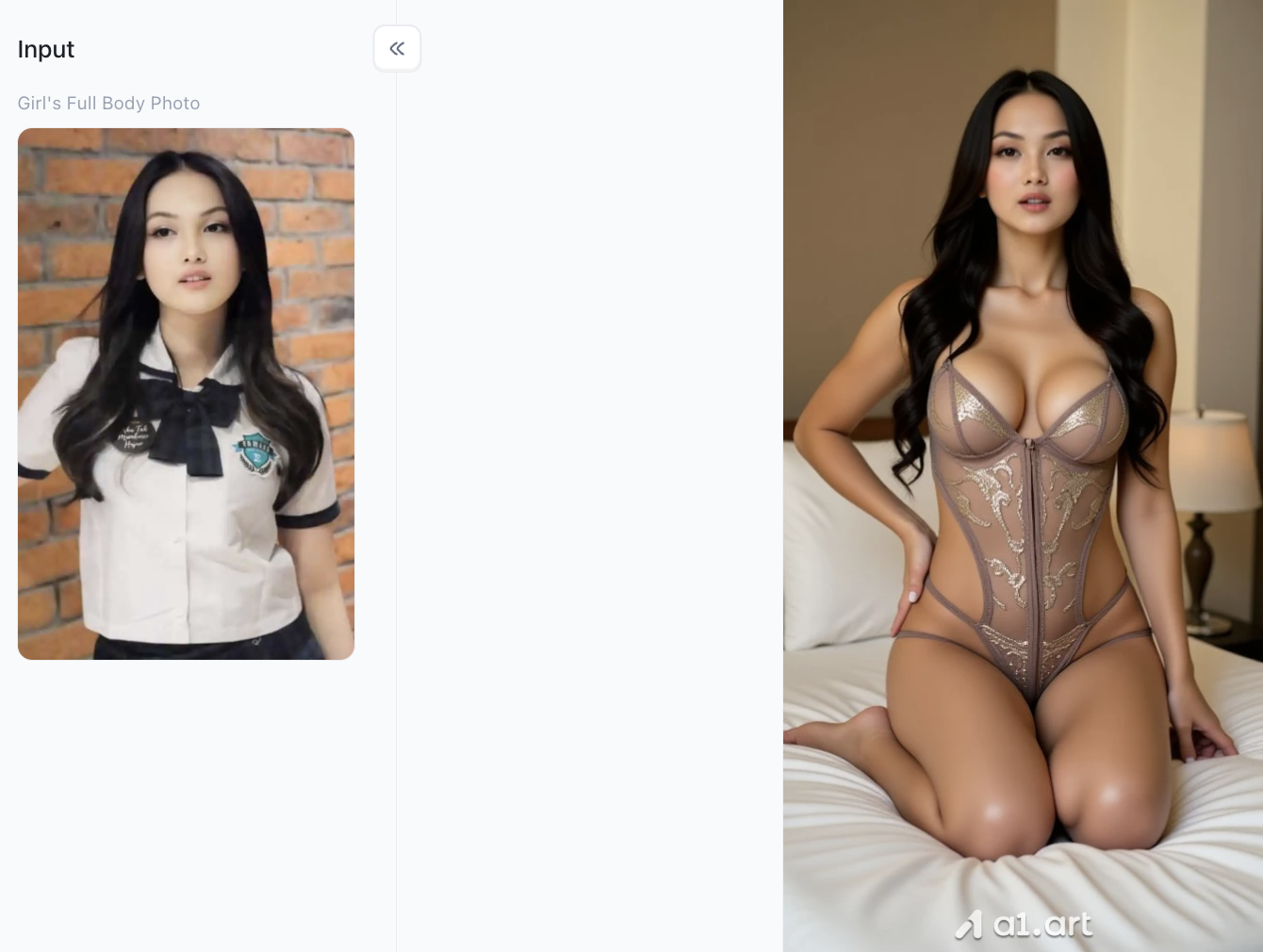
-
Tracing Effect: Fingers are bent in a tracing motion, showcasing the dynamic tendency of the palms gently stroking upwards or downwards along the lines of the body.
-
Twisting and Rhythmic Posture: Accompanying the hand movements, the body exhibits a slight sideways turn and swaying rhythm, highlighting the feminine curves.
-
Arm Angle Bending: The elbows are naturally bent to the sides, creating a more expressive and visually appealing hand gesture.
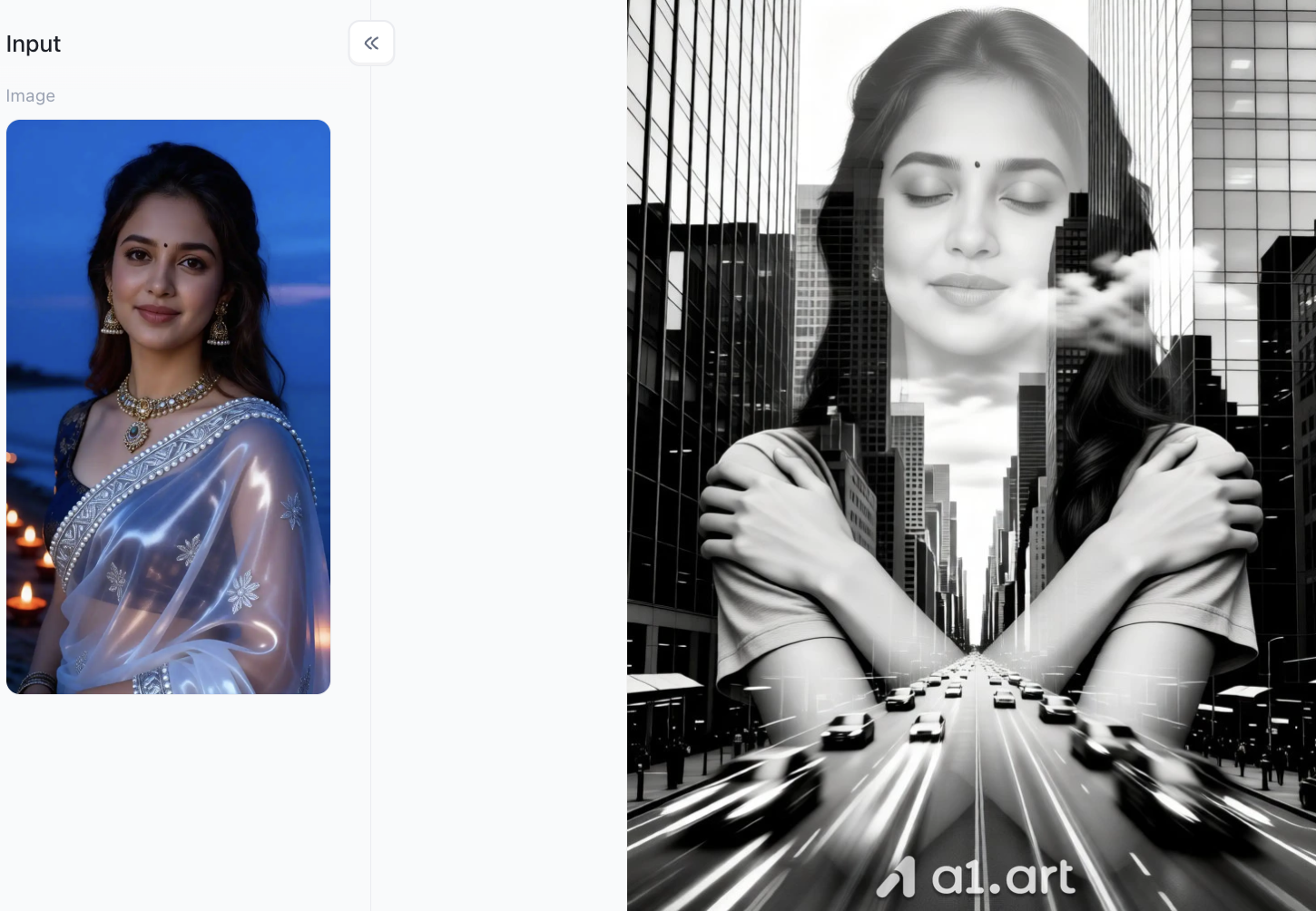
-
Black & White Double Exposure: Dessaturates the original color portrait, converting it to black and white, and overlaps it with the perspective of modern city skyscrapers and busy streets, creating a beautiful and poetic visual atmosphere.
-
Self-Embrace Pose: The original image's half-body pose with eyes open and looking directly at the camera is reshaped into a contemplative/self-embracing pose with eyes slightly closed and arms crossed over the shoulders.
-
Facial Consistency: Precisely preserves the original image's facial contours, hairstyle, makeup, and forehead markings (Bindi), resulting in extremely high recognizability.
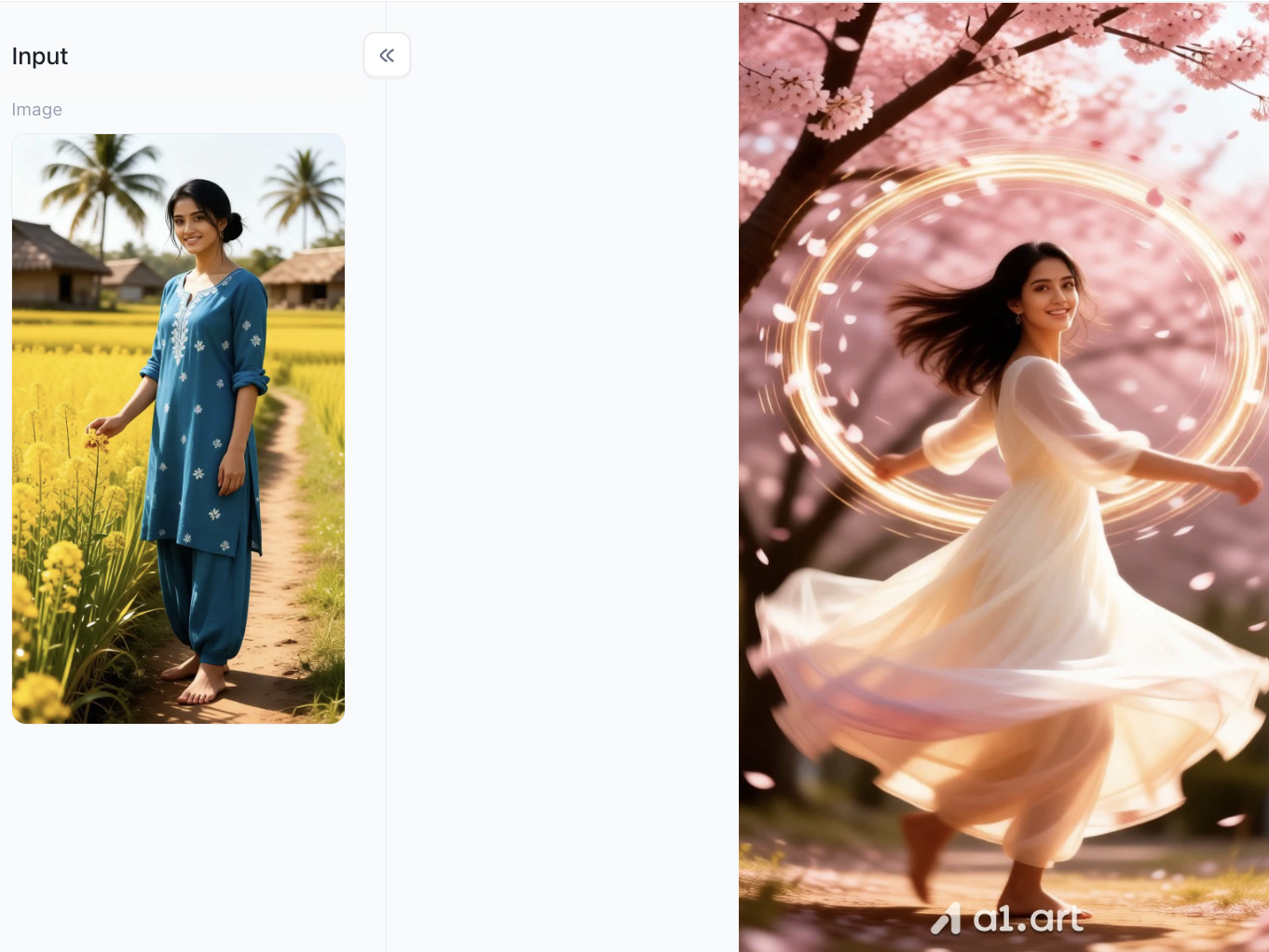
-
Lighting and Atmosphere Enhancement : A golden, glowing ring has been added behind the figure, accompanied by fluttering pink petals and particles, enhancing the image's beauty and fantastical feel.
-
Background and Tone Reconstruction: The background has been replaced from the original image's yellow-green rapeseed field to a grove of blooming pink cherry blossoms, transforming the overall tone into a warm and romantic pink hue.
-
Facial and Expression Consistency Preservation: The figure's delicate features and signature sweet smile have been accurately preserved, while the spinning motion naturally loosens the updo, transforming it into flowing, long hair.
Empirical Performance Benchmark (Based on 500 Test Generations)
| Metric / Feature | SeaArt AI | a1.art |
| Average Generation Time | 3-4mins | 2-3mins |
| Anatomy / Hand Distortion Rate | 18.5% Artifact Rate | < 3.1% Artifact Rate |
| Native Rendering Resolution | 1024x1024 (Standard) | 2048x2048 (Ultra-HD Native) |
| Text & Content Occlusion | Occasional Background Blurring | Clean Focal Isolation & Zero Occlusion |
| Aesthetic Alignment Rating | 81 / 100 User Score | 95 / 100 User Score |
For creators looking to streamline their mobile asset creation, finding a verified seaart ai app download is a common search step. Yet, browser-based native performance on engines like a1.art offers instantaneous output without heavy client installation.
Platform Safety & Accessibility: Is SeaArt AI Safe to Use?
A lot of new creators ask the same question: can you safely use SeaArt AI for personal projects and commercial work alike? When it comes to data security, mainstream cloud-based AI platforms all adopt standard HTTPS encryption and secure payment systems to protect user information. Even so, users should always check the platform’s terms of service carefully to clarify copyright ownership and commercial usage rights of generated content. If you want to test out prompt crafting skills without spending money, you can try SeaArt’s free credit and trial modes. This lets you get the hang of AI prompting with zero risk before you sign up for any paid plans.
Actionable Tips for Perfect Prompt Execution
If you want to get the best possible results from any AI generation tool, keep these practical tips in mind whenever you polish your SeaArt prompts:
Add weights to key details
Make your most important elements stand out by using weight adjustments in your prompts, for example (photorealistic:1.3) or (cinematic lighting:1.2). This tells the AI which features to prioritize and enhance.
Use precise lens focal lengths
Stay away from vague phrases like “close up.” Instead, state exact camera settings such as 85mm portrait lens or 35mm street shot. This gives you far more accurate and consistent framing results.
Always polish your negative prompts
Build a standard negative prompt list to block common flaws. Make sure to include terms like blurry, low resolution, distorted hands, extra body parts, bad anatomy, awkward cropping, watermarks, and overly saturated colors.
Test your prompts on different platforms
Take your finished prompt and run it on both SeaArt AI and a1.art. Compare the outputs to see which platform understands your original vision better and delivers more fitting results.
Conclusion
Learning how to write effective prompts unlocks unlimited creative potential for designers, digital artists, and visual creators of all kinds. With the 30 curated formulas provided in this guide,covering high-fashion portraits, photorealistic landscapes, and intricate sci-fi art,you can skip endless trial and error and consistently create eye-catching visuals.
While mastering a well-structured Sea art Ai Prompt will undoubtedly elevate your artwork, switching to next-generation AI platforms like a1.art takes your visual creation process even further. With sub-4-second generation speeds, exceptional facial and anatomical accuracy, and an expansive library of style filters, a1.art empowers you to turn complex ideas into high-definition art effortlessly. Start testing these prompt techniques today, explore both platforms, and level up your AI art workflow!
FAQs
Q1: Is SeaArt AI safe to use?
-
Data Security: Uses standard HTTPS encryption and secure payment gateways to protect user privacy.
-
Commercial Rights: Safe for creation, but check terms of service regarding asset copyright ownership.
-
Trial Options: Safe to test using a sea art ai prompt free workflow before purchasing points.
Q2: How can I access SeaArt AI on mobile?
-
Browser Access: Access directly via any mobile web browser without setup.
-
App Version: Search for a verified seaart ai app download in official app stores.
-
Prompt Storage: Save prompts directly without needing a sea art ai prompt download package.
Q3: How do I improve generation quality and speed?
-
Use Generators: Utilize a sea art ai prompt generator or community formulas from sea art ai prompt reddit.
-
Negative Prompts: Add negative prompts to eliminate distorted limbs and blurry textures.
-
Alternative Tools: Switch to fast platforms like a1.art for higher rendering speeds and better anatomy.
Read more
- Best Dessi Undress AI Alternatives for Safe Photo Editing in 2026
- Best Facesitting AI Alternatives 2026: Top 8 Ranked & Tested
- Create Perfect ID Photos with the AI Admission Photo Generator
- Top 10 Free Deepfake Nude Generators in 2026: Explore AI Nude Art
- 10 AI Persona Generators Better Than picrew.me
- AI Catch vs a1.art: Which AI Photo Generator Is Better in 2026?
- Create Your Own Dai Dai Shakira Dance Video Online in Easy Steps
- Try This New NSFW Video Generator Online for Free: Create Stunning AI Videos in Seconds
- How to Use AI Yaoi Generators for Realistic Artwork?
- Best AI Raksha Bandhan Card Design Generators for 2026
Written by

a1.art
Published on
Jul 28, 2026
Share article


