


Let me ask you a question: Even now, do you still have to travel a long way to a physical photo studio to take your ID photo? Sitting for half a day under the glaring and awkward flash, spending a lot of money to get a passport photo or student ID photo that looks drastically different from your real self and is unusable? Whether applying to overseas universities, obtaining visas, or preparing your employment file for a new company, getting a perfectly compliant portrait photo that can be used directly for document collection used to be incredibly troublesome. Poor lighting, a sudden pimple, an unnatural expression, or even a small detail like messy hair, the whole photo shoot is a waste of time and money.
Now, there's no need to compromise or waste time and effort. You can easily take compliant and attractive standard ID photos at home using an AI-powered ID photo generator. Professional portrait tools like a1.art, relying on mature deep learning technology, can remove unwanted shadows on the face with a single click, fine-tune posture, and automatically replace the background with compliant colors, adapting to the ID photo requirements of various domestic and international institutions. This article will explain in detail the principles of AI-generated ID photos, compare its advantages and disadvantages with traditional offline photography, and then teach you step by step how to transform a casual selfie into a high-resolution ID photo that meets all the requirements for application purposes.
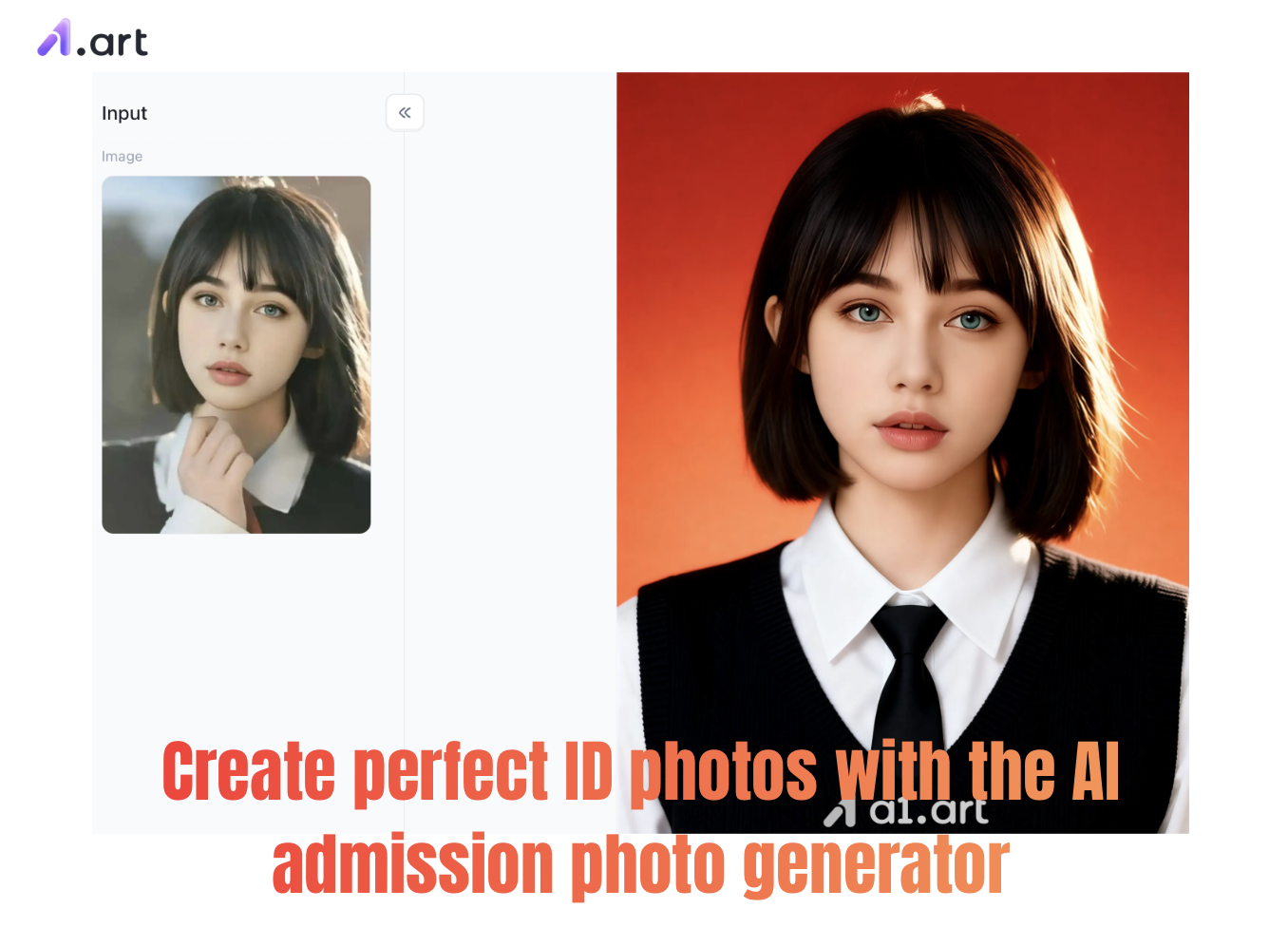
Why choose AI-generated ID photo tools instead of going to a physical photo studio?
Whether it's for school registration, student record keeping, or taking various standardized exams, your ID photo is the first impression you leave on the admissions officer. Physical photo studios are generally expensive, but they often over-edit the photos, distorting your face and making it impossible to recognize your original features. AI-generated ID photo tools have directly changed the way ID photos are created.
User survey data from 2025 shows that over 74% of students and young professionals use online tools to create ID photos for various official documents. The core reasons for this switch are threefold: it saves time and effort, allows for control over the photo's quality, and offers better value for money.
Start your art journey with a1.art.
In-depth analysis: Why is a1.art the optimal solution for portrait ID photos?
Many people have a core question when choosing online photo editing tools: Can AI-generated ID photos pass school registration verification and biometric system screening? Many inferior online tools on the market either stretch and distort faces, warping facial features, or produce blurry images with pixelated edges, easily leading to rejection during system review.
Double-click the image to start generating your AI admission photo⬇️
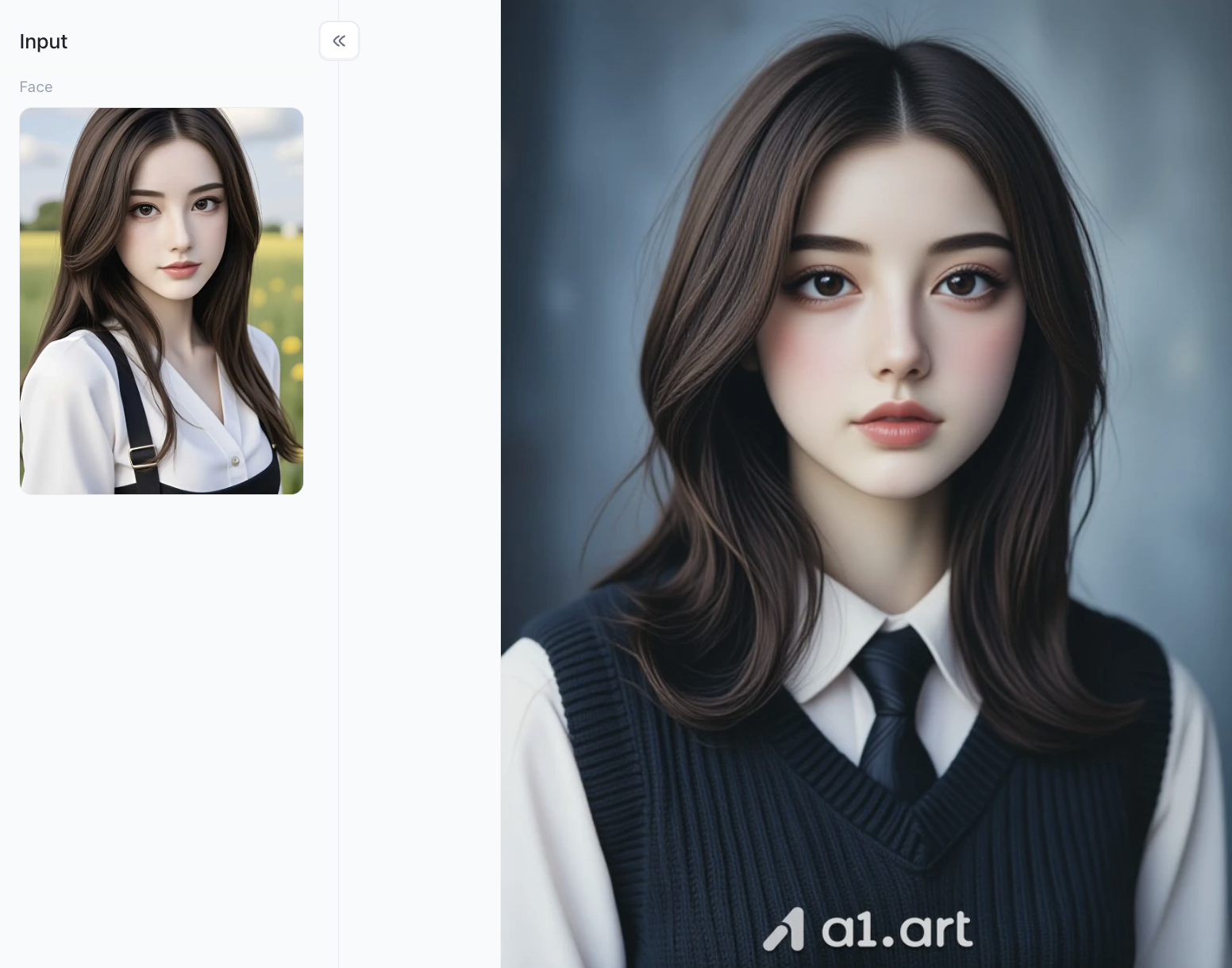
a1.art has become an industry benchmark thanks to its solid visual processing technology and superior user experience.
Super-fast rendering, no waiting: Most similar platforms require several minutes of waiting time to render. A1.art, equipped with a dedicated server cluster, generates high-definition, high-quality ID photos in just 2-3 minutes, offering efficiency and peace of mind.
Ultra-clear and detailed image quality, zero facial distortion: The platform's core processing algorithm completely preserves your facial details, including original skin texture, eyebrow shape, and realistic pupil color, restoring your true appearance to the greatest extent possible. It also perfectly corrects the fisheye distortion common in mobile phone selfies, eliminating facial distortion and strange edges.
Natural and clear lighting, professional-looking image: After uploading your photo, the system automatically recognizes the light and shadow in the image and intelligently adjusts the brightness and darkness of the entire face. The resulting photo has even lighting and a natural, clear complexion, meeting professional ID photo standards and avoiding overexposure or a pale, unnatural look.
Precise background removal for complete and unobstructed images: The platform's hair-level AI background removal technology can accurately distinguish every single hair. When changing the background of your ID photo, it won't accidentally crop details such as ears, eyeglass frames, or clothing textures, resulting in a clean, pure background and a neat, natural final image.
Practical tips: When using these automatic ID photo tools, try not to wear clothing that is similar in color to the background. If you need a white background for your ID photo for visa applications or school registration, it is recommended to wear a dark gray or navy blue top. The clear color contrast will result in a cleaner, more aesthetically pleasing ID photo that meets higher compliance standards!
Step-by-Step Guide: How to Generate AI admission photo with a1.art
To create professional-quality studio portrait photos using AI, the key is choosing the right platform. a1.art is specifically designed to simplify this entire process. It's easy to use, allowing you to generate high-resolution portraits with realistic textures and stunning effects in just a few simple steps.
Many AI image-generating tools on the market have extremely high learning curves, requiring you to learn complex Python code from scratch and manually build an AI image generation framework – a tedious and time-consuming process. a1.art completely eliminates this complexity, offering a fully visual interface that's easy for anyone to use. Follow the simple steps below to easily create compliant and perfect ID photo files.
Step 1: Register your personal a1.art account
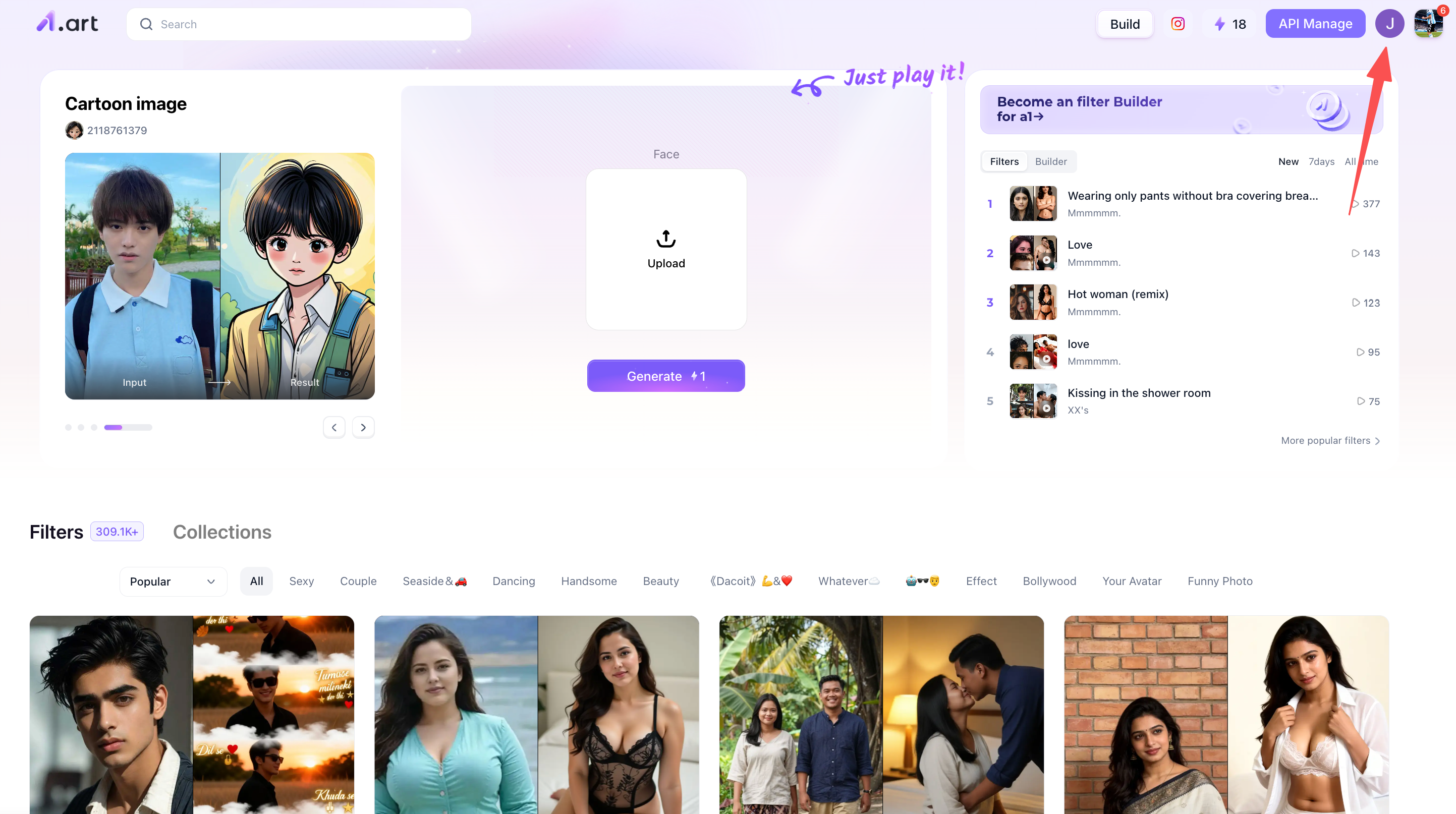
After registering your personal account, you can use your points to generate corresponding images or videos. This is actually very simple. Follow the instructions in the image below; this is the entry point to your personal account. Then, simply follow the normal registration steps.
Step 2: Selecting Suitable AI Admission Photo Filters
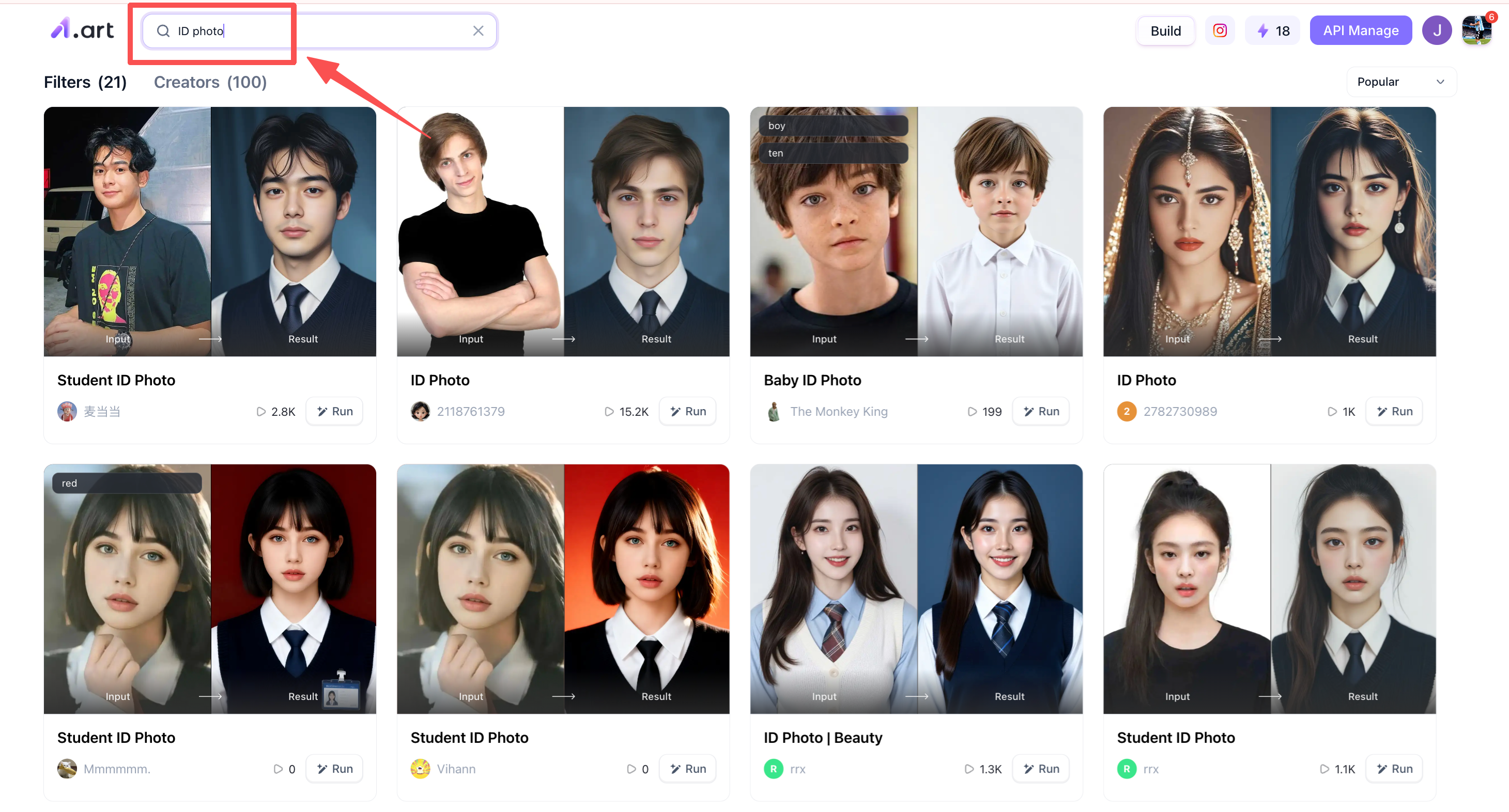
As we mentioned before, many users and creators generate various filters on a1.art every day. Finding suitable filters can save a lot of time if you want to create an AI admission photo. For example, you can enter relevant keywords in the search box, and a1.art will filter a batch of related AI admission photo filters for you, which you can then choose from. Of course, the platform offers more than just these suitable filters.
Step 3: Start Generating AI Admission Photo
After filtering out suitable AI Admission Photo filters in Step 2, we can now start creating our AI Admission Photo. How exactly do we do this? Just follow my steps, it's very simple! For example, if we choose the "American high school ID photo" filter to generate an image, after clicking this filter, you will see the following page. The top left corner shows an example of this filter, and the bottom left corner shows some images created by other users using the filter. You can take a look if you have time. The right side is the generation area. You can upload the image you want to generate in the box area on the right, and then click the "Generate" button below. a1.art will then generate the image for you in the background.
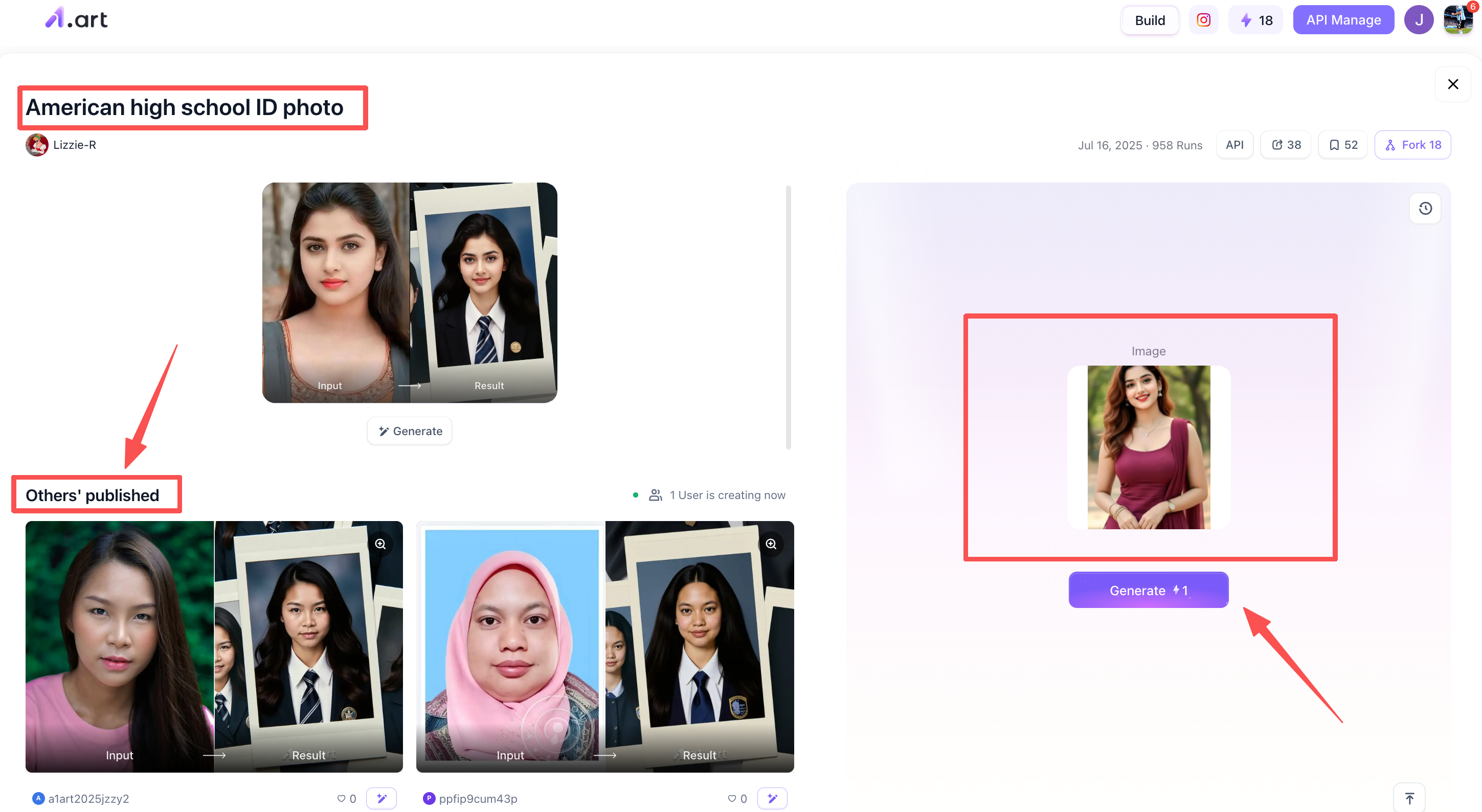
Step 4: Process your generated AI admission photo
After waiting 2-3 minutes, a1.art will generate the final version of the AI admission photo for you. You can check the effect and if you are satisfied, you can choose to process it yourself. There are generally two ways: you can publish it in the a1.art community like other users, so that other users can see your work; or if you don't want to publish it, you can download it to your local device and use it or post it on other social media later.
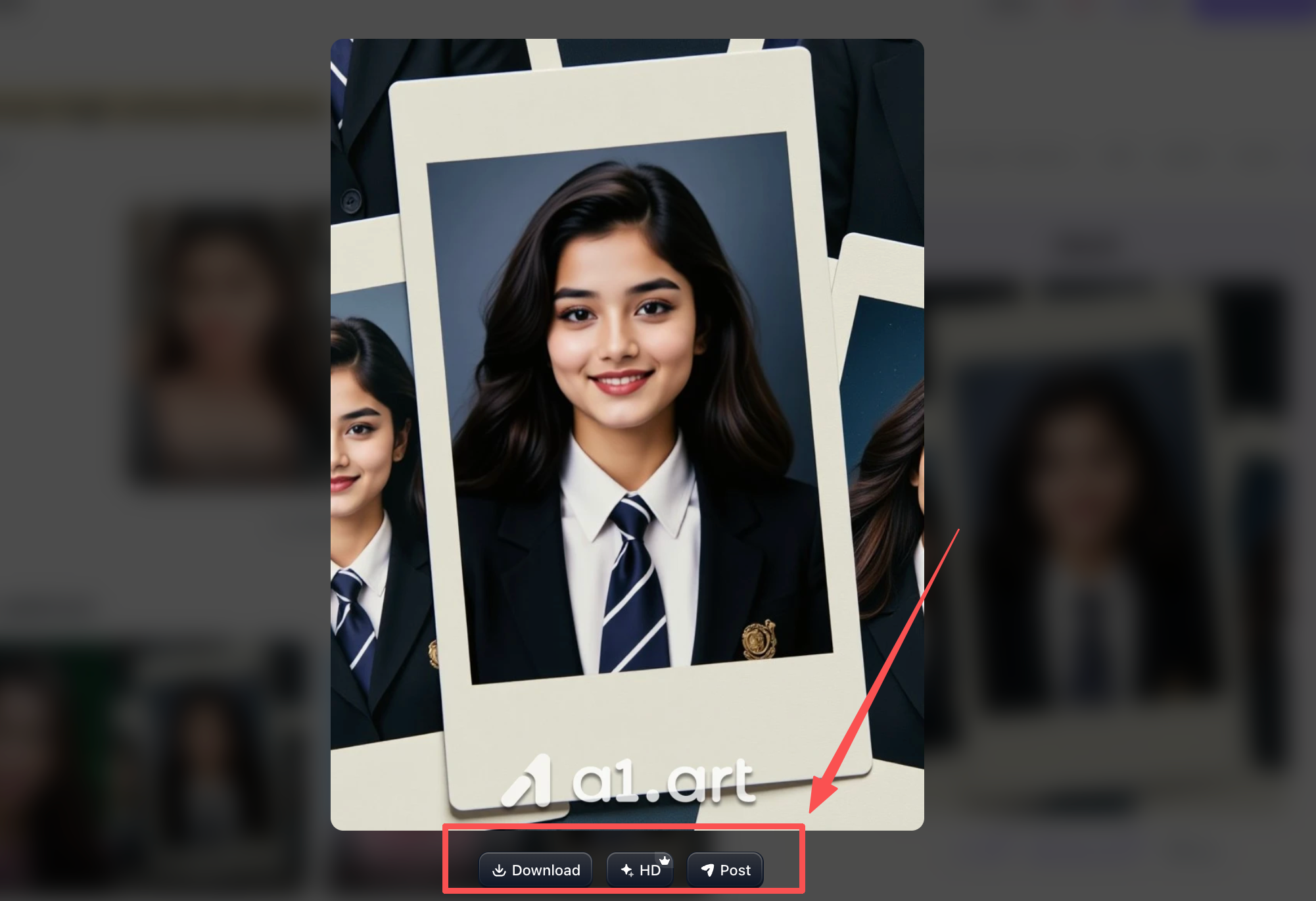
The above are very simple steps to generate an AI admission photo, which should be sufficient for beginners. And a1.art offers much more than just these; you can continue to explore and discover other AI admission photo filters with different styles. If you have time, give them all a try!
Three other AI admission photo filters you shouldn't miss
Besides the filter mentioned above, I have three more AI admission photo filters to recommend! I think they're all pretty good.
First one: Student ID Photo
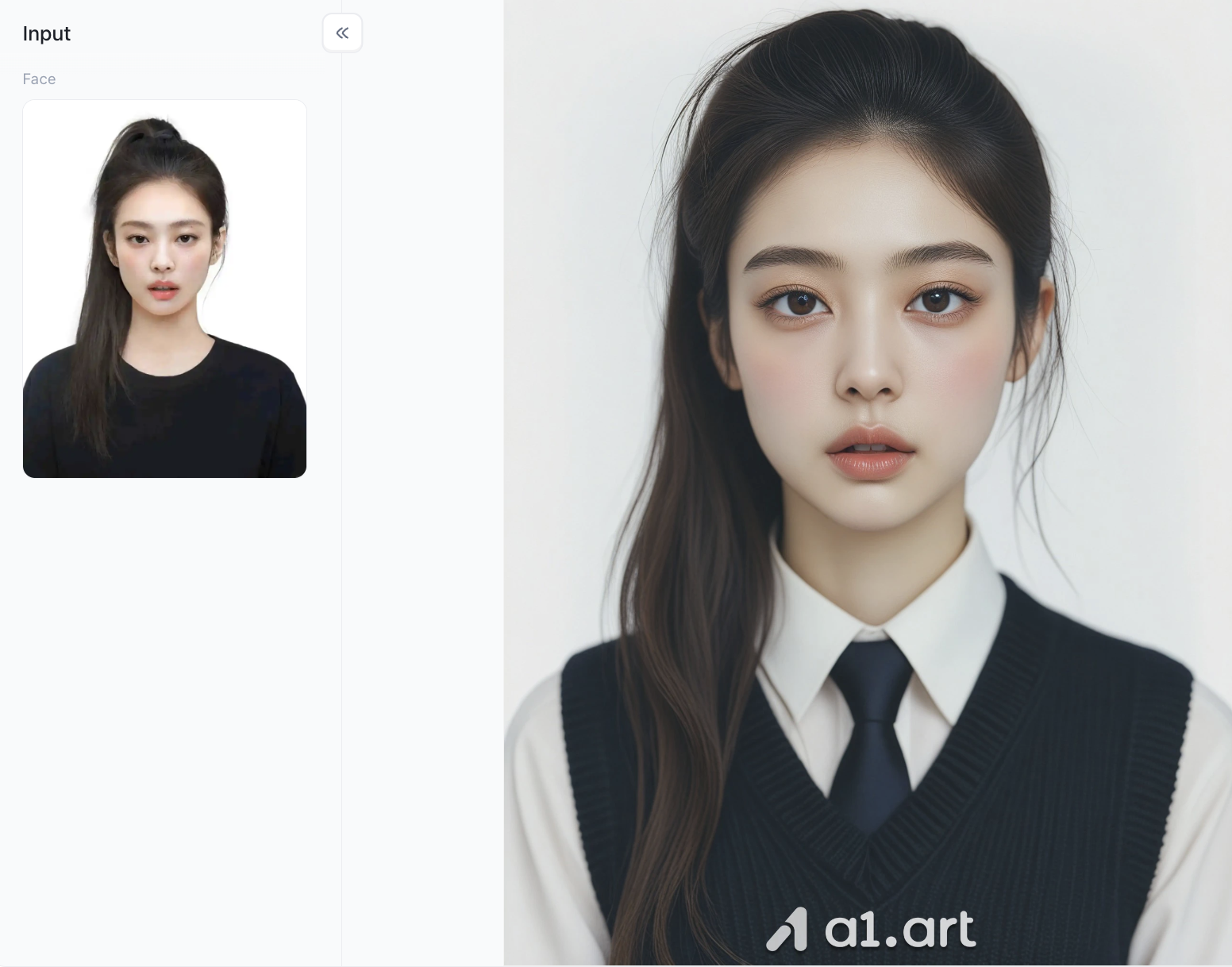
Face & Makeup Optimization It keeps the core facial features from the original uploaded photo, delicately polishes skin texture without over-editing, and adds a light, natural studio makeup look with well-defined eyes and soft blush to make the portrait vivid and authentic.
Hair & Outfit Intelligent Redesign The AI restructures the ponytail into a more layered, fluffy hairstyle with lifelike flyaway strands, and automatically switches the basic black top to a standardized formal student uniform with a white shirt, knitted waistcoat and tie, perfectly fitting ID photo dress codes.
Lighting & Background Professional Tuning Uniform soft studio lighting eliminates uneven shadows on the face; a plain pure white seamless background is applied, plus high-definition rendering with zero facial distortion, fully compliant with official admission and document photo requirements.
Second one: ID Photo | Beauty
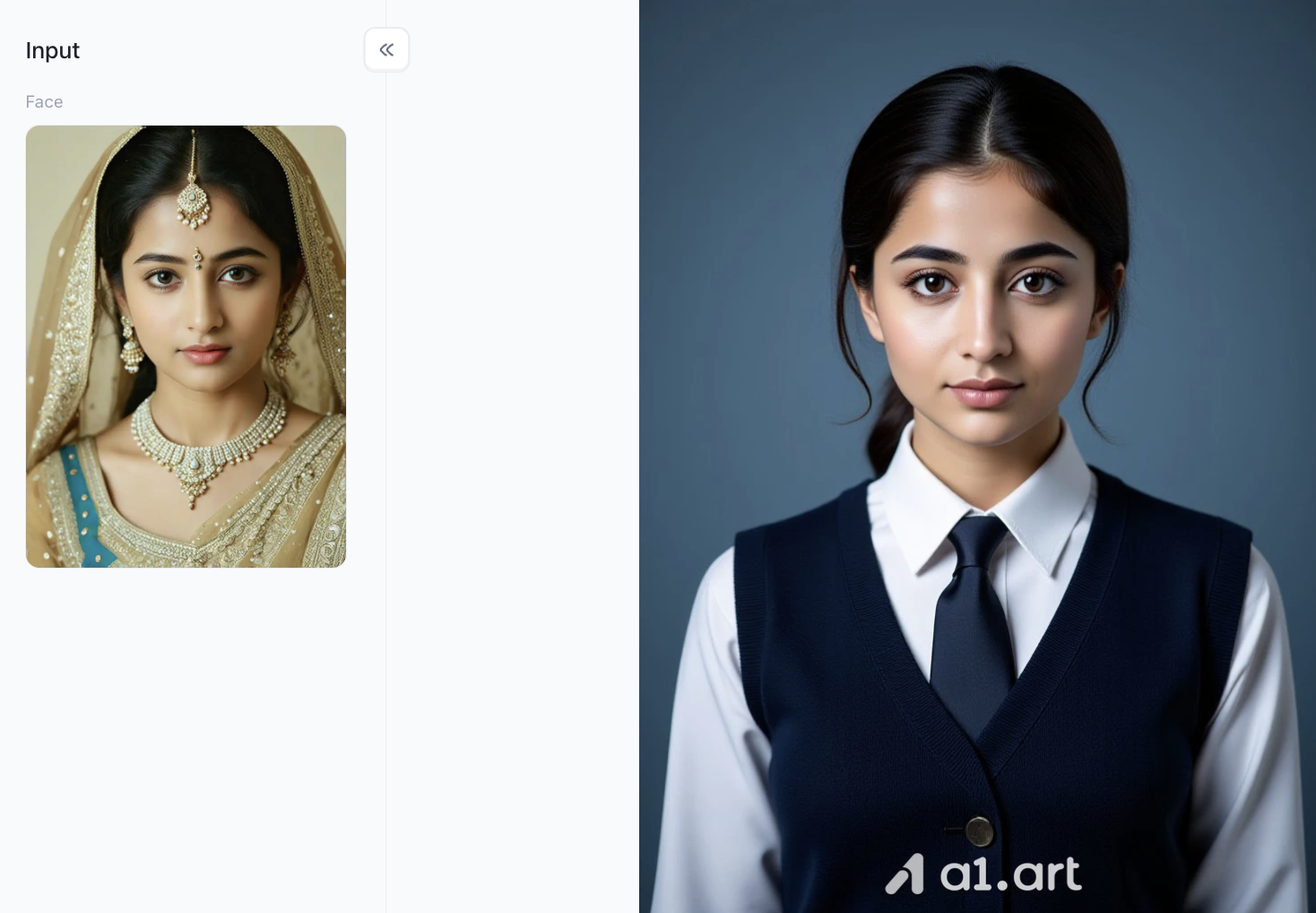
Faithful Facial Feature Inheritance
The AI precisely retains the subject’s original facial structure, eye shape and core facial characteristics from the input traditional ethnic portrait, only refining skin tone subtly without distorting personal facial features, so the ID photo still looks highly recognizable as the same person.
Full Outfit & Hairstyle Conversion
It completely strips off the ornate traditional bridal attire, jewelry and embroidered veil, then restyles the hair into a neat low ponytail, and automatically generates a standard formal school uniform set including a white collared shirt, dark knit vest and matching tie that fits official document photo norms.
Professional Studio-Level Visual Optimization
Uneven ambient lighting of the original photo is replaced with soft, even studio frontal lighting to eliminate harsh shadows; the complicated warm-toned background is switched to a solid matte navy backdrop, with crisp high-resolution output that fully meets the formal requirements for admission and official ID photographs.
Third one: ID Photo
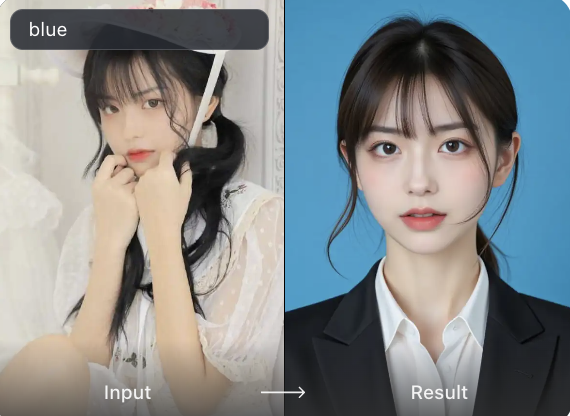
Face Feature Consistency & Natural Beautification
It perfectly locks in the core facial features and facial contour from the original casual selfie. It carries out delicate skin smoothing and light makeup enhancement moderately, without over-modifying facial details, so the generated ID photo is still highly recognizable as the original person.
Attire, Pose & Composition Standardization
The casual lace outfit and hand-covering pose in the input image are completely replaced. The AI automatically generates a formal suit with a white shirt, adjusts the framing to a standard bust shot, and removes redundant messy elements to match the official specification of formal ID portraits.
Background & Studio Lighting Refinement
The cluttered indoor background is switched to a solid pure blue background as required. Professional even studio lighting is applied to erase messy shadows on the face, creating a bright, uniform tone that fully meets the submission standards for admission and certification photos.
Real-world Use Cases: This Tool Rescues You in These Emergency Moments
To intuitively understand how practical this tool is, here are three common tricky scenarios where using AI online tools to process ID photos can save you time, money, and hassle:
Scenario 1: Urgently Re-applying for Admission ID Photos Near the Deadline
At 11:30 PM, the postgraduate application system is closing its submission channel in half an hour, and you realize your previously uploaded ID photo was rejected because the background color didn't meet the requirements. At this time, offline photo studios are long closed, and you can't go out to retake it. Simply open a1.art, select any old photo from your phone's album, apply the admission ID photo template, and use the AI admission ID photo generator to generate a perfectly compliant standard ID photo with one click. It only takes about ten minutes to complete the modification and submit your materials smoothly, perfectly meeting the application deadline.
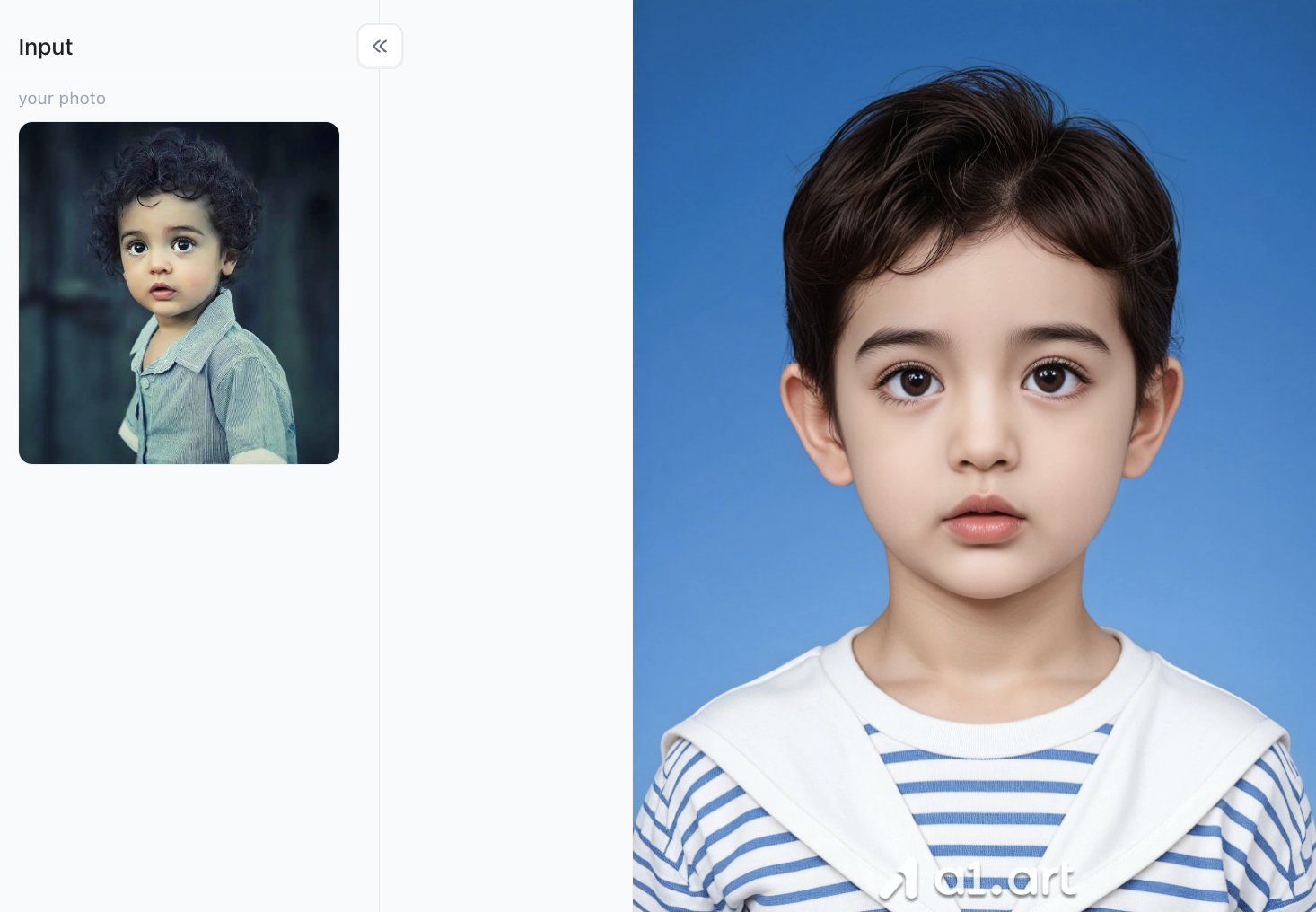
Scenario 2: Professional Account Packaging, Creating a Professional Business Image
Your profile picture on your professional social media page directly determines others' first impression of you. If your profile picture is just a blurry cropped from a group photo, it can easily leave recruiters with an impression of being unprofessional and lacking seriousness. Simply upload this casual photo, and the tool will automatically apply a formal portrait effect, instantly enhancing your online professional image and making you more appealing to HR professionals at reputable companies during job interviews.
Scenario 3: Batch Generation of Visa Application Materials for Multiple Countries, Adapting to National Standards
Embassies of different countries have completely different and strict regulations regarding visa photo size, whether ears should be visible, and the color difference between clothing and background. Going to a photo studio to have your photos retaken and reprinted for each visa application is expensive and inconvenient. With a1.art, you can generate multiple versions of passport photos conforming to the visa requirements of different countries in one go within a single interface, eliminating the need for repeated offline photoshoots.
Conclusion
The days of having to go to a photo studio, spend money, wait in line, and get unattractive photos are completely over. Mastering this AI-powered ID photo generator will help you produce presentable and compliant photos for various application forms, document processing, and personal file creation, giving you an edge in the details.
a1.art updates its template resources daily, with a total of over hundreds of thousands templates. The interface is clean and ad-free, and the exported images are ultra-high-definition, allowing anyone to easily create ID photos comparable to professional shots.
Don't let a poorly taken passport photo ruin your mood or even delay important application processes. Open a1.art now, try inputting simple requirements, and with a few taps, you can use the AI ID photo generator to create standard and beautiful ID photos.
FAQs
Can AI-generated ID photos pass strict university and visa biometric systems?
Yes. Because platforms like a1.art focus on correcting lighting, backgrounds, and attire while maintaining your exact facial proportions and eye positions, the outputs fully comply with global biometric recognition standards.
What kind of base photo should I upload for the best results?
For optimal quality, upload a clear, front-facing selfie where your head is centered and looking directly at the lens. Ensure your face is evenly lit without hats or sunglasses blocking your eyes.
How long does it take to generate a completed photo on a1.art?
Thanks to dedicated server clustering, the entire image transformation process,including background removal and wardrobe replacement,takes only 2 to 3 minutes to output a crisp, uncompressed file.
Read more
- Top 10 Free Deepfake Nude Generators in 2026: Explore AI Nude Art
- 10 AI Persona Generators Better Than picrew.me
- AI Catch vs a1.art: Which AI Photo Generator Is Better in 2026?
- Create Your Own Dai Dai Shakira Dance Video Online in Easy Steps
- Try This New NSFW Video Generator Online for Free: Create Stunning AI Videos in Seconds
- How to Use AI Yaoi Generators for Realistic Artwork?
- Best AI Raksha Bandhan Card Design Generators for 2026
- Top 10 AI Lingerie Generators for Fashion and Character Design
- 12 Monsoon Portrait Ideas You Can Create with AI in 2026
- 15 Best AI India Independence Day AI Image Ideas for 2026
Written by

a1.art
Published on
Jul 23, 2026
Share article


