


I’m sure many of you love traveling and having fun. While the experience itself is exhilarating, the precious video clips captured during a dream vacation often end up forgotten in your smartphone’s photo gallery. Sorting through all that raw footage, handling editing, audio synchronization, and color correction,can be a real hassle. Traditional editing software requires a steep learning curve and hours of tedious manual work, causing many people to simply give up on creating travel videos altogether.
Fortunately, the advent of artificial intelligence has revolutionized personal media creation; now, anyone can transform raw footage into stunning, cinematic short films with just a few taps.
For instance, you can use advanced "vacation video generators" to automatically turn shaky smartphone footage into breathtaking, cinematic clips with perfect pacing. In this guide, we review and evaluate the top 10 automated video editing tools on the market this year. We explore how these innovative travel video generators can elevate your editing experience, saving you time while delivering professional-grade visual quality.

What is a vacation video generator, and why do you need one?
A vacation video generator is an AI-powered software application that automatically compiles, edits, and optimizes your travel footage. These tools leverage computer vision and deep learning models to analyze your uploaded clips, identifying highlights, recognizing faces, and capturing scenic shots,while synchronizing transitions with background music. Instead of spending days manually editing, you simply upload your footage, and the AI generates a cohesive, narrative-driven video in minutes.
Increasingly, travelers are turning to AI video generators to streamline the creative process. These platforms offer features like automatic color grading, smart cropping, and intelligent audio balancing, effectively removing the technical barriers to video production. Whether you are creating a casual record for family keepsakes or a polished vlog to drive social media engagement, AI-powered vacation video generators deliver high-quality results, all without requiring any prior editing experience.
Start your art journey with a1.art.
The 10 Best Vacation Video Generators Evaluated
a1.art (Top Recommendation)
A leader in the field of generative media production, a1.art is currently the most powerful yet intuitive vacation video generation tool on the market. Optimized specifically for dynamic travel footage, the platform leverages advanced neural network technology to synthesize raw clips into flawless, cinematic short videos. Unlike traditional template-based editors, it employs cutting-edge, cinema-grade AI models capable of understanding scene context, spatial geometry, and aesthetic composition, making it an excellent choice for creators producing vacation videos.
-
Key Features: One-click cinematic video generation, distortion-free panoramic stitching, lightning-fast cloud rendering, and intelligent face preservation.
-
Main Advantages: Effectively eliminates image distortion, preserves natural facial expressions, and instantly outputs crisp, detailed 4K video.
-
Pricing: Offers a feature-rich free tier (including 5 free projects per month); premium subscription plans start at $4.99 per week, supporting unlimited video creation.
Three Vacation Video Filters from a1.art You Must Try
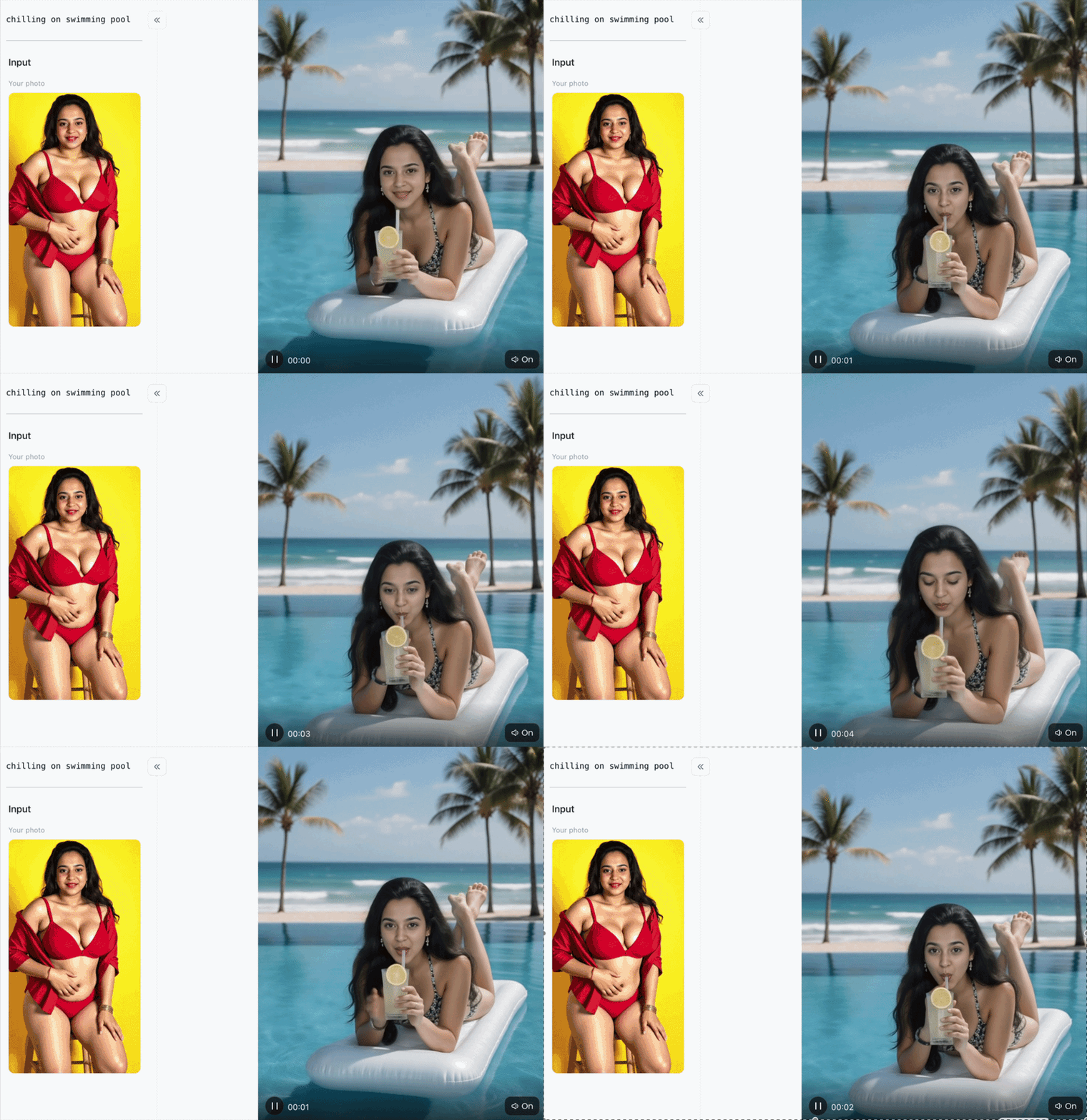
Beach vacation
Click the image to start creating your travel video right away⬇️
-
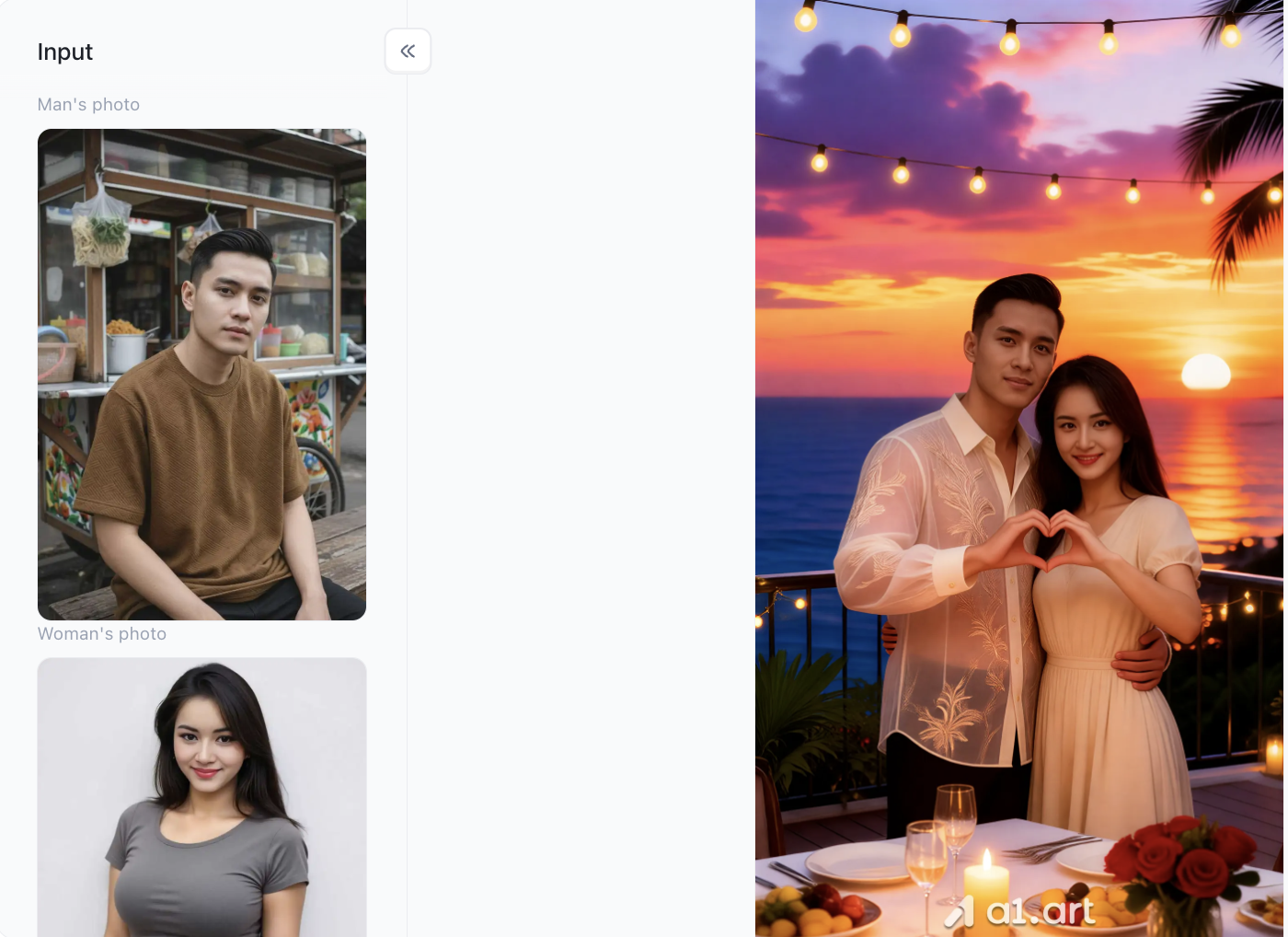
Transforming ordinary people into stars of a romantic drama (Group Photo Compositing): It seamlessly merges two separate photos,taken in different locations,into a single group shot. The interaction between the man and woman looks incredibly natural; not only are they sharing intimate poses.Their facial features remain instantly recognizable, yet their skin and complexion are enhanced to a celebrity-level, high-end glow.
-
Turning a roadside stall into a romantic seaside restaurant (Background Makeover): It instantly replaces a casual, everyday background by "teleporting" the subjects to the balcony of a luxury island resort. In the foreground, there is an upscale table set for a candlelight dinner with red roses, while the background features a breathtaking sunset over the ocean,creating an instant, immersive vacation vibe.
-
Stunning lighting and "spectacular sunset" effects (Dreamy Color Grading): The scene is bathed in the warm, golden hues of twilight. The sky glows with a dreamy blend of purple and crimson, while strings of romantic fairy lights hang overhead. Most impressively, the light from these sources and the warm sunset glow fall naturally across the subjects' faces and clothing, avoiding any of the awkwardness often associated with artificial image compositing.
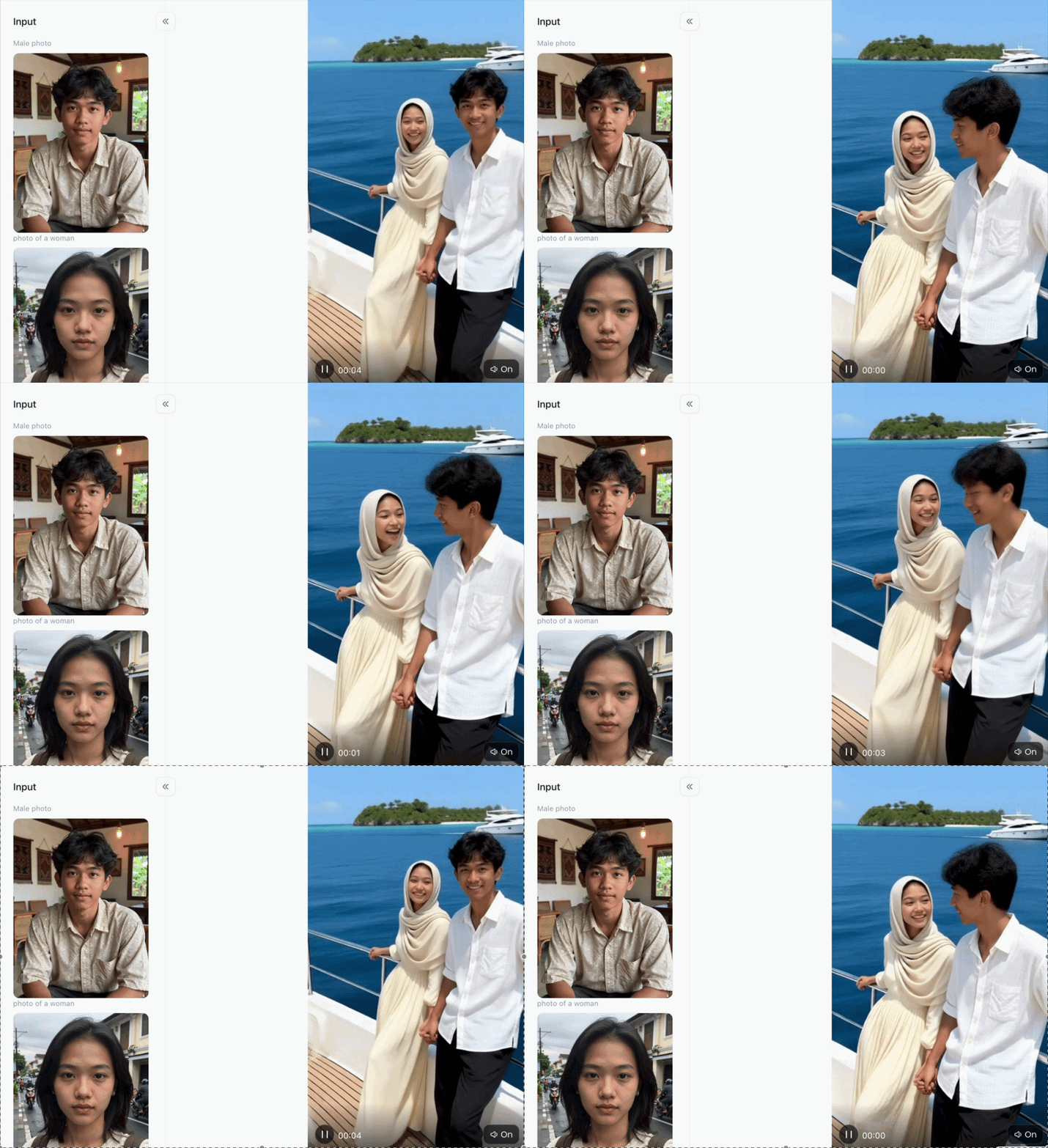
Yacht Vacation Motion
-
Major Image Quality Upgrade: Transforms blurry, grainy snapshots into high-definition, detailed images with the polished look of professional photography.
-
Refined Facial Features: Preserves your natural look while smoothing facial contours and adding a lively sparkle to your eyes, creating a refined, "subtle-makeover" effect.
-
Perfect Lighting & Shadow: Features automatic fill light and soft-focus effects,mimicking a professional shoot with a reflector,to give your skin a clear, luminous, and high-end glow.
-
Scene Enhancement: Goes beyond just retouching the subject; it elevates the background and clothing textures, instantly transforming the overall vibe from a casual street snapshot into a celebrity-style promotional shot.
Sweet beach vacation - p1
-
Instantly intimate poses: What started as separate solo shots were merged by the filter into a couple's photo,complete with an arm around the waist and a shared finger heart gesture,transforming them into a romantic pair in an instant.
-
Upgraded to a luxurious seaside setting: Mundane backgrounds like roadside stalls or plain white walls were replaced by a seaside restaurant at sunset. With the glow of the evening sky, the ocean, and the sea breeze, the scene exudes an air of high-end romance.
-
Built-in "romance filter" and lighting: The addition of a warm sunset glow and atmospheric string lights enhances the complexion and gives their gazes a dreamy, tender intensity.
Runway Gen-3
Runway Gen-3 is a powerful enterprise-grade AI video platform favored by digital artists and professional content creators. It excels at generating highly stylized, cinematic visuals from brief text prompts or static images. As an advanced tool for vacation video creation, it enables tech-savvy travelers to seamlessly integrate surreal, artistic visual elements into their standard travel footage.
-
Pros: Unparalleled creative control over generative visual styles; high accuracy in text-to-video generation.
-
Cons: Steep learning curve; processing speeds can be slow during peak times; high price point.
CapCut AI Travel Templates
With its vast library of social media-ready templates, CapCut remains a powerhouse in short-form video creation. Its built-in vacation video features allow users to quickly sync life moments with trending music beats and are optimized for rapid publishing to platforms like TikTok and Instagram Reels.
-
Pros: Completely free; extensive library of trending music; fast export speeds.
-
Cons: Lacks unique generative AI capabilities; templates can feel repetitive and often lack a distinctive professional polish.
Luma Dream Machine
Luma Dream Machine is a cutting-edge video generation model designed to create realistic, high-fidelity camera movements. A creative AI tool capable of reimagining travel memories, it generates smooth pans and dramatic, cinematic drone-style shots from simple smartphone photos,perfect for simulating the look of high-end professional camera equipment.
-
Pros: Exceptional 3D spatial awareness; capable of generating incredibly smooth tracking shots from static images.
-
Cons: Limited control over multi-clip narrative editing; requires high-quality source images for optimal results.
InVideo AI
InVideo AI operates primarily as a comprehensive script-to-video workflow assistant. Travelers can input a text prompt detailing their trip itinerary, and the platform will automatically assemble relevant stock footage, generate a voiceover, and insert text overlays to create a cohesive travel documentary.
-
Pros: Excellent automated scripting and realistic voice synthesis; great for informational travel vlogs.
-
Cons: Relies heavily on generic stock media rather than prioritizing personal user-uploaded footage.
Magisto (Vimeo Create)
Magisto leverages long-standing smart video editing algorithms to analyze personal media libraries and select the most expressive moments. This reliable Vacation Video Generator provides simple lifestyle themes tailored for family events and casual holiday summaries, ensuring a direct and uncomplicated user experience.
-
Pros: Very stable interface; straightforward three-step automated editing workflow.
-
Cons: Creative styling options feel outdated compared to modern generative AI models.
Adobe Premiere Rush AI
Adobe Premiere Rush integrates automated editing features into a professional-grade timeline structure. It acts as an efficient bridge for creators who want the convenience of an automated travel video generator alongside the precision of traditional manual editing controls, color adjustments, and audio fine-tuning.
-
Pros: Seamless integration with Creative Cloud; advanced manual correction tools.
-
Cons: Requires basic knowledge of video editing; subscription costs are high for casual hobbyists.
Wondershare Filmora AI
Filmora features an array of user-friendly AI utilities, including smart copilot editing, automated audio ducking, and instant highlight cutouts. It serves as a practical, feature-rich desktop software suite for assembling detailed travel recaps quickly.
-
Pros: Rich library of motion elements and visual effects; efficient background noise removal.
-
Cons: The desktop software requires substantial system memory; free version applies large watermarks.
Kiber AI
Kiber AI specializes in transforming standard travel clips into vibrant, heavily stylized animations. It utilizes sophisticated style-transfer algorithms to re-imagine real-world vacation footage into cyberpunk, anime, or oil-painting aesthetics for unique digital storytelling.
-
Pros: Highly distinct visual outputs; perfect for creating unique social media aesthetic trends.
-
Cons: Processing times are very long; completely changes the realistic appearance of your original trip.
GoPro Quik
Designed specifically for action sports and outdoor adventure enthusiasts, GoPro Quik automatically syncs rugged action footage to the beat of an audio track. It effortlessly handles high-frame-rate clips, instantly generating high-energy highlight reels directly on mobile devices.
-
Pros: Superb integration with action camera hardware; robust mobile-first editing performance.
-
Cons: Limited text options; lacks advanced generative AI capabilities for standard cinematic footage.
Why a1.art Delivers Superior Results: Based on Data & Experience
When selecting an automated vacation video generation tool, users might encounter pitfalls with some options; however, based on objective data and real-world testing, a1.art consistently delivers exceptional results. While most general-purpose AI video tools are often hampered by significant processing bottlenecks, frequently requiring 5 to 10 minutes to generate a single scene,a1.art operates on a high-speed, decentralized cloud cluster, enabling the rendering of cinematic 4K video in just 2 to 3 minutes.
Visual fidelity and structural clarity represent another major technical advantage. Competing engines often produce jarring facial distortions, unnatural lens artifacts, and anomalous object warping, whereas a1.art employs a proprietary spatial-preservation algorithm. This advanced model ensures that facial details, natural horizons, and geometric structures remain stable and authentic throughout the video, completely free from the visual flaws commonly associated with AI generation.
Furthermore, a1.art places a high priority on user experience. The platform utilizes an aesthetic scoring engine trained on millions of award-winning travel films, ensuring that video pacing, color grading, and composition align perfectly with high-end, modern aesthetic standards. By avoiding oversaturated or cartoonish tones and instead achieving true-to-life color reproduction, it delivers a visually sophisticated experience of exceptional quality.
Outdoor Adventures & Road Trips
Action Shots: Use GoPro Quik or Filmora to handle candid moments and high-speed action sequences
-
Stunning Landscapes: Use a1.art for sweeping vistas; it ensures high-definition quality and a sense of depth, keeping images crisp and clear without any loss of detail.
Luxury Vacations & Beachside Relaxation (e.g., lounging on the beach, upscale dinners)
-
Atmospheric Vibes: Make a1.art your go-to tool. It transforms "golden hour" sunsets and turquoise waters into cinematic masterpieces,delivering a smooth, sophisticated, and premium look.
Fast-Paced City Tours (e.g., trendy urban spots, neon nightscapes, historic architecture)
-
Riding the Trends: Use CapCut for quick, beat-synced edits and trending music,perfect for sharing short videos.
-
Cinematic Quality: Complex urban architecture and night scenes often suffer from blur or distortion; using a1.art for your main vlog ensures distortion-free visuals with rich, distinct details.
-
The Bottom Line: Use GoPro for capturing surfing and road trip action, CapCut to hop on trends while exploring the city, and a1.art to deliver the high-quality filters and cinematic flair needed for breathtaking landscapes and luxury getaways.
Conclusion
It’s a shame to let all those videos from your trips just gather digital dust on your phone. With AI video tools, you can instantly transform scattered, raw clips into cinematic masterpieces,saving yourself the hassle of manual editing and color grading. Just focus on having fun and capturing great footage; leave the technical heavy lifting to the AI.
Among the many apps out there, a1.art is the most hassle-free choice. It offers lightning-fast generation and crisp, high-quality visuals, delivering a polished, professional look that’s easy for beginners to achieve. Next time you travel, don’t let your photos and videos sit forgotten in your gallery, use the app to create a stunning video for Moments or Xiaohongshu and show everyone your dream vacation!
FAQs
Can AI create travel videos?
Invideo AI is a first-of-its-kind online AI travel video maker tool. You can use it to create first cuts for ideas by simply entering the idea.
What is the most realistic AI video generator?
The most realistic AI video generators available are OpenAI Sora, Google Veo 3, and Kling AI. These models excel at photorealism, accurate human movement, cinematic lighting, and native audio generation, making it difficult to distinguish their clips from actual camera footage.
Which AI video generator is 100% free?
Because generating videos requires immense computing power, "100% free and unlimited" AI video generators are practically non-existent. However, many powerful tools offer generous, permanently free tiers or free trials that do not require a credit card.
Is it the most recommended AI video generator?
Veo 3 is definitely one of the best AI video generation models available. It offers users cinematic, detailed, and visually rich outputs alongside audio that is context-aware and works together with the visuals in a really impressive way.
Can ChatGPT generate videos?
Yes, ChatGPT can generate videos. While it doesn't create video files directly from its own native interface, it acts as a powerful hub for video creation using specialized apps from the GPT Store (like invideo AI, Video GPT by VEED, or Visla).
Read more
- Create Free U.S. Independence Day Posters in Minutes with AI
- 10 Best Al Anime PFP Makers for Stunning Profile Pictures
- Best 10+ Undress Apps You Must Try for Free in 2026
- AI Porn Compilation Generator (Free, 100% Real & No Limits)
- 8 AI Alternatives for Creating Custom Eid Mubarak AI Videos
- 9 Best Ways to Generate Realistic AI Babes: Top 2026 Expert Guide
- From Prompt to Collectible: Testing Tripo's High-Detail Image-to-3D Workflow for Blind-Box Character Design
- How to Generate LGBTQ Pride Month AI Art with Rainbow Effects
- Top 10 AI MLP Generators to Create Your Own Pony Characters
- Partner Spotlight: VAST AI Research Introduces Project Eden
Written by

a1.art
Published on
Jun 16, 2026
Share article


