

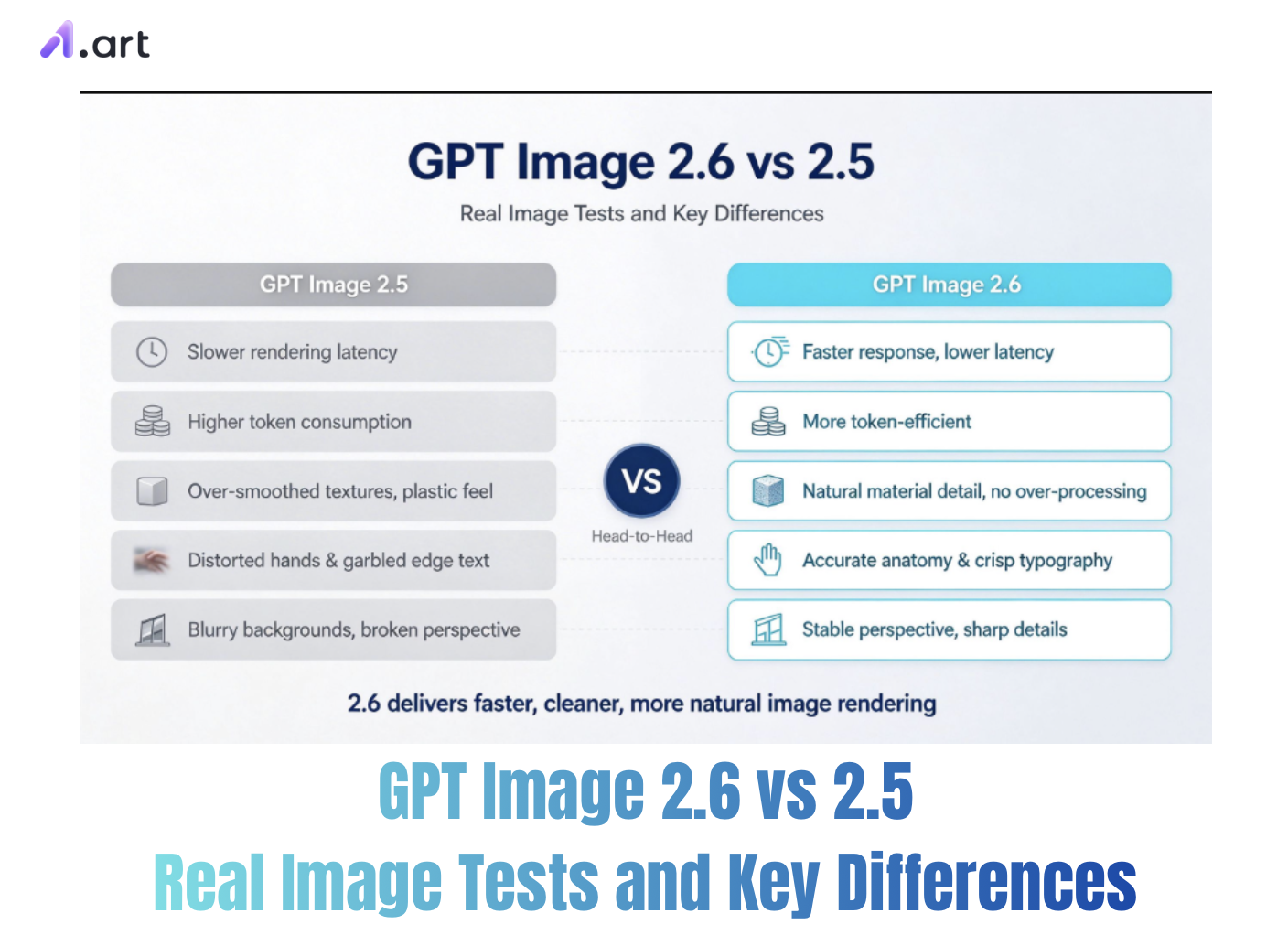
Tired of wonky distortions, blurry textures, and painfully slow renders on your AI product shots and design assets? Picking the right generative model can feel like guessing in the dark, especially when you’re trying to balance creative flexibility and workflow speed. OpenAI’s newest model lineup has been making waves among digital marketers and designers. Creators are curious how GPT Image 2.6 stacks up against 2.5 in real, day-to-day use. This in-depth comparison covers their underlying design, generation speed, and visual fidelity, so you can figure out which one deserves a regular spot in your toolkit.
Evolution of Generative Quality: Understanding the Core Upgrades
When upgrading from older base models to the latest multimodal releases, creators often ask if the new version is worth reworking their entire workflow. Most of the conversation around GPT Image 2.6 vs 2.5 boils down to how their underlying settings handle tiny details and complicated multi-step edits.
Version 2.5 set a solid standard with two modes: Flare, built for speed, and Sunburst, focused on depth and dimension. Version 2.6 tweaks its premium rendering modes to cut wait times significantly even when you crank up the quality. Learning what changed between these two versions lets creators streamline their pipelines and avoid burning through unnecessary tokens.
Speed, Rendering Mechanics, and Token Efficiency
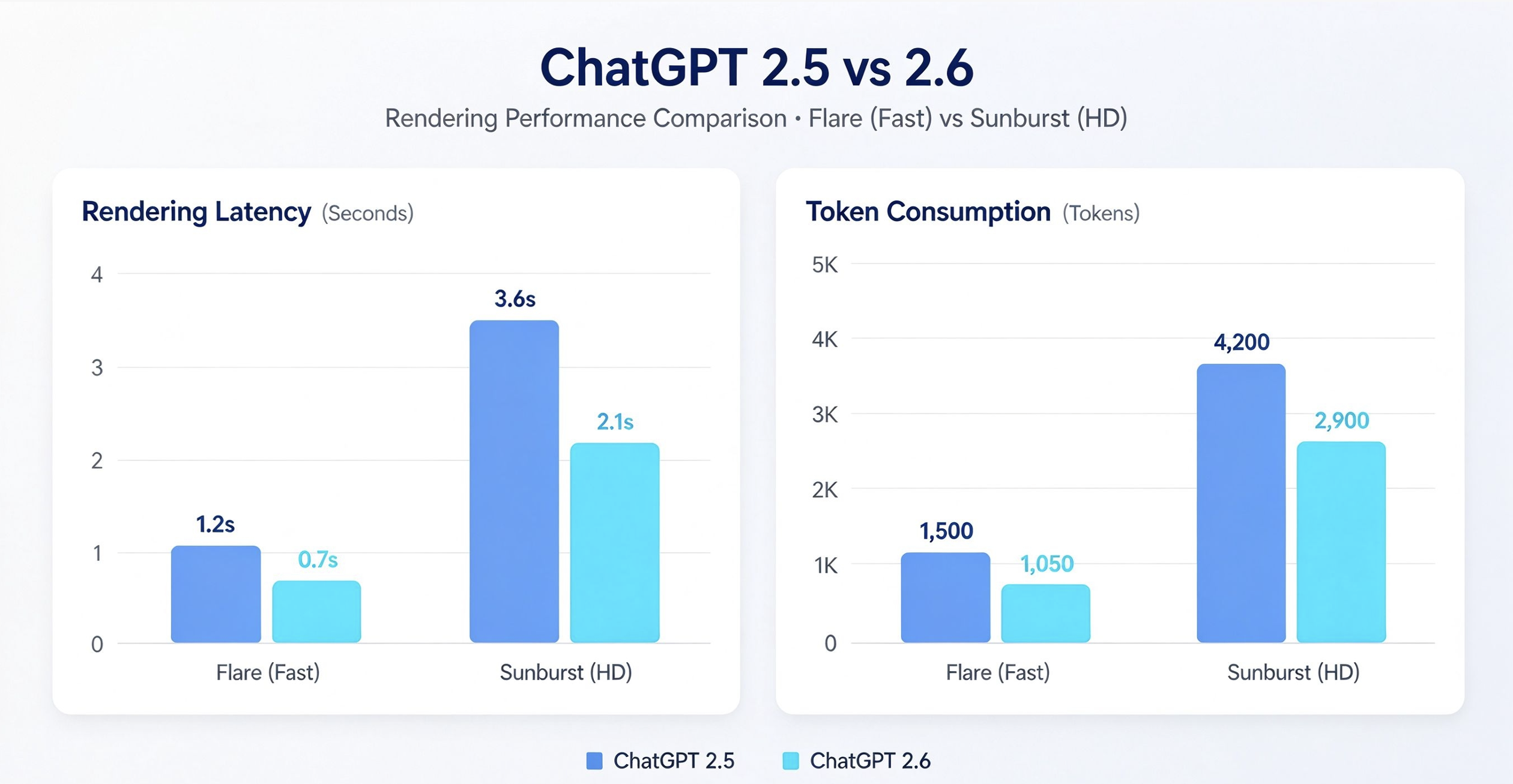
Performance benchmarks show clear gaps between these two model generations when it comes to resource usage and generation speed. Side-by-side quality and speed tests for GPT Image 2.6 vs 2.5 confirm that the Flare mode in 2.6 can slash render times by as much as 50% for heavy, high-resolution outputs.
That said, the token cost picture is more mixed. Both versions charge the same number of tokens at the high and max quality levels, so 2.6 is a straight performance boost here. On lower settings, though, 2.6 removes the budget entry tier that existed in 2.5. It uses more tokens even for simple, straightforward assets.
- High-Quality Rendering: GPT Image 2.6 Flare renders complex scenes up to twice as fast as the older version, with no price increase for high quality and above.
- Low-Tier Cost Scaling: Version 2.5 remains cheaper in tokens for simple icons and quick concept sketches.
- Latency Trade-offs: Flare is built for speed, but the Sunburst setting in 2.6 can sometimes be slightly slower for specialized, precision editing work.
Prompt Engineering and Parameter Adaptation
Switching to this new architecture means you’ll need to tweak how you write your prompts. To smoothly move prompts from GPT Image 2.5 over to 2.6, you have to grasp the differences in how these two models interpret prompt instructions.
GPT Image 2.6 adds better markup-based editing, plus built-in support for vector formats such as SVG and animated sequences generated from a single text prompt. Creators migrating between versions should clean up bulky modifiers in their prompts, cut back on long negative prompts, and use clear spatial tags instead.
E-commerce Visuals: Texture Fidelity and Lighting Optics
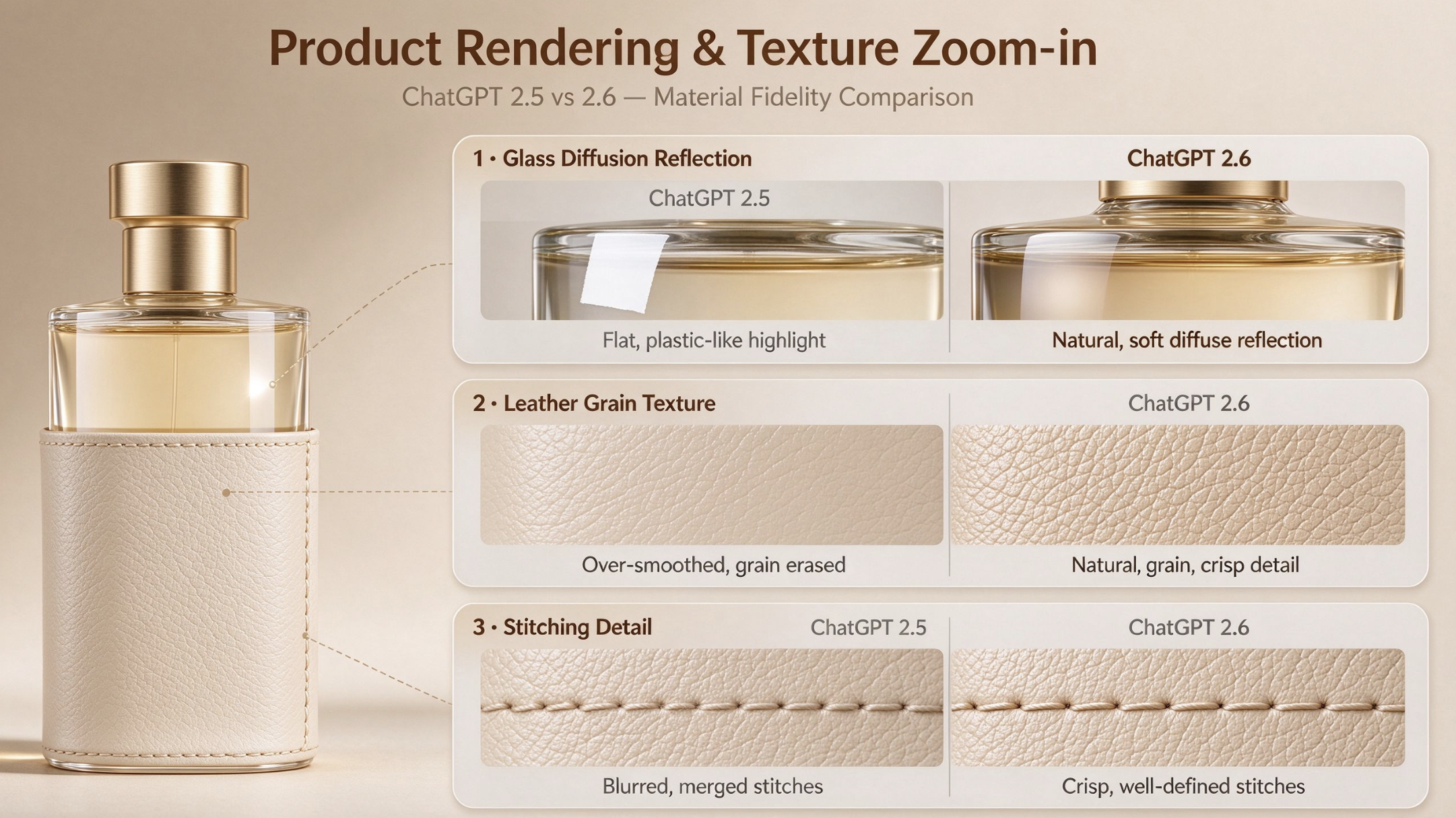
For digital marketers and DTC brands, how realistic your visuals look directly impacts sales. When we compare GPT Image 2.6 and 2.5 for e-commerce product shots, the newer model delivers much more lifelike materials.
Looking at texture accuracy and lighting performance side by side, 2.6 does a far better job rendering tricky light refraction effects, metallic reflections, and fine fabric details, it doesn’t over-blur everything into that fake, plastic-looking smoothness.
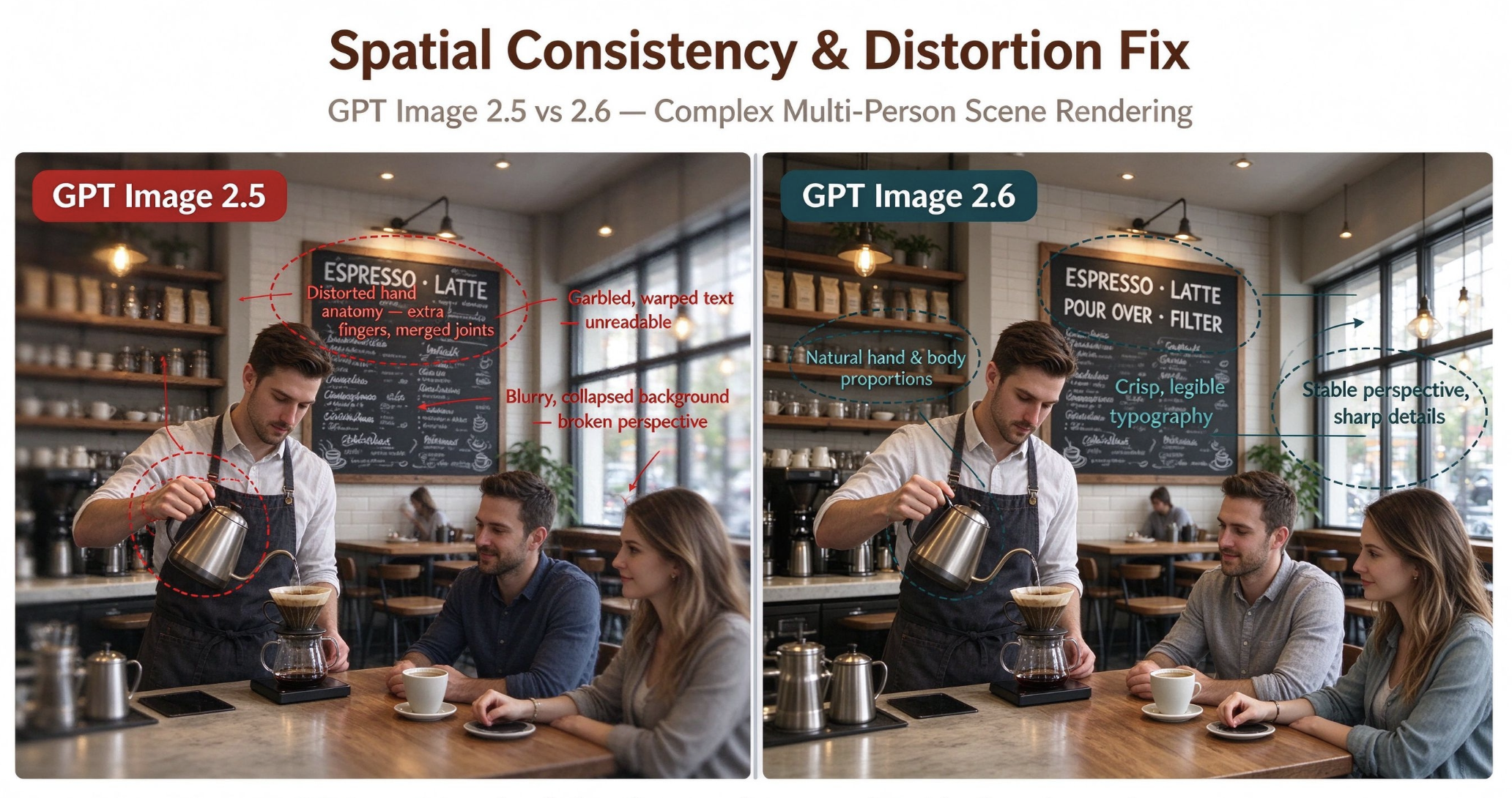
Spatial Coherence and Deformation Fixes Older AI image tools often struggled with messed-up anatomy, garbled text, and objects that look like they’re floating out of place. These newer versions pack stronger algorithms to fix those spatial glitches.
Comparing GPT Image 2.6 and 2.5 on spatial consistency and distortion fixes, 2.6 cuts down noticeably on warped shapes, wonky background perspective, and broken text labels. It applies tighter geometric rules early in the generation process, so complicated scenes hold their structure properly across the whole frame.
Streamlining Workflows with a1.art
To get the most out of these powerful image models day-to-day, you need one simple hub that removes all the hassle. That’s exactly what a1.art brings to your creative workflow. It hosts multiple base generation engines, including the latest GPT Image versions, so creators can run prompt side-by-side tests right away.
No more switching between separate APIs or fighting clunky workspace limits. With a1.art, you can test different parameter setups, store brand asset presets, and keep your characters or product looks consistent across bulk campaigns. Whether you’re polishing commercial product mockups or quickly making eye-catching clips for social media, this platform turns raw model power into smooth, professional output.
Here are a few images generated on a1.art!
Yearbook Photo | Yearbook
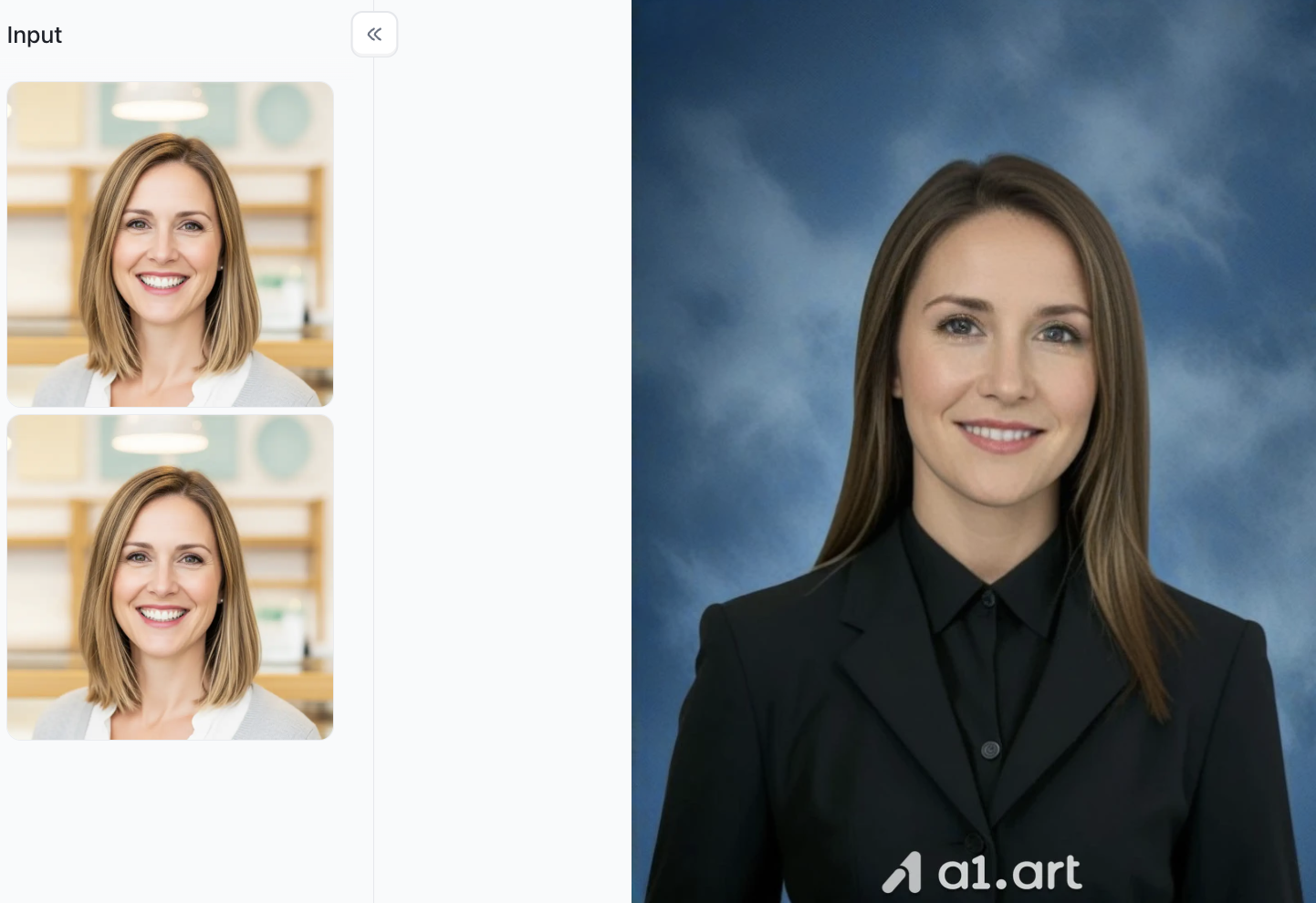
- Generates timeless yearbook-style portrait photos
- Faithfully retains the subject’s facial features from reference images
- Features a soft textured blue studio background
- Delivers natural, flattering studio portrait lighting
- Outputs neat, formal professional portrait aesthetics
- Adjusts hairstyle and outfit for a classic yearbook vibe
Become the heroine of American comics
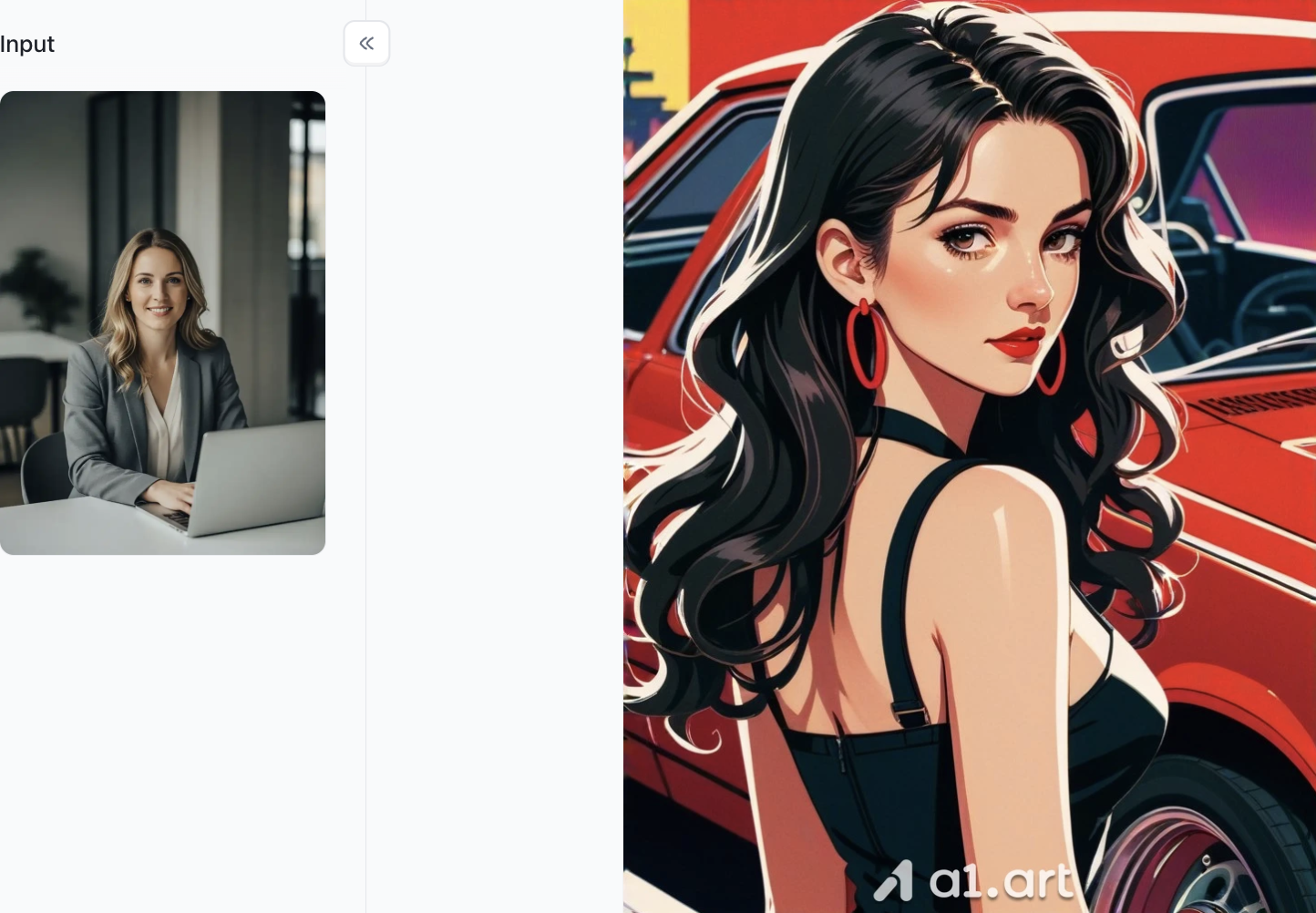
- Transforms your photo into a bold American comic book heroine style
- Keeps your core facial likeness from the reference image
- Features striking thick outlines and vibrant saturated retro colors
- Classic pop-art comic shading and dramatic lighting
- Comes with cool retro scene backdrops (vintage cars, urban settings)
- Stylized glamorous makeup and dynamic character poses
Realistic Character
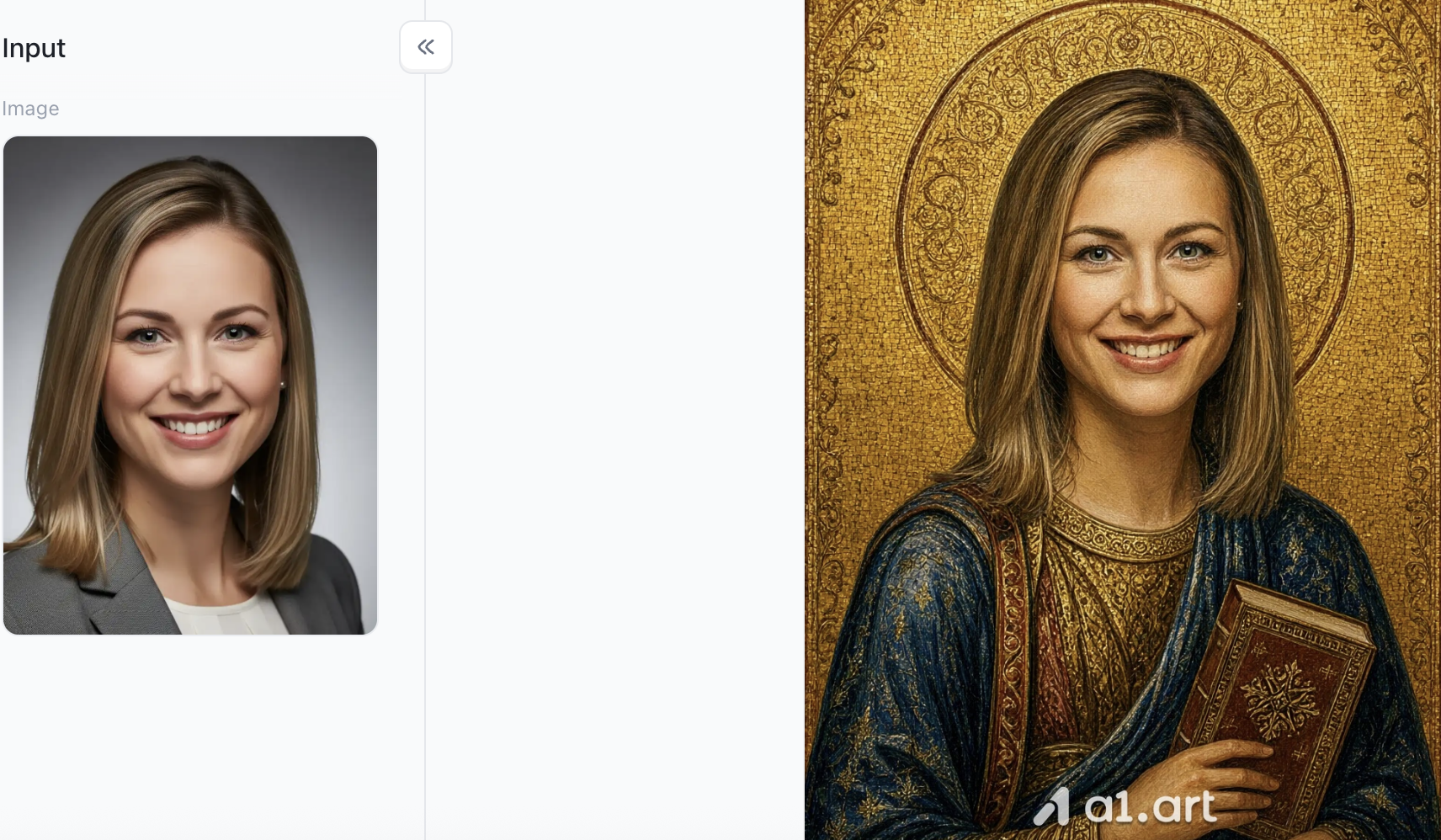
- The filter transforms the portrait into a classical medieval Byzantine mosaic religious art style.
- The background features gorgeous golden mosaics with a fine halo and intricate relief patterns.
- The subject wears a vintage dark blue and gold robe with delicate embroidery and jewelry decorations.
a1.art has far more creative presets beyond the styles we’ve covered here. Whether you’re chasing portrait aesthetics, comic art, photorealistic renders or other unique visual looks, the platform packs an extensive collection of high-quality filters to match nearly any creative vision you have.
Why Choose Us? The Data-Driven Advantage
When picking a creative partner or platform, any bold performance claims need solid test numbers to back them up. We stand out from other common tools with real, provable benefits:
- Faster Execution: Our streamlined workflow cuts down waiting time, so you can test and tweak creative ideas almost as fast as you can think them up.
- Sharper Clarity & Realism: Advanced upscaling and lighting rendering produce crisp, high-quality assets that hold up for professional commercial use.
- Natural Composition: The model follows your prompts reliably, so you avoid weird glitches and stiff, unnatural poses.
- Better Spatial Consistency: Precise geometry handling stops elements from getting cut off, warped at the edges, or crammed awkwardly together.
- On-Point Aesthetics: Smart color tuning and lighting naturally fit the style modern online shoppers respond to.
Conclusion
Choosing between model iterations ultimately depends on your specific production scale and asset requirements. While version 2.5 remains a cost-effective choice for lightweight batch tasks, upgrading high-end hero asset pipelines to version 2.6 unlocks unprecedented speed and visual depth. By combining these state-of-the-art models with an intuitive ecosystem like a1.art, creators can dramatically elevate their visual storytelling while keeping operational workflows streamlined and efficient.
FAQs
What is the main difference between GPT Image 2.6 and 2.5?
GPT Image 2.6 is faster at high quality, while 2.5 offers cheaper low-tier token pricing.
Do I need to rewrite all my old prompts for GPT Image 2.6?
Not fully. Simplify modifiers, reduce negative prompts and use clear spatial tags for better results.
Which mode should I use for e-commerce product rendering?
Use GPT Image 2.6 Sunburst for lifelike textures and accurate lighting.
Is GPT Image 2.6 better at fixing distorted images and messy text?
Yes. It has stronger geometric constraints to reduce deformation and garbled text.
Can I test GPT Image 2.5 and 2.6 side by side on a1.art?
Absolutely. a1.art supports direct prompt comparison for both models in one workspace.
Which version is better for simple icons and quick drafts?
GPT Image 2.5 works better, thanks to its budget-friendly low token tier.
Read more
- How to Make GIFs with ChatGPT Images 2.6 (Step-by-Step)
- Hari Pahlawan 2026: Tanggal, Sejarah & Makna Hari Pahlawan
- Best Hot Girl Prompts for Gemini: Stylish AI Photo Ideas
- Diwali 2026: Date, Lakshmi Puja Muhurat, Rangoli & 5-Day Guide
- All Souls' Day 2026: Date, Meaning & Prayers for the Departed
- How to Make an AI Kissing Video from 2 Photos for Free
- How to Design a Poster with AI: From Idea to Final Layout
- Best Nemora AI Alternatives in 2026
- AI Diwali Photo Generator: 20 Festive Portrait Prompts (2026)
- When Is All Saints' Day 2026? Date, History & Meaning
Written by

a1.art
Published on
Nov 6, 2026
Share article


