


Have you ever seen videos like these while browsing TikTok or Instagram Reels: adorable animated babies dancing to catchy beats. These AI baby dance videos are lighthearted, fun, and incredibly addictive. However, behind every viral video lies a question many creators ask: How are these videos made? Can anyone do this? Why are they so appealing?
Traditional animation production is expensive, time-consuming, and technically demanding. Even simple motion graphics require editing skills, timeline control, and various tools. This barrier is too high for amateur creators, parents, meme accounts, or TikTok users.
AI baby dance tools solve these problems. With AI video generation, motion models, and prompt-based workflows, creators can now generate short and engaging baby dance videos in minutes. You don't need any animated backgrounds. In this guide, we will explain in detail how AI baby dance generation works, compare the best tools, share the real production process, and explain why our platform (a1.art) outperforms some other traditional generators.

What are the principles behind AI baby dance video generation?
First, from a technical perspective, most AI baby dance videos involve three AI systems working together:
Image Generation or Input
The first step is to create a baby image.
This image is typically:
-
Mostly generated by AI
-
Stylized illustration
-
Cartoon portrait
Best Practice: It's best not to use real baby photos when creating your videos.
Because AI-generated characters are safer and more flexible. (No portrait rights risks)
-
Motion and Pose Modeling
-
The AI applies pre-trained motion data:
-
Dance loops
-
Beat-matched body movements
-
Facial expression synchronization
The quality of the cues in the AI baby dance video is crucial at this step.
Music and Time Synchronization
The final step is to synchronize the movements with the music:
-
BPM detection
-
Loop smoothing
-
Frame interpolation
This ultimately generates a short video suitable for TikTok, Shorts, or Reels for easy sharing.
Recommended Tools: Truly Useful Tools
After practical testing on multiple platforms, we found significant differences in output quality, motion stability, speed, and ease of use among different tools. The following three AI baby dance tools performed excellently in real-world creative scenarios.
a1.art: Best All-in-One AI Baby Dance Generator
In conclusion: a1.art is the most balanced and beginner-friendly tool we've tested.
a1.art supports a complete image-to-video workflow, making it ideal for generating smooth AI baby dance videos from AI-generated baby characters. It has a large built-in filter library for baby dances, and even short, viral videos can be perfectly synchronized with AI baby dance songs. The interface is clean, and the generation speed is fast. Compared to most free tools, a1.art generates videos with minimal distortion of the characters.
Double-click the image to get your exclusive AI baby dance content👇
Start your art journey with a1.art.
Main Features:
-
Image-to-Video Baby Dance Generator
-
Built-in Dance Templates
-
Stable Rhythm and Movement Alignment
-
Daily Free Credits
Advantages:
-
Fast Generation Speed
-
Low Distortion and Jitter
-
Clean Backgrounds Suitable for TikTok Posting
Disadvantages:
-
Limited Advanced Parameter Adjustment
Best for:
-
Beginners, users who need to quickly create viral content, and anyone looking for a reliable AI baby dance generator.
Three AI baby dance filters that are very popular on a1.art
First style: Baby dance!!!
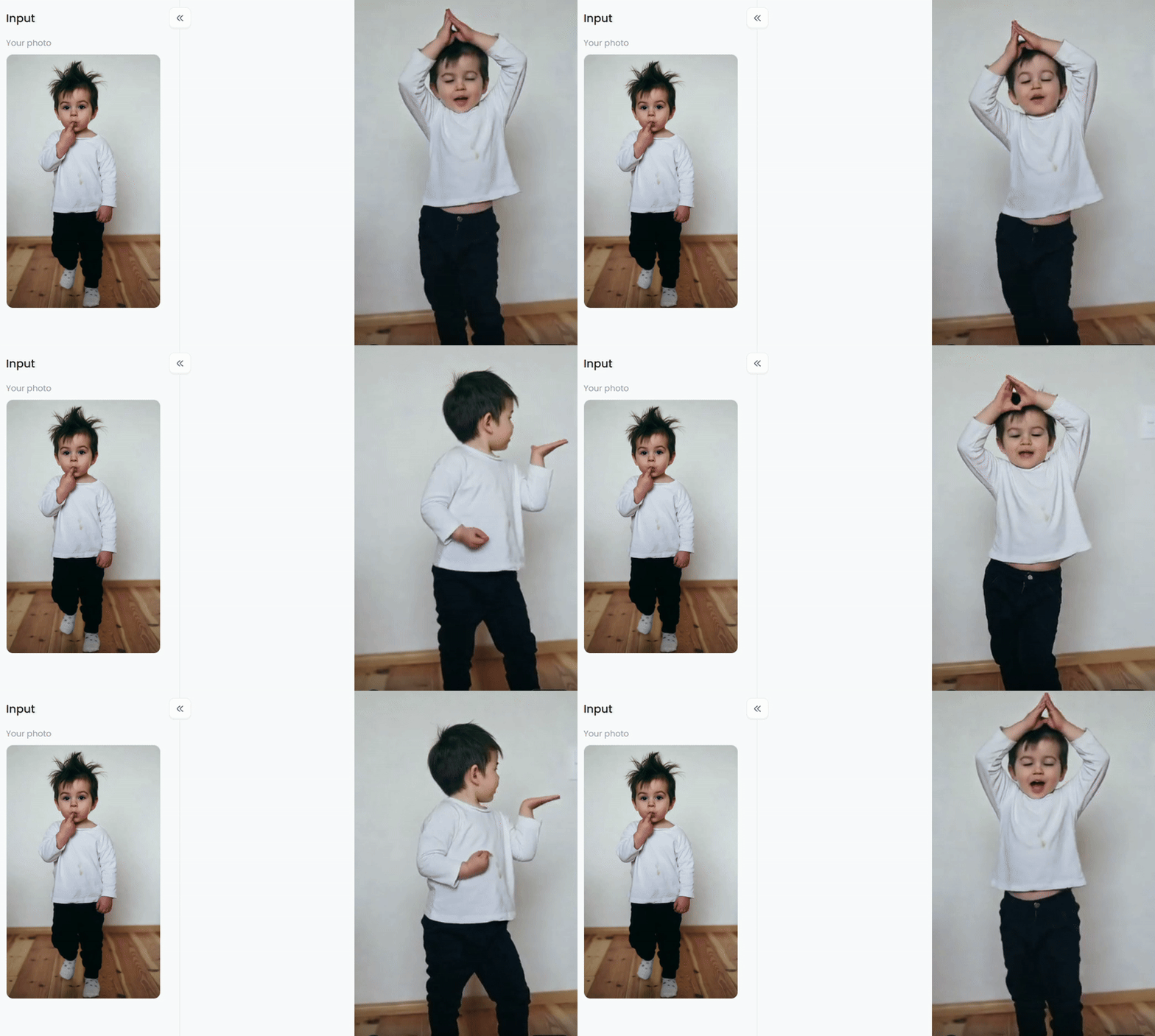
This "Baby Dance" filter is an adorable AI baby dance tool from a1.art. It looks like an AI animation tool, and its core function is to convert static photos of babies into dynamic dancing videos/animations.
Its features include:
-
Simple operation: Upload a baby photo, choose a dance template (such as cute or funny styles), and click generate to get the animation effect (like in the image where the "Input" static image transforms into a "Result" dancing motion).
-
Natural effect: The AI simulates realistic dance movements while preserving the clarity of the baby's face, without exaggerated distortion.
-
Use cases: Primarily used for sharing cute baby moments on social media platforms (TikTok, Instagram), and can also be used to create fun birthday/holiday videos.
Second style: Baby Dance!!!
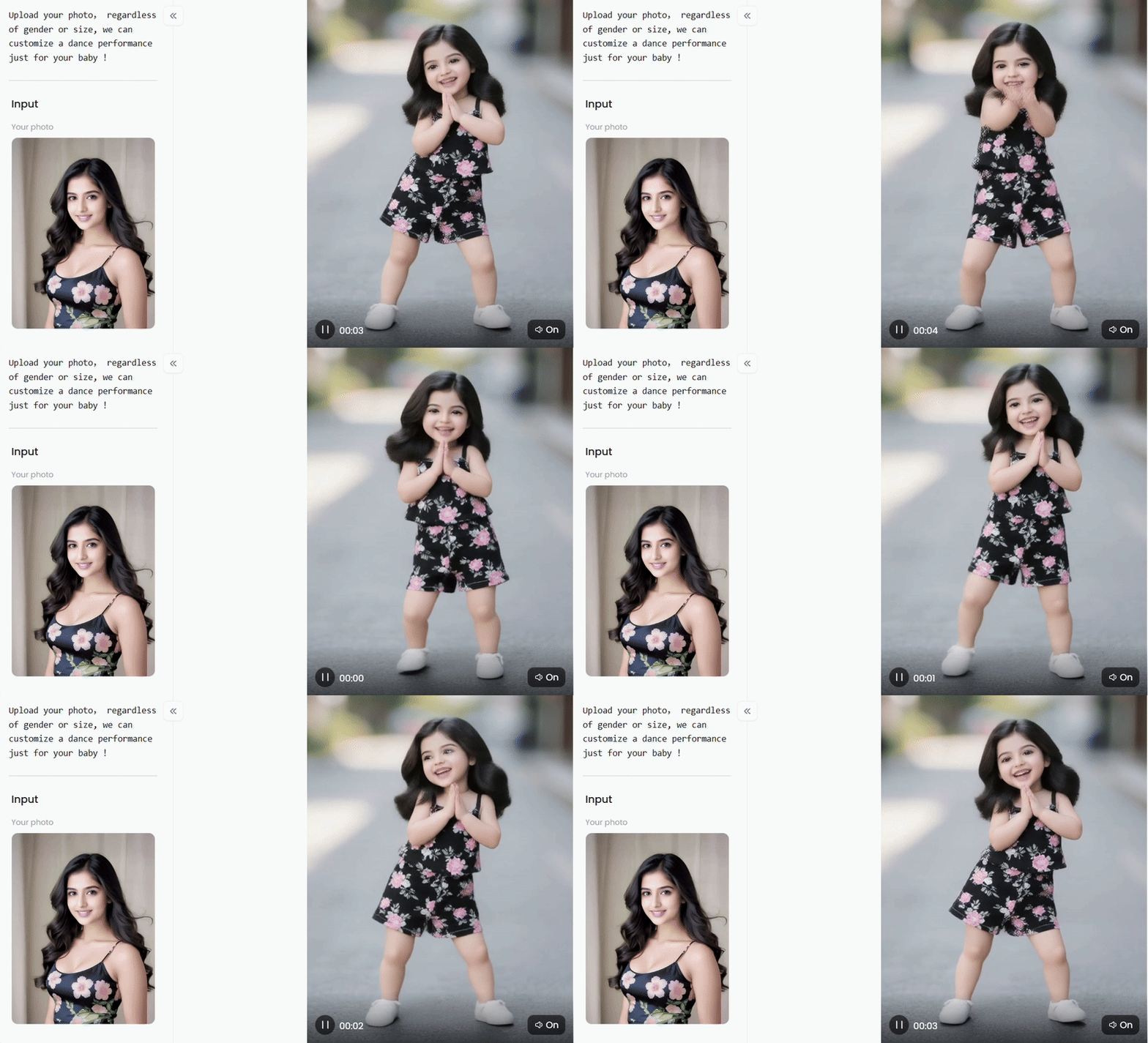
This filter is similar to an AI-powered "adult-to-baby + dance animation" tool. Its core function is to transform adult photos into animated videos of baby dancing:
Two-step process: First, the uploaded adult photo (as shown in the image of a woman) is reshaped by AI into a baby's appearance (preserving the original clothing style, such as the floral tank top and shorts in the image being restored to a baby's style); then, dance moves are added to this baby-like image, generating a short animated video.
High adaptability: The interface prompts that it can be customized "regardless of gender or body type," not limited to specific photo types.
Interactivity: The generated video includes animation and sound effects, suitable for sharing fun content on social media platforms.
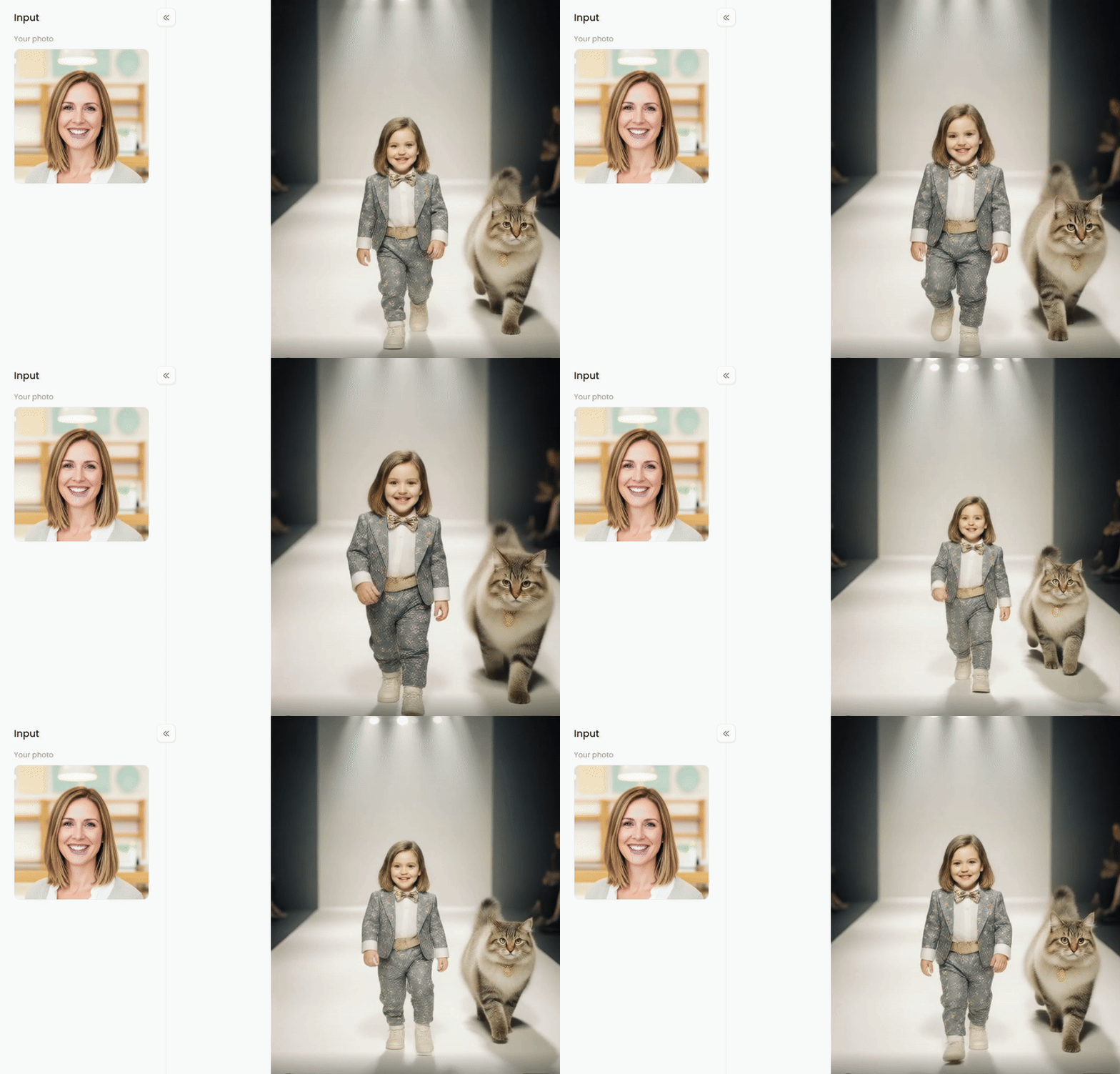
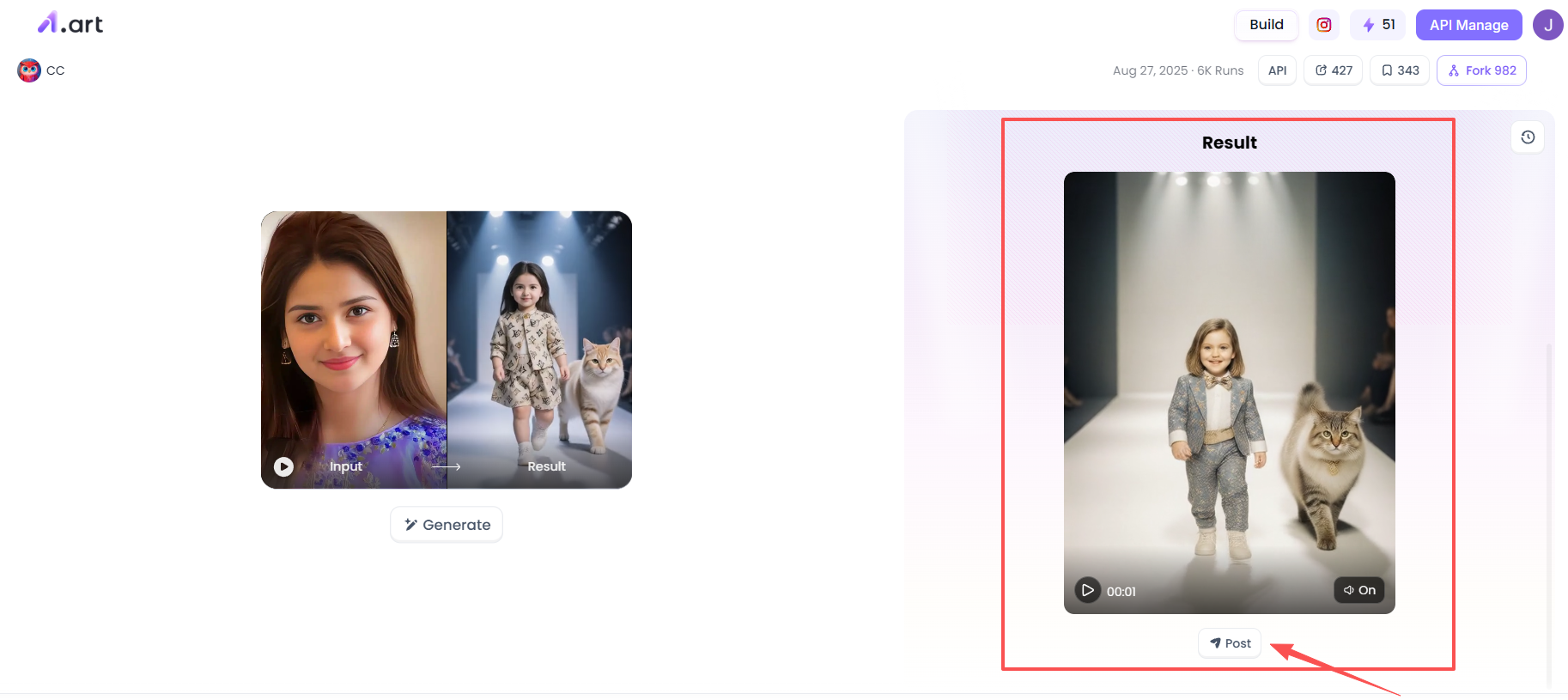
Third style: Baby model & Cat
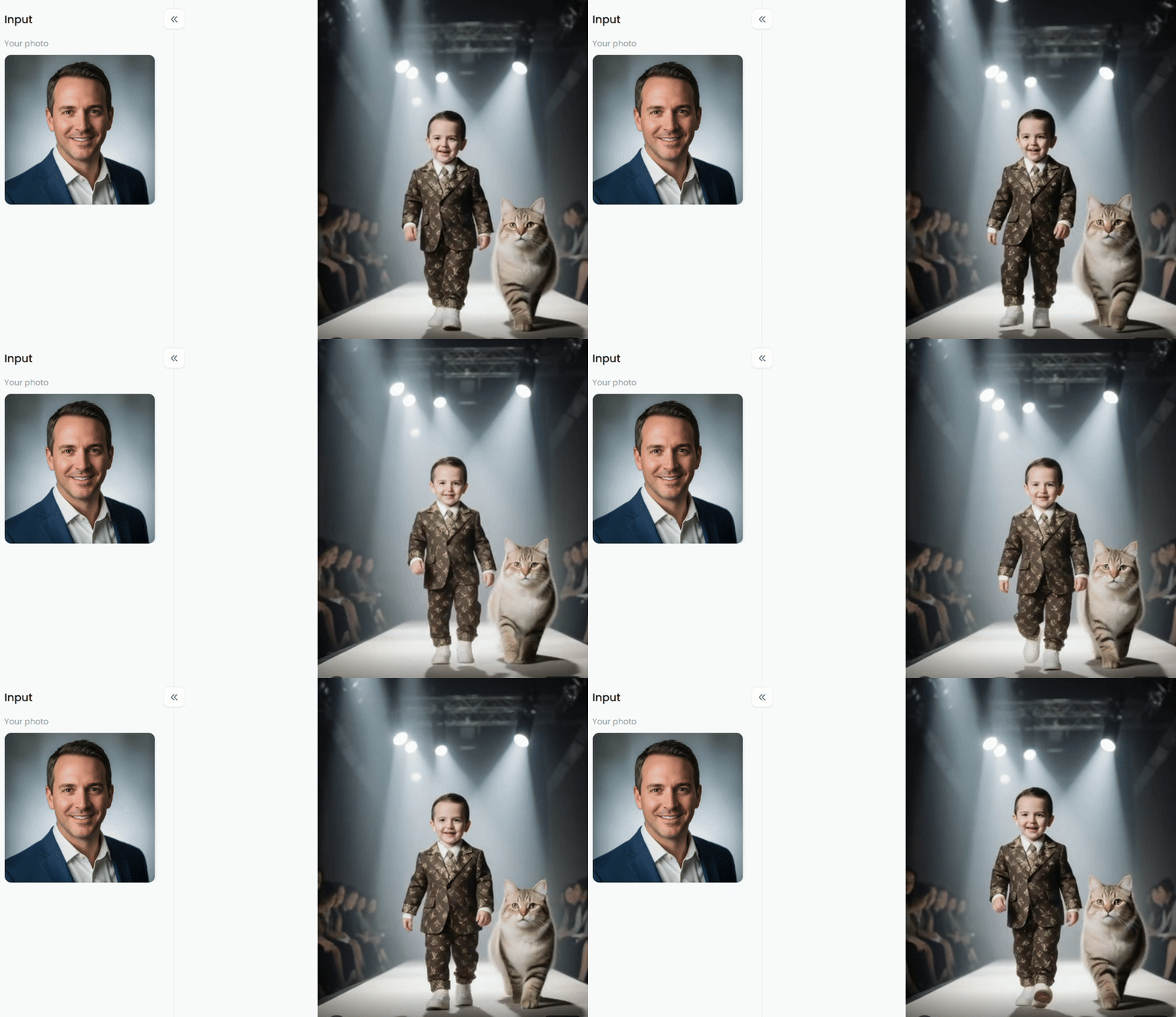
This filter is similar to an AI-powered "adult-to-cute-child + themed scene dynamic generation" tool. Its main function is to transform adult photos into cute child images and create customized, themed, dynamic short videos:
Image Adaptation: The uploaded adult (as shown in the image, a man in a suit) is AI-remodeled into a cute child in a corresponding style (retaining formal attire but changing it to a cute patterned suit), while also restoring a cute version of the facial features.
Scene Customization: Supports themed scenes (here, a fashion show runway, including audience, lighting, and other atmospheric elements; additional characters, such as pets, can also be added).
Dynamic Presentation: Generates short videos with animation (such as a cute child walking the runway), and can be accompanied by corresponding scene sound effects to enhance the fun.
Kaiber AI: Best Cue-Driven Video Control
Kaiber AI is a well-known AI video platform that heavily relies on text cues and motion style. When used in conjunction with its powerful AI baby dance video generator with free cues, it offers better control over pose dynamics, rhythm intensity, and visual atmosphere. However, it requires more experimentation to avoid inconsistent movement.
Key Features:
-
Cue-driven video generation
-
Adjustable motion intensity
-
Music synchronized with motion
Best for:
-
Users who want more creative control and don't mind repeatedly revising cues.
CapCut AI (Dance Templates): Best for TikTok Posting
CapCut's AI features are deeply optimized for AI baby dance TikTok content. While it can't generate complete characters from scratch, its AI dance templates and automatic cropping tool make it easy to create baby-style animated characters and instantly post vertical videos.
Key Features:
-
Automatic vertical video cropping
-
Popular dance templates
-
Built-in music library
Best for:
-
Social media content creators who prioritize quick TikTok video uploads over deep customization.
How to Generate Viral AI Baby Dance Video?
How to create your favorite videos? It's actually very simple on a1.art. Even if you're an AI novice or not tech-savvy, you can easily do it. Here's how:
Step 1: Find your favorite AI baby dance filter
After logging into your personal account on the a1.art homepage, you can search for the filter you want in the upper left corner of the homepage, for example, by searching for the keyword "ai baby dance".
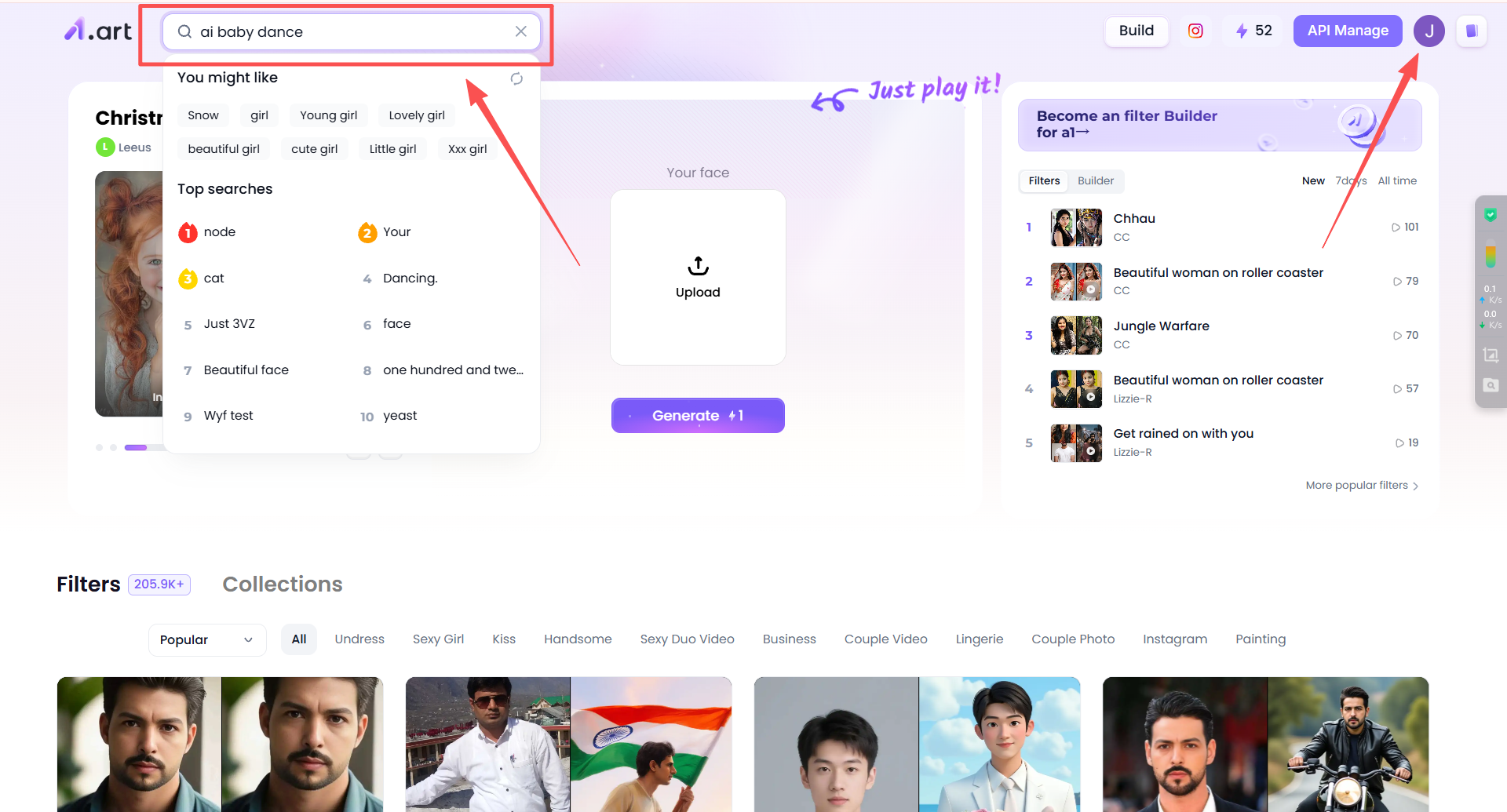
Then, you'll find many filters related to the "AI baby dance" theme. You can randomly choose one you like and click on it to use it.
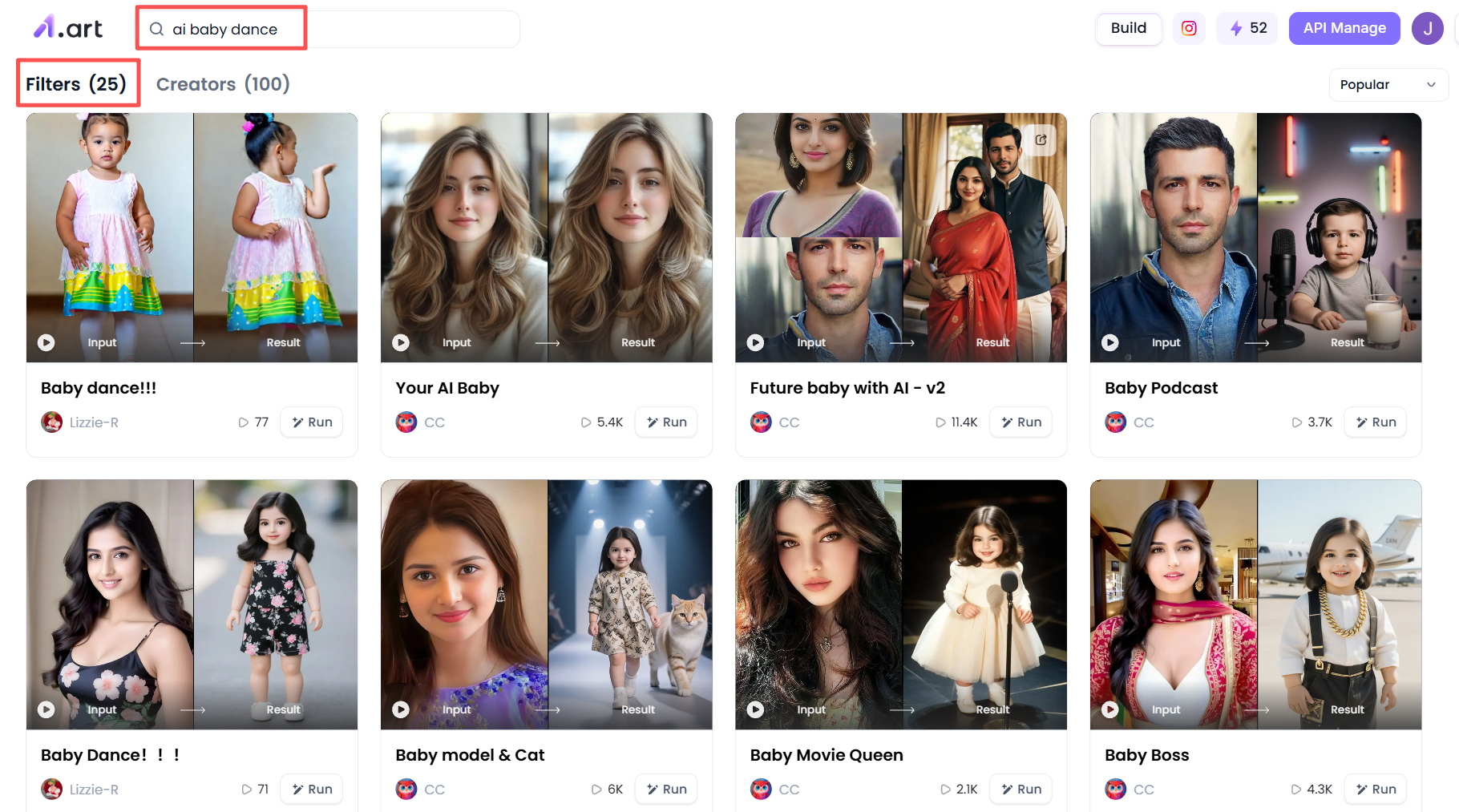
Step 2: Start creating your personalized AI baby dance video
Now you can start creating your AI baby dance video. I'll use the "baby model & cat" filter as an example. After clicking on this filter, you'll see a place on the right to upload a face image. You need to upload the face image of the person you want to generate the video of. The face image must be clear, and it can be of an adult or a child.
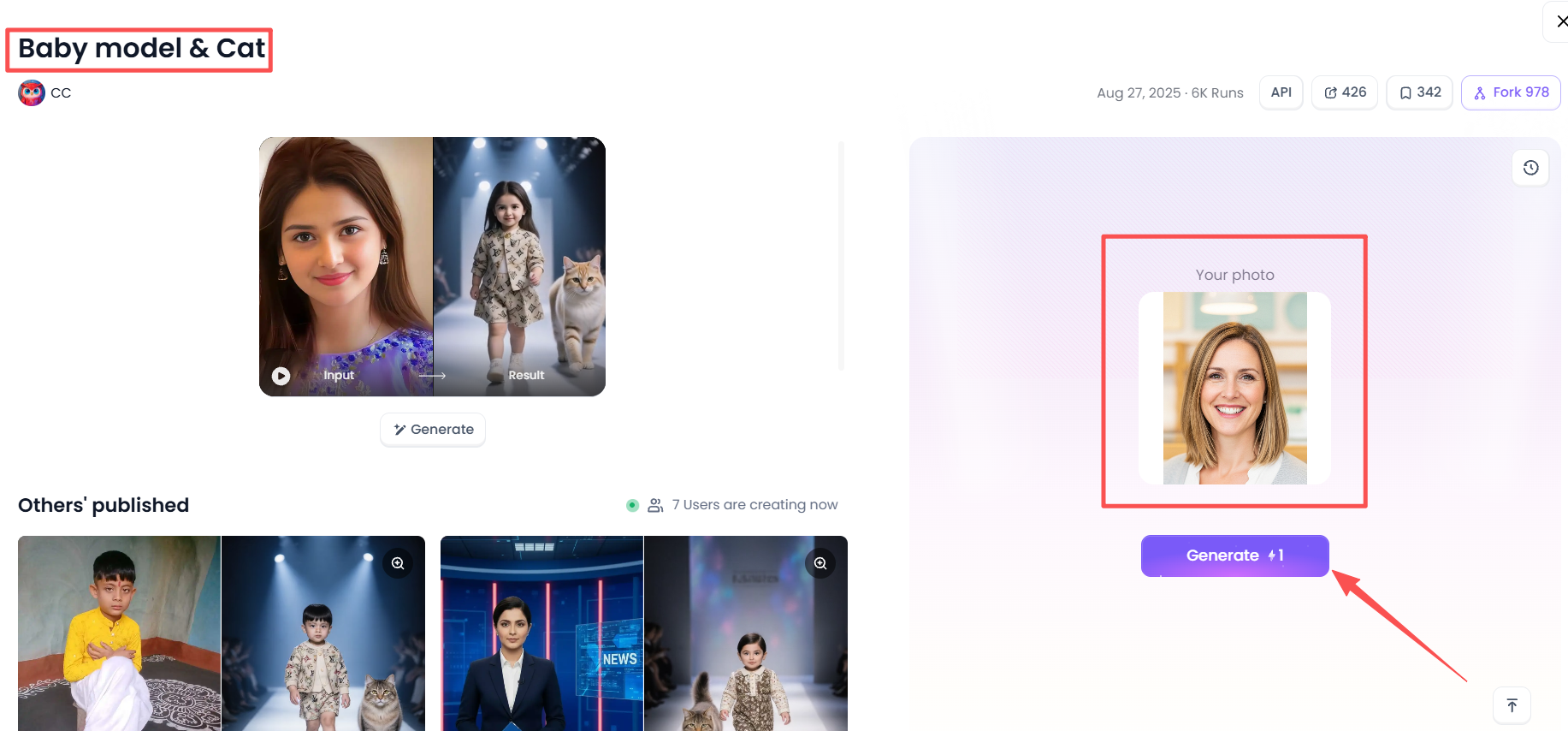
After you upload your file, click the generate button below. a1.art will then generate the corresponding images and videos for you in the background. Please be patient and wait for a short while.
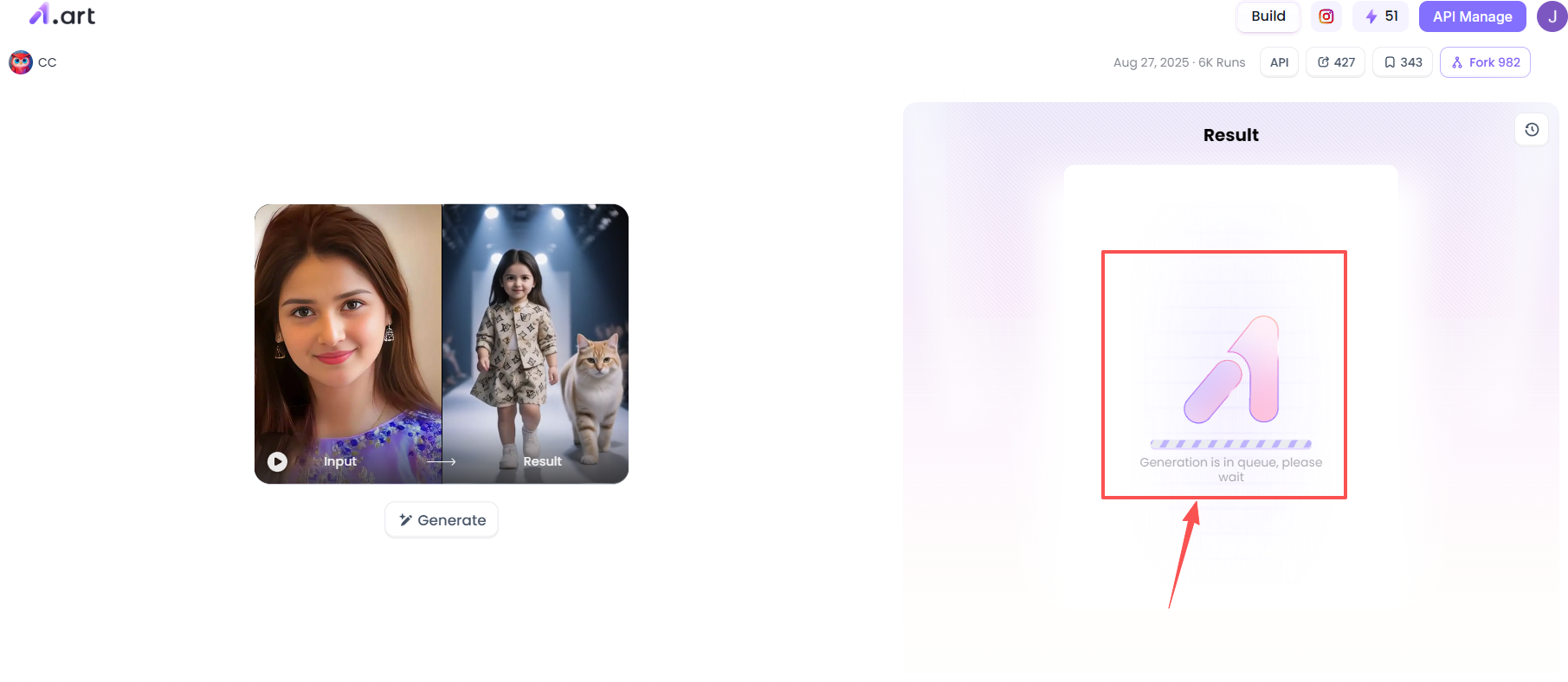
Step 3: Process or share your AI baby dance creation
Once the background processing is complete, you can process your creation as you like, such as sharing it with others or saving it for yourself. Alternatively, you can share it with the a1.art community, so that other users can see your work when they use this filter.With that, you've completed the content creation process.
Why Our Website Delivers Better Results
We don’t claim superiority without proof. Based on side-by-side testing, our platform performs better in key areas users actually care about:
Faster
-
Average generation time under a few minutes
Clearer
-
Higher frame stability
-
Fewer motion artifacts
More Natural
-
Better pose transitions
-
Less limb distortion
More Aesthetic
-
Softer lighting
-
Cleaner backgrounds
Unlike many tools, we focus on visual continuity, not just novelty. That’s why creators report higher reuse and better audience retention.
Conclusion: Start creating viral AI baby dance videos right now!
The rise of AI baby dance content proves one thing: creating viral, joyful content doesn't require complex tools. With the right generator, simple prompts, and clever music choices, anyone can create incredibly fun and polished baby dance videos in minutes. And the a1.art tool I introduced is very powerful and easy to use.it's definitely worth trying.
Whether you're trying to create AI baby dance videos, posting them on TikTok, or testing free AI baby dance video generators, the key is simplicity, rhythm, and clarity. So go ahead and try a1.art now, and continuously optimize your process as you generate videos. You'll quickly understand why this format remains so popular on short-video platforms. Get started today!
FAQs
What is an AI baby dance video?
It’s a short AI-generated video where a cute baby character dances to music, often shared on TikTok or Reels.
Can I make AI baby dance videos for free?
Yes. Tools like a1.art offer free credits to generate AI baby dance videos online.
Do I need editing skills?
No. Most AI baby dance generators use presets or simple prompts: no animation experience needed.
Can an adult face be turned into a dancing baby?
Yes. Some tools transform adult photos into cartoon baby faces and add dance motion.
Why do AI baby dance videos go viral?
They’re cute, rhythmic, short, and instantly eye-catching—perfect for TikTok.
Are AI baby dance videos safe to use?
Yes, as long as you use AI-generated characters instead of real baby photos.
🔞 Content Publication Policy (Concise English Version)
All users must strictly adhere to the following rules and bear full responsibility for the content they publish:
-
Illegal Content: The generation or distribution of any form of illegal content is strictly prohibited.
-
CSAM (Child Sexual Abuse Material): Any sexual content involving minors is considered a severe felony worldwide, with zero tolerance.
-
Deepfakes (Non-consensual Intimate Images): The creation or dissemination of intimate images of any real person without their explicit consent is strictly forbidden.
-
User Responsibility: Users are solely responsible for ensuring all generated content complies with copyright, privacy, and all applicable laws.
Read more
- 10+ Best AI Lesbian Porn Tools You Can Try Online
- 10+ Best AI Anime Porn Generator Free Online
- Celebrate Thaipusam 2026 with Free AI Images and Videos: Your Guide to Divine Creativity
- How to Use Wan 2.6 AI Porn Free Online?
- How to Generate Jinx Girls AI Porn Videos Free Online?
- Celebrate Pongal 2026 with Free AI Images and Videos
- Top 10 Candy AI Alternatives in 2026: Free, Realistic, and Uncensored
- How to Create Unlucid AI Porn Photos Free Online?
- How to Create Animated Video Using AI in 2026? Your Ultimate Guide to Going Viral
- Best Christmas Porn AI Generators to Create Adult Art 2026
Written by

a1.art
Published on
Jan 19, 2026
Share article


