

Lately on gaming social feeds, it seems everyone’s dropped into the neon-lit streets of Leonida,except you. Fans are picking apart every shot from the GTA VI trailer, and feeds are full of custom loading screens, sunset palm portraits and stylized crime-themed graphics.
But recreating Rockstar’s signature look the hard way is annoying. Regular editors produce cheap cartoon-style results, and generic AI often warps faces, messes up iconic text, or buries your subject under clunky overlays.
You don’t need art skills or costly software to join the trend. A dedicated GTA 6 Poster generator can turn any selfie, pet photo or casual snapshot into sharp, Vice City-style key art instantly. This guide covers the core visual traits of the Leonida look, reviews top tools including a1.art, compares their performance, and gives ready-to-use prompts so you can make genuine GTA-style art easily.

Decoding the Iconic Vice City & Leonida Visual
Aesthetic Before generating your art, knowing what makes real GTA key art different from plain illustrations helps you get better outputs. The series’ promo style, shaped by artists such as Stephen Bliss and updated for the HD era, mixes sun-faded realism, sharp cel-shaded outlines and bright Miami-inspired colors.
- Three core rules shape a custom GTA 6 Poster: Color Palette: Unlike Liberty City’s muted grit or Blaine County’s dusty yellow tones, Leonida uses punchy tropical colors: warm golden sunset orange, vivid magenta, deep teal ocean blue and soft neon pink.
- Lighting and Texture: Modern GTA art blends painted strokes with realistic lighting. Rim light from the sun or neon traces the edges of hair and shoulders to add depth. Light halftone texture and airbrushed gradients keep skin smooth while preserving facial form.
- Composition and Framing: Classic loading screens place characters slightly off-center, backed by recognizable details: palm trees, luxury sports cars, speedboats or Art Deco hotels. Empty space at the top corners leaves room for poster title graphics without covering the character.
Top Tools to Create Custom GTA 6 Style Images
a1.art
If you want authentic results fast without fiddling with long prompts, a1.art is a top pick. It skips complicated code and unstable settings, with pre-built Vice City and GTA style tools made for portrait and scene conversion.
- Key Strengths: Renders in under 6 seconds on average, keeps your facial features consistent, and avoids random UI elements covering the face.
- Workflow: Upload a clear portrait, pick a Leonida filter or add your own prompt. Daily free credits make it a great free GTA 6 image generator for casual fans and social creators.
Midjourney v6
Midjourney is strong for text-to-image creation, perfect for building detailed Vice City streets and original scenes from scratch.
- Key Strengths: Amazing lighting, rich atmosphere, and it understands references like digital airbrush art or modern game promo artwork.
- Limitations: It runs on Discord and takes practice. Keeping your face recognizable with reference settings needs careful tuning, which can weaken the signature GTA painting style.
OpenAI DALL-E 3
Built into ChatGPT, DALL-E 3 works well with plain, natural language and lets you adjust scene details through simple chat.
- Key Strengths: Handles multi-character scenes, custom cars and dynamic action poses without technical terms.
- Limitations: Its content rules often block GTA-themed prompts. It also cannot reliably swap in your own face from a photo.
Stable Diffusion XL with Custom LoRAs (Best for Advanced Local Control)
Power users with good GPUs often use Stable Diffusion XL plus community-made GTA LoRA models. Key Strengths: Full control over sampling, pose guidance with ControlNet, and high-resolution upscaling. Limitations: Needs capable hardware, takes time to set up, and easily creates weird anatomy or warped vehicles if negative prompts are not set carefully.
Click the image to start generating a GTA 6 AI image immediately⬇️

Performance & Quality Comparison: Why Specialized Platforms Win
Why a1.art Works Better in Real Tests Keeps up with fast social gaming trends: Complex diffusion tools can take 40+ seconds plus extra upscaling. a1.art creates sharp, post-ready results in around 3mins, so you can try different outfits and backgrounds quickly.
Sharp details, no over-smoothing: Basic filters turn skin into plastic-looking cartoons. It balances clear edges and soft airbrush shading, keeping fabric, sunglass reflections and hair strands distinct.
Natural lighting blend: It does not just stick your face on a static Miami backdrop. The renderer adjusts sunset and neon rim lighting on your face to match the Leonida scene.
Fewer glitches, cleaner framing: Many GTA 6 AI pic generators produce messed-up hands, warped car parts or random logos covering your face. Its custom presets keep vehicles proportionate and center the subject neatly.
How to Create Satisfying GTA 6 AI Images Using a1.art
If you want to create high-quality, satisfying AI-generated images for GTA 6, you can follow the steps outlined below.
Step 1: Open a1.art and register an account
First, visit a1.art, locate the user icon in the top-right corner of the page, and follow the on-screen prompts to complete the registration process.

Step 2: Search for the GTA 6 AI image filter you want to use
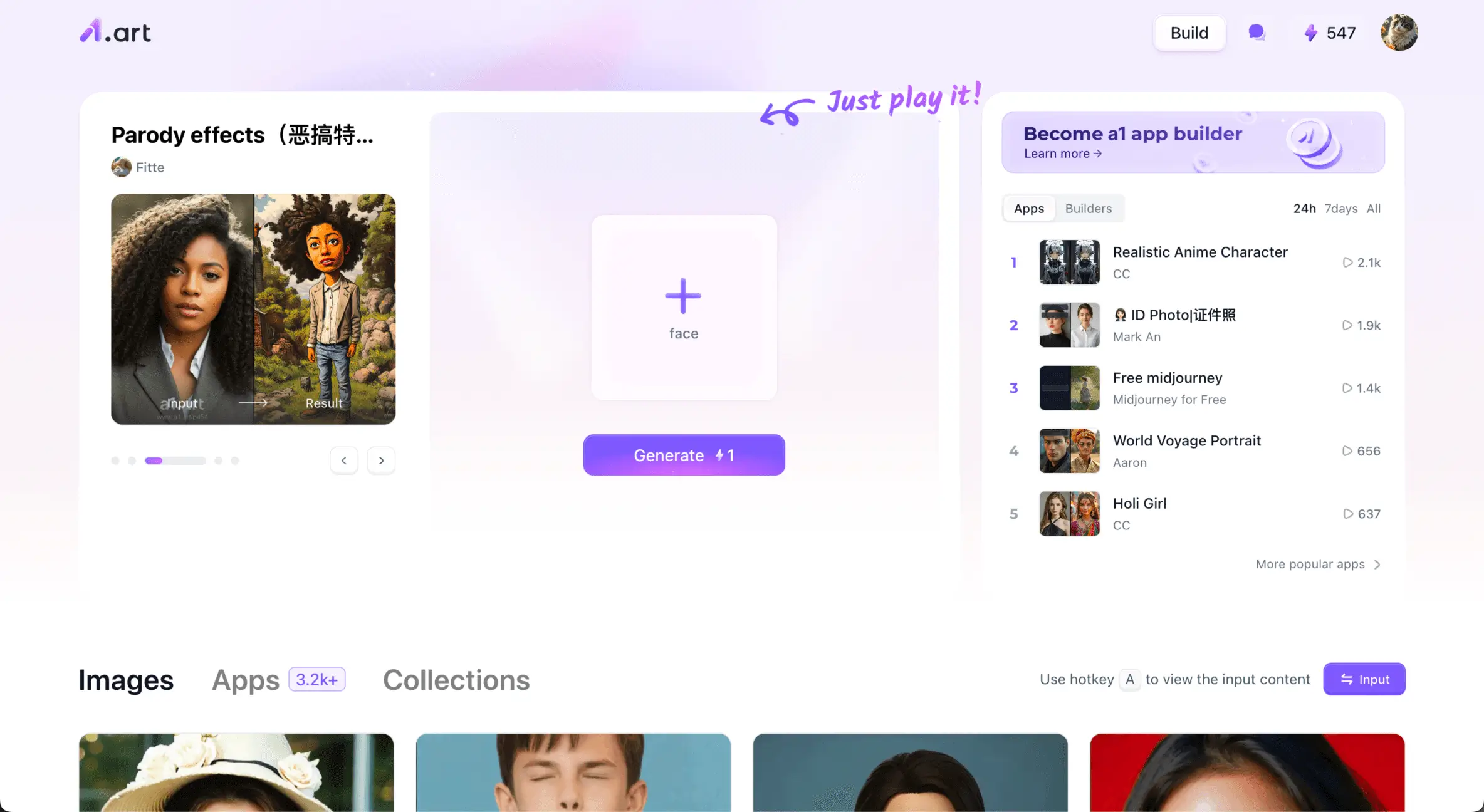
For instance, since the topic of this article is "GTA 6 AI Image Generator," you can enter this keyword into the search box on the homepage, and the system will then display a selection of relevant filters.

Step 3: Find a GTA 6-themed AI filter that interests you and start using it
For example, let’s take the "GTA 6 Poster Face Swap" filter. Once you open it, you will see examples of the filter on the left, and an area on the right where you can upload your own image. Simply upload the image you’d like to use, click the "Generate" button below, and then wait about 2–3 minutes for the result.

Step 4: Process the GTA 6 AI image you generated
The final step is to download your GTA 6 AI-generated image. You are free to handle the image however you like,whether that means downloading it for your own use or sharing it with the a1.art community.

Let’s take a look at some authentic-looking GTA 6 AI images generated by a1.art.

Creative Use Cases: Where to Use Your Custom GTA 6 Artwork
Your finished GTA 6 Poster works great for personal and creator projects:
- Gaming Channel Branding: Refresh Twitch banners, YouTube thumbnails and Discord icons with matching Leonida-style portraits to stand out in busy gaming feeds.
- Social Media Profiles: Use 9:16 vertical outputs for TikTok and Reel covers, or square 1:1 shots for X and Steam avatars before the game launches.
- Custom Merch & Desk Prints: High-res files can be printed as posters, mousepads or phone cases to build a unique gaming setup.
- Short Video Content Hooks: Creators add soft parallax zoom and synthwave music to these loading-screen images, making snappy 3-second intros for gaming commentary clips.
Pro Tips for Realistic, Distortion-Free Results
Even with a good GTA 6 AI generator, your source photo decides how true the result looks. Use these tricks to avoid common issues:
- Use well-lit source photos: Skip dark, blurry shots or photos with harsh overhead shadows. Front-lit natural daylight photos help the AI map your facial features accurately.
- Keep hands simple or out of view: Waist-up or chest-up portraits prevent messed-up fingers and keep focus on your face and details like sunglass reflections.
- Skip long text in prompts: Don’t ask the AI to draw custom titles directly,it usually garbles the letters. Make your clean art on a1.art first, then add text later for a proper poster layout.
- Tweak the style strength wisely: For image-to-image generation, set style intensity between 45%–60%. Above 75%, your face may turn into a generic game character instead of you.
Conclusion
GTA VI’s buzz has made the sunlit, neon Vice City look iconic online. Skip flat cartoon filters and hours of tweaking complex diffusion settings. With a clear portrait, good prompts and purpose-built tools like a1.art, you can make clean, glitch-free loading-screen art in seconds.
Update your gaming profile, grab standout thumbnails, or imagine yourself cruising Ocean Drive at sunset. Your custom GTA 6 Poster is just one click away.
FAQs
Can I create a custom GTA 6 Poster for free?
Yes. Platforms like a1.art offer daily free credits to test Vice City filters and generate a custom GTA 6 Poster from any selfie in seconds.
How do I keep my face recognizable in a GTA 6 ai generator?
Use a clear, well-lit, front-facing photo and keep stylization strength around 45%–60%. This applies the neon rim lighting and brushwork without altering your facial features.
What is the best gta 6 ai photo prompt for selfies?
Keep it simple so the AI prioritizes your face: "Transform this portrait into GTA 6 cover art style, keep exact facial features, vibrant Miami sunset rim lighting, palm tree silhouettes in background, clean cel-shaded outlines."
Which aspect ratios work best for social media?
Choose 9:16 for TikTok and Reels, 16:9 for YouTube thumbnails and loading screen banners, and 1:1 for Discord or Steam avatars.
Read more
- GTA 6 Poster Maker: Turn Your Photo Into a GTA 6 Style Poster
- Thanksgiving 2026: Date, History, Traditions & What's Open
- Chhath Puja 2026: Dates, Arghya Timings, Vidhi & Samagri List
- World Diabetes Day 2026: Theme, History & How to Get Involved
- Remembrance Day 2026: Date, Poppies & Armistice Day History
- Veterans Day 2026: History, Meaning & How Americans Honor Veterans
- GPT Image 2.6 vs 2.5: Real Image Tests and Key Differences
- 20+ GPT Image 2.6 Prompts with Real Examples
- Hari Pahlawan 2026: Tanggal, Sejarah & Makna Hari Pahlawan
- Diwali 2026: Date, Lakshmi Puja Muhurat, Rangoli & 5-Day Guide
Written by

a1.art
Published on
Nov 26, 2026
Share article


